
Production Teardowns
Bypassing the Meta Sandbox: Register a Twilio Number in WhatsApp Manager Without a Physical SIM

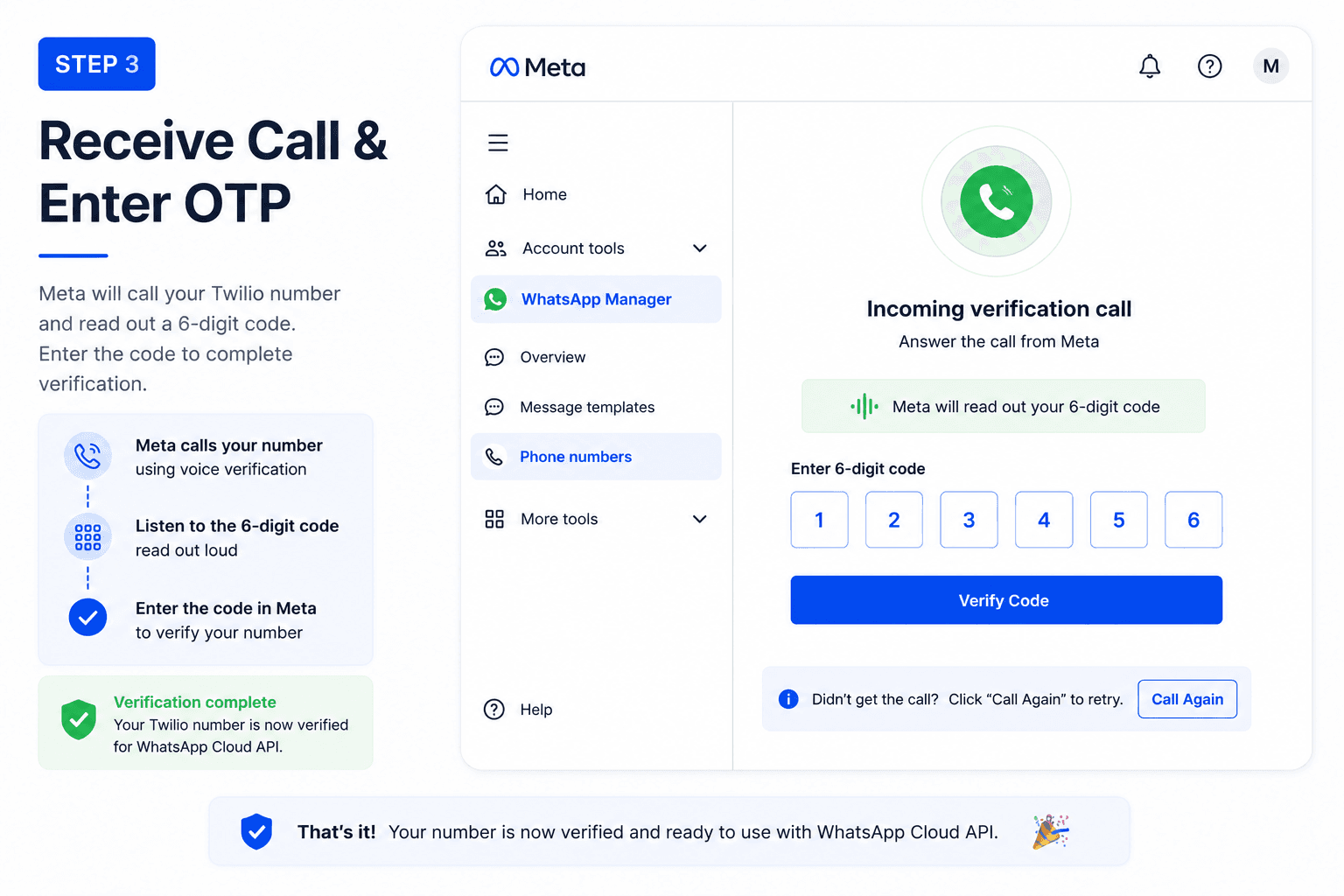
How to register a Twilio virtual number as a production WhatsApp sender in under 5 minutes using Twilio Dev Phone + voice verification. No physical SIM, no SIP trunking, no server code.
If you have ever tried to build a custom AI WhatsApp agent -- something that listens to incoming payloads, runs them through an LLM orchestration layer, and shoots back responses -- you know the exact moment the engineering process grinds to a halt: the Meta Developer Sandbox.
You set up your developer app, configure your inbound webhook endpoints, send a test message from your personal phone, and get absolute silence. No incoming data payloads. No delivery events. The webhook listener is completely green and active on your server, but Meta's test environment refuses to route actual inbound traffic.
I got tired of fighting a broken sandbox environment. I did not want to waste days debugging why a test suite was not receiving events when I could just test my agent on a real, production-ready number.
But I had a constraint: I did not have an extra physical SIM from a mobile carrier lying around. What I did have was an active Twilio account with a bunch of virtual numbers.
I figured, why can I not just use a Twilio number for my production WhatsApp profile?
If you try this the standard way, you will hit a wall that locks your number out for hours. Here is the exact playbook of how I broke through the verification loop and successfully registered a Twilio number to WhatsApp Manager in under 5 minutes using just a browser tab.
The Trap: Virtual Numbers vs. Short-Code SMS
When you go into your Meta WhatsApp Manager to add a new production phone number, Meta forces you to verify identity by sending a 6-digit One-Time Password (OTP) [^1].
The dashboard gives you two choices:
- Text Message (SMS)
- Phone Call
Naturally, you hit Text Message.
The result is total failure. Because of global A2P (Application-to-Person) carrier filtering, standard virtual and VoIP phone systems frequently drop automated short-code SMS verification texts from massive platforms like Meta [^2]. The message simply vanishes into thin air before ever hitting your Twilio logs.
If you do not know what is happening behind the scenes, you do what every developer does: you click Resend Code. You change the format. You try again. After two or three attempts, Meta triggers a security defense mechanism and hits you with a brutal verification rate-limit lockout that freezes your number for hours [^3].
Why A2P filtering drops short-code SMS on virtual numbers
A2P (Application-to-Person) messaging is the framework telecom carriers use to distinguish automated traffic from person-to-person texts. Short-code SMS -- the 5- or 6-digit numbers used by platforms like Meta for verification -- is particularly susceptible to carrier-level filtering when the recipient is a VoIP or virtual number [^4]. Major US carriers including T-Mobile, Verizon, and AT&T have implemented A2P filtering regimes that aggressively flag and drop SMS traffic to non-carrier numbers [^5].
Twilio's own documentation acknowledges this limitation: some carriers block verification SMS to toll-free and virtual numbers, and the recommended workaround is to use a different verification channel [^6].
The Core Solution: Twilio Dev Phone + Voice Verification
Once the rate limit cooled down, I realized I was fighting the wrong channel. While virtual numbers are notoriously unreliable at receiving short-code SMS authentication, they are exceptionally good at processing inbound voice calls. Meta does not just send texts; their authentication cluster can place a direct automated phone call that reads the 6-digit code out loud over the line.
The WhatsApp Business API registration flow supports both SMS and voice OTP delivery, and the voice channel operates independently from the SMS rate-limit track [^7].
But how do you answer a voice call on a virtual Twilio number without spinning up complex server infrastructure, configuring SIP trunks, or writing code to route the audio?
You use a native, often overlooked tool hidden right inside the Twilio Console: the Twilio Dev Phone.
What is the Twilio Dev Phone?
The Twilio Dev Phone is a browser-based softphone that runs directly inside your Twilio Console. It is designed for testing voice calls without provisioning actual phone hardware or configuring SIP endpoints [^8]. When you activate it, your browser tab becomes a fully functional phone handset that can receive calls placed to any active Twilio number in your account.
The Dev Phone works by registering as a SIP client with Twilio's infrastructure, using the same signalling path as a production SIP trunk but routing the audio stream directly to your browser's WebRTC stack [^9].
Here is the three-step flow that bypasses the SMS trap entirely:
Step 1: Initialize the Twilio Dev Phone
Log into your Twilio Console and search for Twilio Dev Phone in the navigation or under the Voice section. Start the plugin. It will ask you to pair it with an active number in your account.
Select the exact virtual phone number you are trying to register inside the Meta WhatsApp Manager. Once initialized, this tool transforms that specific browser tab into a live, fully functional softphone connected to that number.
Step 2: Request Voice Verification in Meta Manager
Go back to your Meta Developer dashboard where you are setting up your WhatsApp app. Input your Twilio number, but skip the SMS option entirely. Select Phone Call and hit submit to request the registration code.
Meta's authentication system will initiate a phone call to the provided number within seconds.
Step 3: Accept the Call in Your Browser
Switch back to your Twilio Dev Phone browser tab. Within about 5 seconds, the Meta authentication robot will dial your number.
[IMAGE_PLACEHOLDER: Browser tab showing Twilio Dev Phone ringing interface with Meta incoming call]
The tab will start ringing right on your screen. Click Accept directly in the browser interface. A computerized voice will read out your 6-digit verification code over your computer speakers.
Type that code straight into your Meta WhatsApp dashboard.
Verification flow comparison
| Channel | Virtual number reliability | Rate-limit risk | Setup complexity | |---------|---------------------------|-----------------|------------------| | SMS short-code | Low -- dropped by A2P filters | High -- lockout after 2-3 attempts | None | | Voice call via Dev Phone | High -- no carrier filtering for voice | Low -- separate rate-limit track | 3 clicks in Twilio Console |
The Biggest Learning
The registration completes instantly. The Twilio number is immediately bound to your Meta WhatsApp Business Account (WABA) as an official, production-ready sender.
The biggest takeaway here is a massive shortcut for anyone building automated AI infrastructure: you do not need a physical carrier number, and you do not need a complex server setup to verify virtual infrastructure.
Text-based authentication is increasingly hostile to virtual developer numbers. A2P filtering is not a bug -- it is an intentional carrier-level security measure that treats short-code SMS to VoIP numbers as suspicious traffic. Fighting it by retrying the same channel is a losing strategy.
Save yourself the rate-limit headache. Skip the SMS layer entirely, pull up the Twilio Dev Phone in an adjacent browser tab, select phone call verification, and answer the robot right from your desktop.
What Happens After Registration
Once the number is bound to your WABA, you can configure the WhatsApp Business API webhook to point at your AI agent backend. The flow becomes:
- Customer sends a WhatsApp message to your Twilio number
- Meta fires a webhook to your configured endpoint
- Your server processes the payload through your orchestration layer
- Your agent responds via the WhatsApp Cloud API send-message endpoint [^10]
The sandbox environment that was refusing to route traffic is now irrelevant because the number is operating in production.
[IMAGE_PLACEHOLDER: Architecture diagram showing inbound WhatsApp message flow through Meta webhook to AI agent backend and back]
Why this matters for AI agent builders
WhatsApp is the most ubiquitous messaging channel globally, with over 2 billion monthly active users [^11]. For event companies operating in WhatsApp-primary markets (Southeast Europe, India, Latin America, parts of the Middle East), a production WhatsApp number is not optional -- it is the primary channel through which leads expect to communicate.
The Meta Sandbox makes it look like building a WhatsApp AI agent is straightforward. The reality is that the sandbox itself is the first obstacle: it does not route production-quality traffic, it does not simulate carrier behaviours, and it does not expose the edge cases that only surface under real volume. Getting out of the sandbox and onto a production number is the necessary first step.
References
[^1]: Meta for Developers, "Phone Numbers: Add a Phone Number," *WhatsApp Business API Documentation*. https://developers.facebook.com/docs/whatsapp/phone-numbers/
[^2]: Twilio, "Why can't I receive SMS verification codes on my Twilio number?" *Twilio Help Center*. https://support.twilio.com/hc/en-us/articles/360125865554-Why-can-t-I-receive-SMS-verification-codes-on-my-Twilio-number-
[^3]: Meta for Developers, "Phone Numbers: Registration Rate Limits," *WhatsApp Business API Documentation*. https://developers.facebook.com/docs/whatsapp/phone-numbers/rate-limits
[^4]: The Campaign Registry, "A2P 10DLC: Understanding Application-to-Person Messaging." https://www.campaignregistry.com/a2p-10dlc/
[^5]: T-Mobile, "A2P Messaging: Frequently Asked Questions." https://www.t-mobile.com/business/resources/a2p-10dlc-faqs
[^6]: Twilio, "Receiving SMS messages to toll-free numbers," *Twilio Docs*. https://www.twilio.com/docs/sms/toll-free
[^7]: Meta for Developers, "Phone Numbers: Verify a Phone Number," *WhatsApp Business API Documentation*. https://developers.facebook.com/docs/whatsapp/phone-numbers/verify
[^8]: Twilio, "Twilio Dev Phone," *Twilio Docs*. https://www.twilio.com/docs/labs/dev-phone
[^9]: Twilio, "How Twilio Dev Phone Works," *Twilio Docs*. https://www.twilio.com/docs/labs/dev-phone/how-it-works
[^10]: Meta for Developers, "Send Messages via WhatsApp Cloud API," *WhatsApp Business API Documentation*. https://developers.facebook.com/docs/whatsapp/cloud-api/guides/send-messages
[^11]: Statista, "WhatsApp: Number of Monthly Active Users Worldwide 2013-2024." https://www.statista.com/statistics/260819/number-of-monthly-active-whatsapp-users/
AI-native business systems
Bring a niche, or bring a workflow.
If you run the business, we build the system around it. If you sell into a niche, we build the system behind your offer.
PolarBuild case study →You sell the niche. We build the system.
We never compete for your end clients. One partnership conversation. You fulfil the same system across the accounts in your niche.
Free POC before dedicated software
A three-day sales demo of the system for your vertical before any large software investment. Implementation starts only when someone in that niche pays.
Replicate the niche, not a one-off build
UK dental becomes US dental with a new local partner and new integration targets. Same system thesis, new market.