
Automation
CRM Automation for Chandigarh Companies with GoHighLevel

Updated
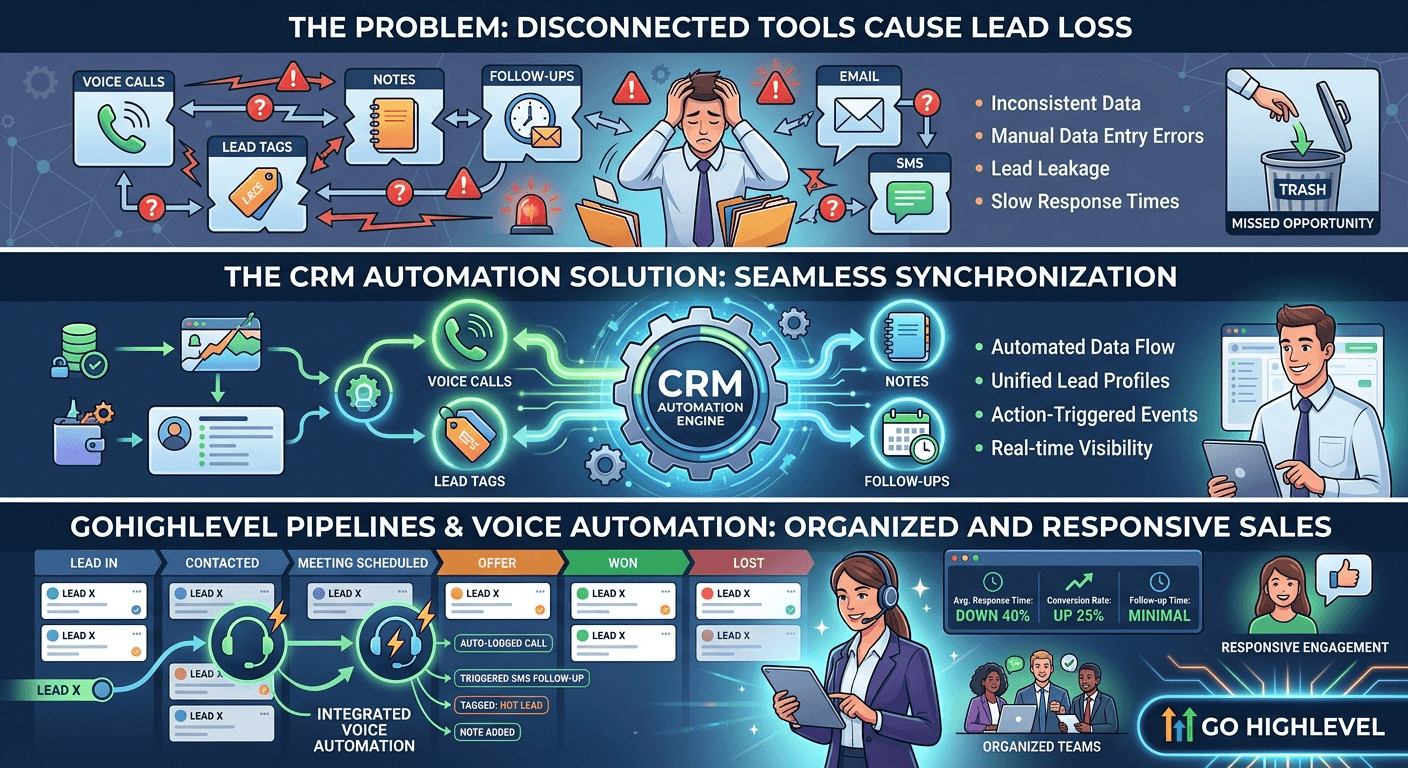
CRM automation eliminates manual data entry and missed leads. Learn how Chandigarh companies automate pipelines using modern CRM systems.
A sales manager in Chandigarh often sees the same pattern repeat: a lead comes in from a website form, a WhatsApp enquiry, a missed call, or a phone conversation, and then the trail goes cold. The team may be busy, but the process is fragmented. One person writes notes in a notebook, another updates a spreadsheet later, and someone else forgets to tag the lead in the CRM. By the time follow-up happens, the prospect has already spoken to a competitor.
That is exactly where CRM automation changes the game. Instead of relying on memory and manual updates, businesses can sync calls, tags, notes, tasks, and follow-ups automatically inside a structured pipeline. With tools like GoHighLevel, companies can build a system where every lead is captured, categorized, routed, and followed up with minimal delay.
For Chandigarh companies trying to improve conversion rates without adding more admin work, this is not just a convenience feature. It is an operational advantage. In this article, we’ll break down why manual CRM handling fails, how automated pipelines work, and how GoHighLevel automation Chandigarh businesses can use to keep sales teams organized, responsive, and consistent.
The Problem Businesses Face with Lead Management
Most companies do not lose leads because they lack interest. They lose leads because they lack process.
A typical business in Chandigarh may have enquiry sources scattered across:
- website forms
- phone calls
- missed calls
- Instagram or Facebook DMs
- WhatsApp conversations
- referral submissions
- landing pages from ad campaigns
Each source creates small operational gaps. Someone may answer the phone, but not record the outcome. A lead may be qualified, but not tagged properly. A promising prospect may be asked to “call back later,” but no reminder is created. When these gaps happen repeatedly, the CRM becomes a storage system rather than a sales engine.
This is especially problematic for service businesses, clinics, education consultants, real estate firms, and agencies where speed and follow-up discipline directly affect revenue. In these environments, lead volume may be moderate, but response expectations are high. If the first contact is delayed or the context is lost between team members, conversion rates fall quickly.
The real issue is not just missed data entry. It is disconnected operations. The sales rep, receptionist, caller, and manager may all be working separately. Without automation, the CRM cannot reflect reality in real time.
Why Traditional Approaches Fail
Manual systems fail for predictable reasons.
1. Human memory is unreliable
A salesperson may remember the lead conversation for a few hours, but not always long enough to update every detail accurately. Notes get shortened. Tags get skipped. Follow-up times are forgotten.
2. Teams work across too many channels
When calls, forms, and messages happen in different tools, the business has no single source of truth. Information gets trapped in one place while the CRM remains incomplete.
3. Delayed updates reduce lead quality
If the CRM is updated later in the day, the record may no longer reflect the lead’s true status. A prospect may have booked a meeting, asked for a quote, or gone cold, but the pipeline still shows them as “new.”
4. Follow-up inconsistency hurts conversions
Many companies know they should follow up, but they do not have a reliable mechanism to do it every time. Some leads get three calls. Others get none. That inconsistency is expensive.
5. Managers cannot see pipeline health clearly
If deal stages are not updated accurately, reporting becomes misleading. A business may think it has more active opportunities than it actually does. That makes forecasting and resource planning weak.
This is why CRM workflow automation matters. It removes the dependence on manual action for routine tasks and allows the team to focus on higher-value conversations.
How the CRM Automation System Works
A strong CRM automation system is not just “software connected to software.” It is a structured workflow that captures lead intent immediately and moves the record through the sales process automatically.
Here is a practical version of the workflow:
Lead form / missed call / inbound call / chat inquiry
→ Trigger in automation platform
→ Lead is created or updated in GoHighLevel
→ Source, tags, and custom fields are assigned
→ AI voice call or instant response is initiated if required
→ Qualification details are captured
→ Pipeline stage is updated
→ Task or follow-up is assigned to a salesperson
→ Meeting booking or next-step reminder is created
What each step does
1. Lead capture
The moment a lead enters from a form, call, or message, the system should create a record in the CRM. This prevents the common issue of leads existing in one channel but never making it into the pipeline.
2. Context enrichment
The lead should be tagged based on source, service interest, location, or campaign. For example, a Chandigarh business may want tags like “website lead,” “missed call,” “high intent,” or “consultation request.”
3. Instant response
This is where voice automation becomes powerful. Instead of waiting for a salesperson to call back later, an AI voice agent can respond quickly, gather intent, and route the lead correctly. For some businesses, this creates a major advantage in speed-to-lead.
4. Qualification and pipeline movement
Once the system collects basic details, it can move the lead to the right stage: new inquiry, contacted, qualified, booked, or follow-up required. This is especially useful when sales teams are handling large volumes.
5. Task creation and reminders
If the lead is not ready to book immediately, the system can create a callback task or sequence automatically. No one needs to remember it manually.
6. Reporting and visibility
Because the CRM is updated as the workflow runs, managers can see where leads are getting stuck and which sources are producing the best opportunities.
This type of architecture is particularly useful when paired with AI systems designed for rapid response. If you want to see how voice workflows can connect directly to the CRM layer, the integration patterns in AI voice agent GoHighLevel integration are especially relevant.
Practical Implementation for Chandigarh Companies
Let’s look at a realistic example of how this can work for a Chandigarh-based company.
Imagine a service business receiving inbound leads from its website, Google ads, and missed calls.
Step 1: Define the trigger sources
Start by identifying every entry point:
- web forms
- missed calls
- inbound calls
- WhatsApp inquiries
- Facebook lead forms
- landing page submissions
Each source should have a clear automation path.
Step 2: Standardize the CRM structure
Before automation is turned on, the CRM should have:
- pipeline stages
- lead tags
- lead source fields
- contact owner rules
- follow-up statuses
- booking steps
Without structure, automation only multiplies confusion.
Step 3: Build the routing logic
The system should decide what happens based on lead intent.
For example:
- high-intent leads get immediate call-back or AI voice response
- general inquiries get an email or WhatsApp sequence
- unresponsive leads go into a reactivation workflow
- sales-qualified leads are assigned to a human rep
Step 4: Connect lead capture to CRM updates
When a lead fills a form, the data should enter the CRM instantly. Their details can be mapped into custom fields, such as service interest, preferred callback time, or city.
Step 5: Add task automation
If the lead is not booked, the CRM should create a call task or reminder for the assigned rep. This ensures follow-up happens within the expected window.
Step 6: Sync notes and call outcomes
After a call, the outcome should be logged automatically. If the agent or rep marks the lead as interested, not reachable, or follow-up later, the stage and notes should update at the same time.
Step 7: Use pipeline rules for accountability
A good pipeline should make it obvious where each lead stands. A manager should be able to open the board and immediately see:
- who was contacted
- who is waiting for follow-up
- who has booked
- who needs escalation
For many firms, this is where GoHighLevel automation Chandigarh becomes practical rather than theoretical. It gives businesses one operational layer for tracking, communicating, and moving leads forward.
Benefits and Strategic Impact
The benefits of CRM automation go beyond convenience.
Faster response times
The sooner a lead gets a response, the better the chance of conversion. Automated workflows reduce the time between enquiry and action.
Better lead ownership
When the CRM assigns tasks and stages automatically, there is less confusion about who should act next.
More complete data
Automated systems reduce missing fields, incomplete notes, and untracked conversations. That improves reporting quality.
Improved conversion discipline
With workflow-driven follow-ups, businesses are less likely to let hot leads go cold.
Better sales visibility
Managers can see which campaigns, channels, and team members are performing well. This helps with forecasting and coaching.
Lower operational load
Instead of having staff spend time updating records manually, they can focus on speaking to leads and closing business.
For companies trying to scale without constantly hiring more admin support, this matters. Automation does not remove the need for human sales judgment, but it does remove repetitive busywork.
It also supports broader speed-to-response systems. Businesses that study speed to lead in Chandigarh business usually discover that automation is not a “nice to have” but a direct driver of conversion efficiency.
Related Systems and Workflows
CRM automation becomes much stronger when it is connected to adjacent workflows.
Voice agents and call handling
If a company receives many inbound calls, AI voice agents can collect intent, answer routine questions, and update the CRM instantly. This is useful for businesses that want to respond immediately without depending on a human to be available every time.
This is especially relevant for sectors where enquiry handling is time-sensitive. For example, companies exploring AI missed call automation in Chandigarh often pair it with CRM pipelines so that every missed call becomes a logged opportunity rather than a lost contact.
Lead qualification systems
Once a lead enters the CRM, the next challenge is deciding whether it is worth a salesperson’s time right now. Automation can help sort leads by urgency, budget, service need, and readiness.
Businesses that use AI lead qualification in Chandigarh often build this into their CRM workflow so the system can distinguish between casual inquiries and high-value opportunities.
Reactivation and follow-up automation
Not every lead converts on the first touch. Some need reminders, nurturing, or a second conversation later. A CRM automation system should support reactivation flows so old contacts are not forgotten.
That is why AI CRM reactivation in Chandigarh fits naturally into this model. It helps companies recover value from leads already sitting in the database.
Sales team coordination
When the CRM is connected to routing, reminders, and call outcomes, the sales process becomes easier to manage. This is useful for teams that need both automation and human follow-up. In those environments, AI SDR workflows for Chandigarh sales teams can complement the CRM layer by handling initial outreach and qualification before handing off to the sales rep.
Taken together, these systems create an operating model where leads are not just captured, but managed intelligently from first touch to final follow-up.
Frequently Asked Questions
What is CRM automation for companies in Chandigarh?
It is the use of automation tools to capture leads, update contact records, assign tags, move deals through pipeline stages, and trigger follow-up actions without manual data entry.
Why is GoHighLevel useful for CRM automation?
GoHighLevel combines CRM, pipeline management, messaging, workflows, and lead capture in one platform, which makes it easier to automate lead handling end to end.
Can CRM automation work with phone calls and missed calls?
Yes. Calls, missed calls, and call outcomes can be tied into the CRM so the system automatically creates records, updates status, and triggers follow-up actions.
Does CRM automation replace sales reps?
No. It removes repetitive admin work and helps reps respond faster, but human judgment is still important for qualification, objection handling, and closing.
What type of businesses benefit most from CRM workflow automation?
Service businesses, agencies, clinics, education consultants, real estate teams, and any company handling inbound leads across multiple channels benefit significantly.
Conclusion
CRM automation is not just about saving time on data entry. For Chandigarh companies, it is a way to build a cleaner, faster, more reliable sales process. When calls, tags, notes, and follow-ups are synchronized automatically, the CRM stops being a passive database and becomes an active revenue system.
With GoHighLevel, businesses can structure pipelines, trigger responses, assign tasks, and maintain visibility across the full lead journey. When paired with voice automation and lead qualification workflows, the result is a more responsive and organized sales operation.
If your business is still relying on manual updates, scattered notes, and inconsistent follow-up, the opportunity is not just operational efficiency. It is better conversion discipline. For teams ready to move toward a more connected system, exploring an AI automation agency in Chandigarh is a practical next step toward building a scalable lead management stack.
AI-native business systems
Bring a niche, or bring a workflow.
If you run the business, we build the system around it. If you sell into a niche, we build the system behind your offer.
PolarBuild case study →You sell the niche. We build the system.
We never compete for your end clients. One partnership conversation. You fulfil the same system across the accounts in your niche.
Free POC before dedicated software
A three-day sales demo of the system for your vertical before any large software investment. Implementation starts only when someone in that niche pays.
Replicate the niche, not a one-off build
UK dental becomes US dental with a new local partner and new integration targets. Same system thesis, new market.