Chandigarh and the Tricity

A dental booking systembuilt around your clinic

Patients should not have to call reception just to find a slot.

We implement a patient-facing booking path around how this practice already works: treatments, eligible dentists, duration, chairs, hours, and the rules for what can book versus what needs a request. Then the appointment lands in the system the clinic actually uses.

Prefer to talk? Book a practice call

Your clinic. Your setup.

Two ways to put booking in front of your practice.

Whether you already run a PMS or need the booking infrastructure itself, we can build the patient-facing booking path around how your clinic operates.

  • Path 01. You already have a PMS

    Use your existing PMS

    Your PMS remains the source of truth. We connect the booking experience to it through its available API or integration, so patients can see eligible availability and bookings flow back into the system your practice already uses.

    1. PatientTreatment → Dentist → Available slot → Book
    2. Booking API
    3. Your PMS

    Clinics already running Bestosys, Practo Ray, Dentee, SoftClinic, or another supported PMS.

    Integration depends on the PMS and available API or access.

  • Path 02. You do not have a PMS

    No PMS? We can provide the booking system itself.

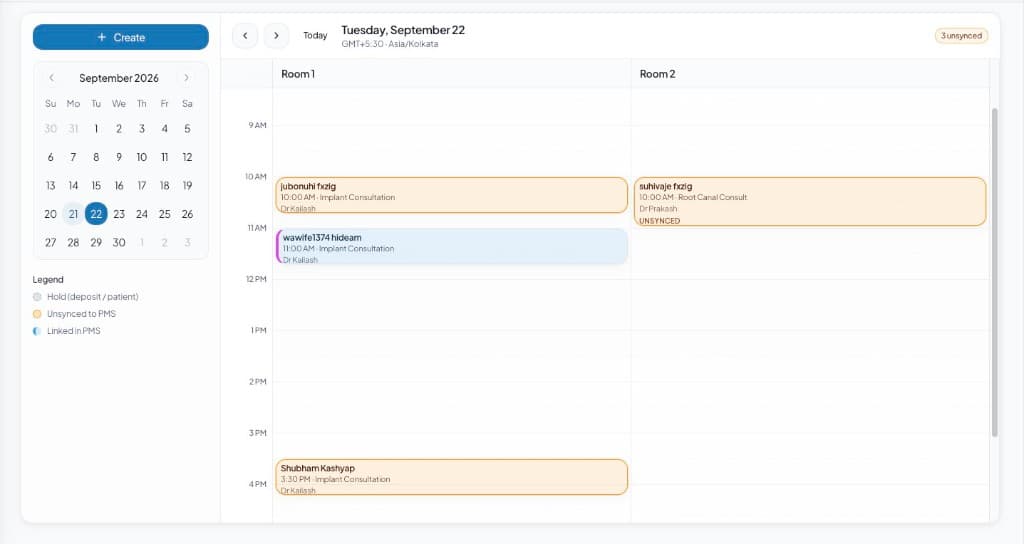
    If your clinic does not have a PMS to connect to, we can provide the booking infrastructure, including the scheduling logic and the operational layer needed to manage appointments.

    With native operations for confirmations, changes, rescheduling, and the day-to-day appointment workflow.

    1. PatientI need an implant consultation
    2. Booking systemTreatment → Provider → Availability → Slot
    3. Appointment
    4. OperationsConfirm · Update · Reschedule · Follow up

PMS connected or not, the patient gets the same simple booking experience.

The leak

A generic calendar is not the same as a clinic booking system.

Patients do not book “any 20 minutes.” They book a treatment with a dentist who can do it, in a chair that is free, inside the hours this practice actually runs.

  1. 01

    The website has a form. Reception still has to find a slot by hand.

  2. 02

    The calendar shows empty time that is not eligible for that treatment or that dentist.

  3. 03

    WhatsApp asks for “tomorrow morning” and nobody can see what is actually free.

  4. 04

    The PMS holds the diary, but the patient never gets in front of it.

The patient should see a simple page. Underneath, the clinic needs a scheduling engine.

How booking works

Treatment first. Then the dentist. Then a real slot.

Clinic treatments are configured around this practice. We do not drop in a default catalogue.

  1. 01

    Treatment

    The patient picks what they came for, or the conversation names it. Duration and rules start here.

  2. 02

    Eligible dentist

    Only providers who actually do that treatment are shown.

  3. 03

    Availability

    Hours, breaks, operatories, and existing bookings constrain what can appear.

  4. 04

    Duration

    The slot length follows the treatment, not a generic 15-minute grid.

  5. 05

    Eligible slot

    The patient sees times that are actually bookable. They pick one. We do not ask them to reply yes to a single option.

  6. 06

    Details and confirmation

    Name, contact, and the confirmation go out on the same path they used to book.

Clinic rules

Configured around how this practice already runs.

The booking layer follows the clinic. The clinic does not reshape itself around a generic diary.

  • Treatments

    What this clinic offers, and which ones can book online versus request only.

  • Dentists

    Who can do which treatment, and on which days they actually sit.

  • Hours and breaks

    Opening hours, lunch, and days the book is closed.

  • Operatories

    Chairs and rooms that have to be free for that appointment.

  • Booking rules

    Lead time, buffers, new versus existing patients, and what always goes to a human.

  • Book or request

    Some clinics start with a slot request until they trust auto-book. Both use the same engine.

On the website

Treatment page to a booked time.

The public path is short: the treatment, the dentist, a time that is actually free, then confirmation.

  1. Treatment page
  2. Book
  3. Eligible time
  4. Confirm
Clinic diary showing chairs and appointment slots for the day

On WhatsApp

The same engine. A different door.

A patient who messages the clinic should still see three real times and pick one. The booking rules do not change because the channel did.

See WhatsApp automation · See the AI receptionist

Mohali, after hours

They asked for an implant consult. They picked a morning slot.

Mohali, after hours

They pick one of three morning times.

  1. 9:18 PM

    Hi, I need an implant consultation. Can I come this week? I work near IT Park Mohali.

  2. Immediate

    Yes. Tomorrow morning we have 9:30, 10:30, and 11:15. Which one works?

  3. 9:19 PM

    10:30

  4. Immediate

    Booked for 10:30 tomorrow. Confirmation and a reminder go out before the visit.

Two booking modes

Direct book, or a request the desk confirms.

Clinics that will not trust auto-book yet start on request. The patient still sees eligible times. Reception decides whether the slot holds.

  • Direct booking

    The chosen time is held. Confirmation goes out. The diary updates on the path this clinic uses.

  • Slot request

    The patient picks from eligible times. The desk confirms. Useful while the clinic is still tightening rules.

After the slot is held

Booked is not the end of the job.

  1. Booked
  2. Confirmed
  3. Reminder
  4. Reschedule or cancel
  5. Show-up

Confirmations, changes, and follow-up on the native path are part of the booking install. The full patient path around ads, capture, and recall is optional. See the full patient path

Built for the Tricity

Same booking engine. Configured around each clinic’s schedule.

We implement this for dental clinics that already take patients across Chandigarh, Mohali, Panchkula, and Zirakpur.

  • Chandigarh

    Sector and Industrial Area practices where the desk is already with a patient when someone tries to book.

  • Mohali

    Phase clinics and IT Park hours. Evening and after-office booking is often the first test.

  • Panchkula

    Family and specialist books that need treatment-specific dentists, not a shared open diary.

  • Zirakpur

    New-clinic and highway traffic. First-time patients should be able to take a slot without calling twice.

The location changes. The rule does not: patients see a simple booking path. The clinic’s treatments, dentists, and hours sit underneath.

Who this is for

Start here if the leak is that patients cannot book a real slot.

  1. 01

    The website or WhatsApp still ends in “call reception for a time.”

  2. 02

    You have treatments and dentists that cannot share one generic calendar.

  3. 03

    You already run a PMS, or you need the booking system itself.

  4. 04

    You want book and request as two modes of the same engine.

  • Missed calls

    If the only problem is the phone ringing out, start with the receptionist. That is the front-desk leak.

    See the dental AI receptionist

  • Lost enquiries

    If the enquiry lands and then disappears, start with the CRM. That is the journey after the message exists.

    See dental CRM implementation

Questions

Straight answers for Tricity clinics.

01Do we need a PMS?

No. If you already have one, we sit in front of it and write back where the API or access allows. If you do not, we can provide the booking system itself, including confirmations, changes, and rescheduling.

02Will this replace Bestosys, Practo Ray, Dentee, or SoftClinic?

No. When a PMS is already in place, it stays the source of truth. How deep the write-back goes depends on that PMS and is scoped before work starts.

03Can patients book from the website?

Yes. The usual path is treatment, eligible dentist, a real time, then confirmation. What can book versus what must request is configured with you.

04Can they book on WhatsApp as well?

Yes. WhatsApp uses the same booking engine. The receptionist can offer three times and they pick one. It is not a separate calendar.

05What if we are not ready to let patients book themselves?

Start on slot request. They still see eligible times. Reception confirms. You can move to direct book when the rules feel safe.

06Do you cover Mohali, Panchkula, and Zirakpur?

Yes. The same booking install is available across the Tricity. Hours, dentists, and treatments are configured around the individual practice.

07Is this booking software we just sign up for?

No. FusionSync implements the booking path around this clinic. You are not picking a ranked product off a comparison list.

Next step

Your patients should not have to call just to find a slot.

Bring the PMS name if you have one, the treatments you want bookable, and how slots are found today. If you are one of the first 5 Tricity clinics, apply for the founding pilot or book a practice call.