
Production Teardowns
How I Automate Google Reviews for Local Businesses

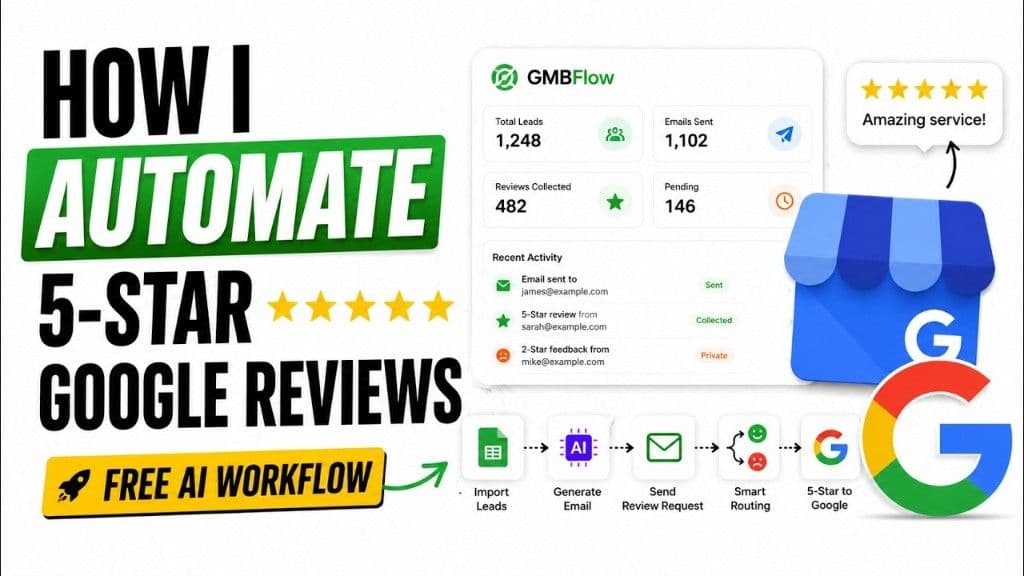
I open-sourced GMBFlow: GBP review automation with n8n cadence, a gated review page, and private low-star flags. Deploy free from GitHub.
Watch the full system demo before the written teardown below.
You ask for a review. Everyone gets the same door.
A local business owner asked me a question I have heard a dozen times:
"We send customers a Google review link after every job. Why do we still have so few 5-stars, and why did a 1-star show up out of nowhere last month?"
Because they were doing the thing almost everyone does. One generic email. One public link. Happy customers and angry customers walked through the same door.
Happy customers rarely review on their own. They finish the job, say thanks, and move on. Your Google Business Profile stays quiet.
Unhappy customers are different. They remember. They click. They post. And once a bad review is public on Google Maps, it does not quietly disappear because you fixed the issue the next day.
That asymmetry is the whole problem. Most businesses are not failing at "reviews." They are failing at process.
I built a system to fix that. It ships as GMBFlow, an open-source Google review management stack: Next.js dashboard, branded review page, n8n automation, and sentiment routing. The repo is public. The n8n workflow exports ship with it. You can deploy the whole thing without paying FusionSync a rupee.
This post is the written version of the walkthrough above. To grab the GitHub repo, importable n8n workflows, and setup guide in one place, go to Deploy GMBFlow for Free on the FusionSync workflow hub.
The three mistakes I keep seeing
Before the build, I mapped what local businesses were actually doing. Same pattern every time.
Mistake 1: Asking too late (or not at all)
The job ends Friday. Nobody sends a request until someone remembers on Tuesday. Or never. Momentum is gone. The customer has already mentally closed the ticket.
Reviews are a timing problem before they are a copywriting problem.
Mistake 2: Sending everyone straight to Google
Mass email. SMS blast. QR code on the receipt. All roads lead to the public review form.
If someone had a bad experience, they can post it before you even know there was a problem. No private signal. No chance to fix. Just a permanent star rating on the listing your business runs on.
Mistake 3: No system behind the ask
Spreadsheet. Manual follow-up. "Did Sarah review yet?" in the group chat.
No queue. No cadence. No deduplication. No per-service templates. No way to see that 146 people were asked, 482 reviewed, and 1,102 emails actually went out.
You cannot improve what you cannot see.
The fix is not "more review links." It is a filter step.
The design I shipped adds one layer before the public Google ask:
- Send a personal review request (not a mass blast with the same body to everyone).
- Customer opens a branded review page on your domain.
- They pick a star rating (1 to 5).
- 4 to 5 stars → guide them to your Google review URL.
- 1 to 3 stars → capture feedback privately. Flag it internally. No automatic push to Google.
That is the core loop in the infographic on this post: import leads → generate email → send request → smart routing → 5-star path to Google.
You still grow public stars from people who loved the service. You also get an early warning when something is going wrong: a technician, a billing issue, a scheduling miss, a location-specific complaint.
For agency owners reading this: the same pattern shows up in MeisterFlow, the Swiss home-services SaaS we shipped with GBP review routing built in. Different vertical, same reputation math.
What the dashboard actually tracks
The UI in the video is not a mockup. It is the operational surface the business owner lives in.
- Total leads organized by service line
- Emails sent vs pending in queue
- Reviews collected on the public path
- Recent activity: who was sent, who opened, who left 5 stars, who left 2 stars and got flagged private
The 2-star row in the screenshot is the point. The owner sees "Private" and a sad-face flag before that experience becomes a public disaster. They can call back, refund, reschedule, or fix the process.
Behind that UI:
- Leads import from sheets or CRM exports
- Review emails enter a queue when a job is marked complete
- Duplicate requests are blocked automatically
- Different email templates per service (plumbing vs HVAC vs cleaning, whatever the business runs)
- n8n runs the automation layer: send, wait, follow-up, store results, apply the rating filter
If you already run self-hosted n8n, the deployment shape will feel familiar. We use the same stack patterns described in our n8n + SSL hardening teardown and Google Forms → webhook triggers.
Why n8n cadence matters more than a one-shot email
A single "please review us" blast is not a campaign. It is a hope.
What local businesses need is cadence:
- Day 0: job complete → enter queue
- Day 1: first personal request
- Day 4: gentle follow-up if no open
- Day 7: final nudge, then stop (no harassment)
Each step is a workflow node, not a calendar reminder someone forgets. n8n handles delays, conditions, and branching. The app handles identity, templates, deduplication, and the branded review page.
That separation is deliberate. n8n is the clock and the postman. The app is the source of truth for who was asked and what they said.
Agency angle: this is exactly the kind of per-client automation FusionSync white-labels. One vertical playbook (home services, dental, auto detail), deployed per account, with local integrations swapped in. The review system is a module, not a one-off script.
The gated review page (and the policy line you should know)
The custom review page is where sentiment routing happens.
A happy customer sees stars, taps 5, gets a clear CTA to the real Google review URL, maybe with a pre-filled draft if you want to reduce blank-page friction. An unhappy customer still gets heard. Their words land in your system, flagged, attributed to the job and service line.
I am going to be direct about the compliance layer because I am a builder, not a growth hacker selling suspension risk.
Google's Maps user-generated content policies and the broader 2026 enforcement wave treat review gating as a violation: selectively sending only happy customers to the public form while routing unhappy ones away. The FTC's consumer reviews rule adds civil exposure for suppressing negative reviews.
If your workflow never shows a public Google option to unhappy customers, that is gating. Platforms are detecting it.
How I think about the system I built:
- Private feedback first is legitimate. Every customer should have a fast way to tell you something went wrong.
- Equal access to the public review link is the compliance guardrail. The unhappy path should not be a dead end that hides Google.
- Operational value is the early flag, the service-line trend, the callback queue. Not artificially inflating a star average.
The product screenshot shows routing logic because that is what operators asked for. If you deploy something like this, treat the policy docs above as part of the spec, not footnotes. Replifast's 2026 guide and QuickFeedback's breakdown are worth reading before you flip a workflow live.
How the automation loop runs end to end
Here is the full path from the video, stripped to the architecture:
| Step | What happens |
|---|---|
| Import | Leads land from Google Sheets or CSV with service tag |
| Queue | Completed jobs trigger enqueue in the app |
| Generate | AI drafts a personal email from job context (customer name, service, date) |
| Send | n8n dispatches email on cadence schedule |
| Open | Branded review page loads on your domain |
| Rate | Customer selects 1 to 5 stars |
| Route | 4 to 5 → Google review URL. 1 to 3 → private feedback store + owner flag |
| Dedupe | System blocks second ask to same customer for same job |
| Report | Dashboard updates counts and activity feed |
The "Generate" step is not fluff. Local businesses sound robotic when every email says "We value your feedback." The model writes one paragraph that references the actual service. That alone lifts open rates.
The "Dedupe" step saves reputation in a different way. Nothing makes a happy customer angrier than three review requests for one plumbing visit.
Who this is for
Local business operators who know reviews are their biggest asset on Maps but do not have time to chase them manually.
Agency owners who sell reputation, GHL, or local SEO packages and need a fulfilment layer they can deploy per client without rebuilding the workflow every time.
Technical founders who want a real production loop: open-source Next.js app, n8n cadence, policy-sensitive routing. Clone GMBFlow on GitHub, not a Lovable weekend project.
If you are still at the "I vibe-coded a landing page in an afternoon" stage, read how that differs from what I ship in production. This GBP project is the other end of that spectrum: boring infrastructure that runs every week.
Deploy GMBFlow for free (GitHub repo and n8n workflows)
I did not build GMBFlow to sit behind a demo call. I open-sourced it because local businesses and agency operators should be able to run the stack themselves.
Everything you need is in two places:
- GMBFlow on GitHub — the full Next.js app, dashboard, branded
/review/{token}page, CSV import, and then8n/workflows/JSON exports (bootstrap tables, API gateway, send-review-email sub-workflow). - FusionSync workflow hub: GMBFlow Google Review Management — the single landing page with workflow files, GitHub links, and deployment steps pulled together.
Clone the repo, copy .env.example, point N8N_WEBHOOK_URL at your instance, import the workflows in order (bootstrap → email sender → API gateway), connect Gmail OAuth in n8n, and you have a working review ops system on your own infrastructure.
The README in the repo walks through table bootstrap, build-workflows.ts, Gmail credential setup, and cold-testing against a live n8n instance. No license fee. No credit meter. Fork it, rebrand the review page, wire your own domain.
What is actually in the box:
| Asset | Where it lives |
|---|---|
| Next.js 16 dashboard | `app/`, `components/` in the GitHub repo |
| Branded review page | `/review/{token}` route |
| n8n workflow exports | `n8n/workflows/*.json` |
| Deploy scripts | `n8n/scripts/` (build, apply, test) |
| Setup guide + workflow bundle | [FusionSync workflow hub page](https://www.fusionsync.ai/workflow/posts/gmbflow-google-review-management-n8n) |
If you are technical, start on GitHub. If you want the workflows and assets in one click without digging through folders, start on the workflow hub page.
What FusionSync sells (and what stays free)
GMBFlow is free and open source. FusionSync makes money when agency owners need white-glove fulfilment: ten client accounts, per-vertical email templates, Gmail and domain setup, compliance review of the routing logic, and ongoing support when a workflow breaks on a client's n8n instance.
You do not need us to run GMBFlow for your own business. You might want us if you are an agency packaging this as a reputation product for every client in your book.
Message me on WhatsApp if that is you. Bring your vertical, client count, and whether you already sell local SEO or reputation management.
The bottom line
Local businesses do not have a reviews problem. They have a system problem.
- Asking late means happy customers never post.
- Sending everyone straight to Google means angry customers post first.
- Manual follow-up does not scale past a dozen jobs a week.
The fix is a filtered, tracked, cadence-driven ask: personal email → branded page → route happy customers to GBP → capture unhappy feedback privately → dashboard for the owner.
That is GMBFlow. The video shows it live. The GitHub repo and workflow hub page are free to deploy. The compliance layer is on you to implement responsibly.
Agency owners who want this productized across a client base can still reach out on WhatsApp. Everyone else: clone the repo and ship.
AI-native business systems
Bring a niche, or bring a workflow.
If you run the business, we build the system around it. If you sell into a niche, we build the system behind your offer.
PolarBuild case study →You sell the niche. We build the system.
We never compete for your end clients. One partnership conversation. You fulfil the same system across the accounts in your niche.
Free POC before dedicated software
A three-day sales demo of the system for your vertical before any large software investment. Implementation starts only when someone in that niche pays.
Replicate the niche, not a one-off build
UK dental becomes US dental with a new local partner and new integration targets. Same system thesis, new market.