
Production Teardowns
Hardening Self-Hosted n8n: TLS, Auth, and IP Allowlist

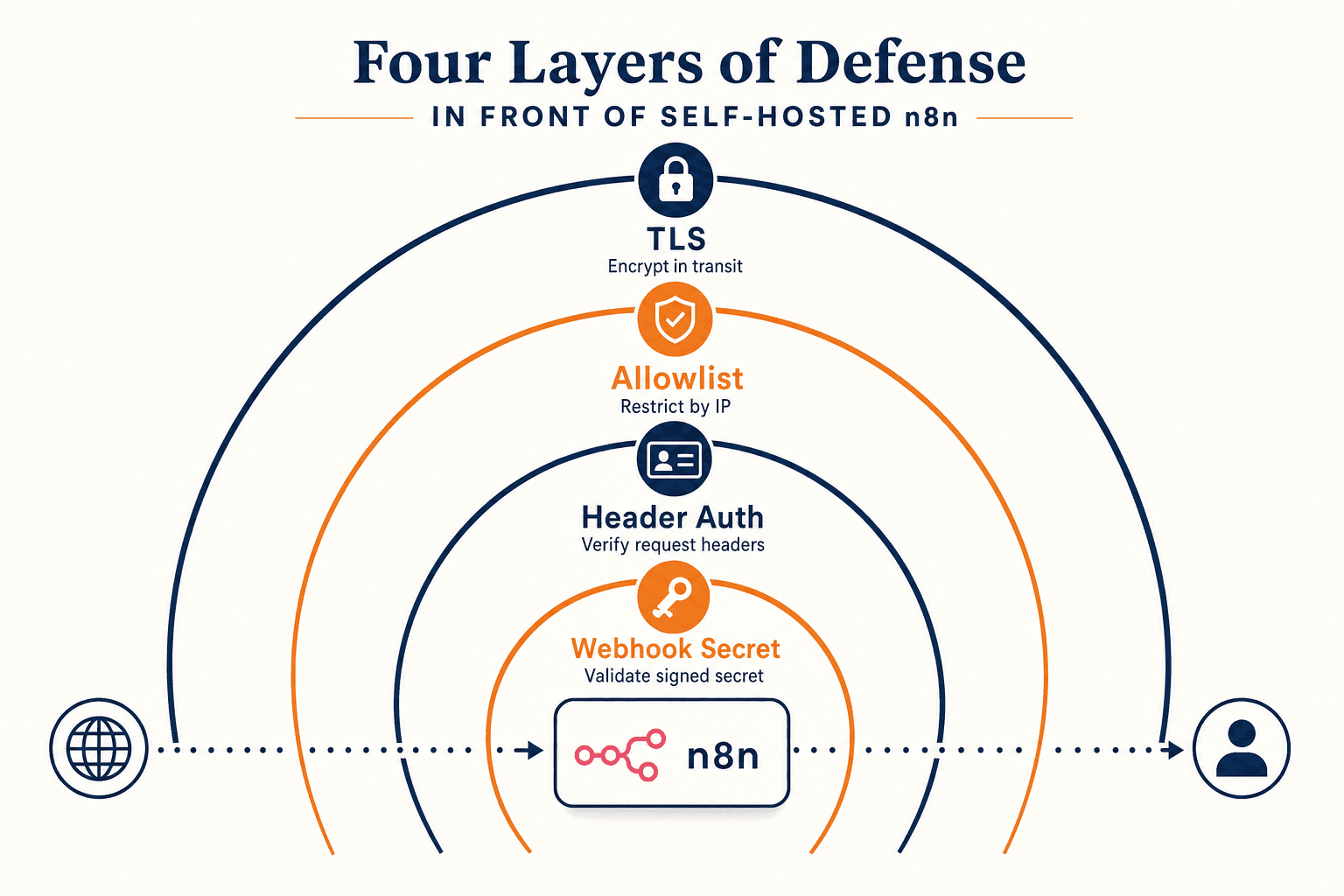
A field guide to securing a public-facing n8n instance: header auth, IP allowlists, webhook secrets, and rotation that survives Certbot.
What we are actually protecting
A self-hosted n8n that handles real customer traffic is a soft target by default. The editor is a full execution environment for arbitrary JavaScript and HTTP calls. Webhook URLs are publicly guessable if you let them be. Workflows store OAuth tokens, API keys, CRM credentials, and message templates. The encryption key file on disk is the keys to all of it.
Most public guides stop at "install Certbot, set up basic auth, done." Basic auth in 2026 is not a security control. It is a speed bump that gets through any half-decent password list in under a minute. The right shape is layered: TLS at the edge, an IP allowlist for the editor, header auth for webhook traffic, secret-scoped paths for each integration, and per-webhook secrets for callbacks you cannot allowlist.
This post is the layered version I run on every n8n VPS that touches money. It assumes you already have the Docker + Nginx + Let's Encrypt baseline and a working Certbot auto-renew. If you do not, do those first.
The threat model in one paragraph
Three buckets of risk: an attacker who can reach the editor login page can brute-force credentials, dump credentials from the database via a malicious workflow, or pivot through any third-party API you have connected. An attacker who can hit your webhook URLs without auth can replay, fuzz, or flood them. An attacker who gets a copy of /srv/n8n/data can decrypt every stored credential with the encryption key file shipped right next to it.
Each layer below addresses one of those buckets. None of them is sufficient alone. All of them together are not absolute either; this is defense in depth, not perimeter security.
Layer one: TLS that does not embarrass you on SSL Labs
A current TLS config on Nginx in 2026 is short. Drop the following snippet into /etc/nginx/conf.d/ssl-hardening.conf so every site on the host inherits it:
Three notes:
- The cipher list is the Mozilla intermediate profile for 2025-2026. If you want to stay on top of changes, Mozilla updates the recommended set on a schedule and publishes a server config generator that produces a current snippet.
HSTSwithpreloadis a one-way commitment. Once you submit your domain to the HSTS preload list, browsers refuse to talk HTTP to it for years. Do not enable preload unless you have committed to HTTPS-only forever.X-Frame-Options: DENYblocks any other site from embedding your n8n editor in an iframe. The n8n editor does not need to be iframed by anything.
Reload Nginx, then re-test with SSL Labs. You should hold an A+ and no flags on protocol downgrade or weak ciphers.
Layer two: IP allowlist for the editor
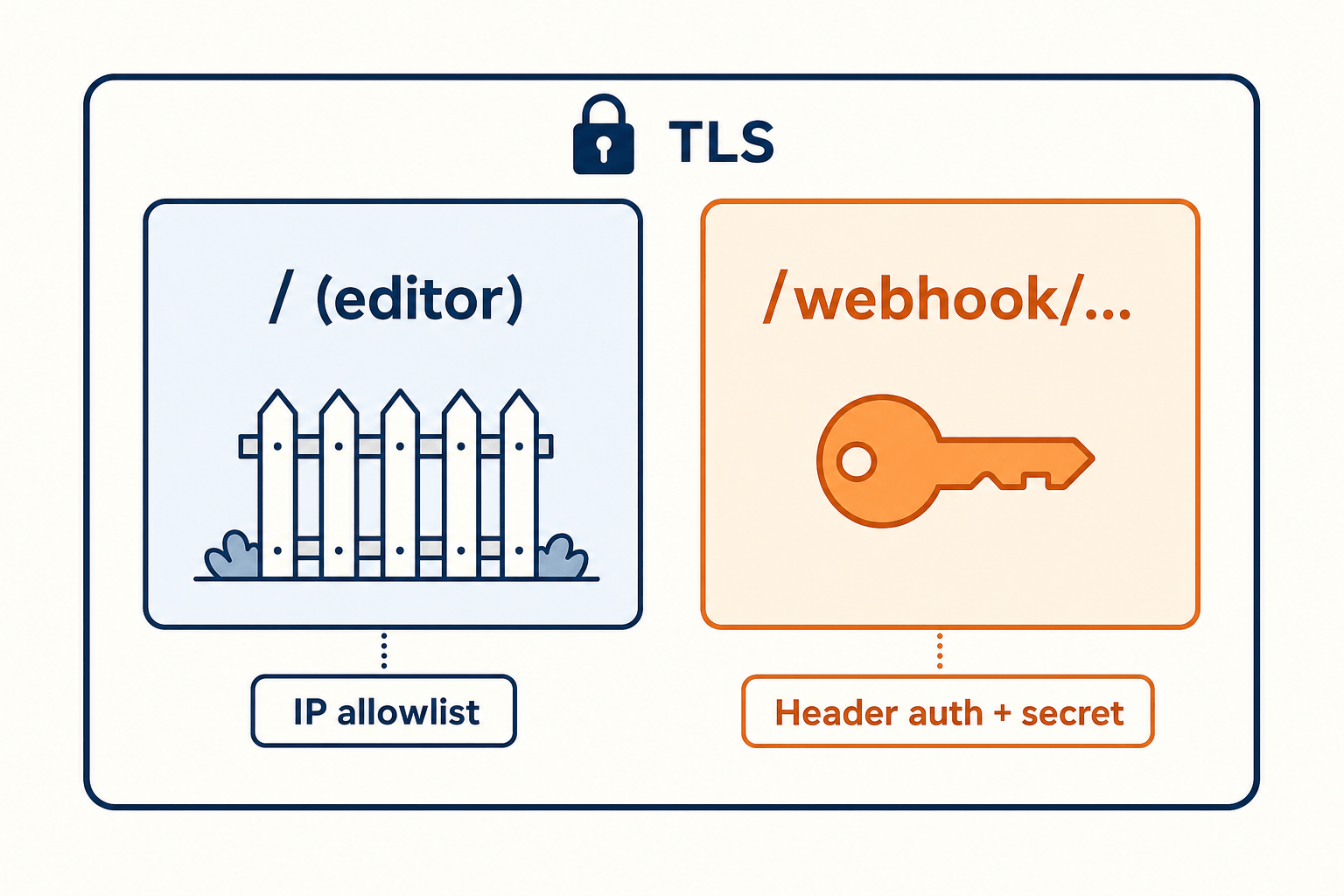
The editor at https://n8n.yourdomain.com/ exists to be used by you, your team, and your agents. It does not exist to be hit by arbitrary internet traffic. The cleanest control is an IP allowlist at Nginx, applied only to the editor's URL space, not to the webhook URL space.
The n8n editor lives at / and under several internal paths. The public webhook endpoints live at /webhook/, /webhook-test/, and /form/. We protect everything except the webhook prefixes.
Pull the repeating proxy headers into a snippet for sanity:
Two operational gotchas:
- If your team is remote and on residential IPs that change weekly, put them behind a VPN with a static egress and allowlist that. Tailscale with a subnet router on the n8n host is a five-minute setup that produces a stable internal IP. WireGuard is the manual equivalent.
- The IP allowlist applies to humans hitting the editor. It does not protect against a worker on the box itself making outbound calls; that is what credential rotation and least-privileged tokens are for.
Layer three: header auth for webhooks
Every n8n webhook node lets you require an auth header. Use it. The pattern that scales across many integrations is:
- Pick one header name your shop uses everywhere. We use
X-Agent-Token. - Generate one secret per vendor (Twilio, WhatsApp, Stripe, GoHighLevel). Store them in the host's
.envfile alongside n8n. - Configure each vendor to send that header.
In n8n, every webhook node has an Authentication dropdown. Pick Header Auth, choose Create New Credential, and set the header name and value. The credential lives in n8n's encrypted store and is referenced from the workflow.
For vendors that do not let you set arbitrary headers, fall back to the per-webhook secret pattern n8n already supports. Every webhook URL n8n generates can include a secret path segment that is unique per workflow and unguessable. The shape is https://n8n.yourdomain.com/webhook/<webhookId> where <webhookId> is a UUID. Treat that UUID as a credential; rotate it by deleting the webhook node and creating a new one if you ever leak it.
For vendors that sign their callbacks with HMAC (Stripe, GitHub, Slack), add a Code or Function node at the top of the workflow that verifies the signature against the raw body and rejects mismatches. The Stripe webhook signature docs are the reference; the same pattern is in the GitHub webhook docs and the Slack request verification docs.
Three layers, one webhook endpoint:
| Layer | Where configured | What it stops |
|---|---|---|
| Path UUID | n8n's webhook node | Random scanners hitting `/webhook/foo` |
| Header auth | n8n credential + vendor config | Replay from any third party that does not know the header |
| HMAC verify | Code node at top of flow | Replay of a captured request with a stale signature |
Layer four: protect the credential store on disk
Even with everything above, an attacker who walks off with /srv/n8n/data and the encryption key has the keys to every OAuth token. Two cheap controls reduce that blast radius:
- Set the encryption key as an environment variable, not in the
.envfile alongside the data directory. The systemd unit for Docker Compose can load it from/etc/n8n/secrets/N8N_ENCRYPTION_KEYwith mode 600 and owner root. A backup of/srv/n8n/datathen no longer contains the key. - Run nightly encrypted backups of
/srv/n8n/datato an off-host bucket usingresticorborg. Store the repository passphrase in your password manager, not in your.env.
Then load it into the container at boot via a small systemd unit or by editing docker-compose.yml to read the file with the env_file: field. Either way, the key never sits in the working directory next to the SQLite database.
If you rotate the key, n8n cannot read existing credentials. Rotate only when you are willing to re-enter every connected credential. In practice, you set it once on day zero and treat it like a TLS root: long-lived, backed up in two places, never copy-pasted into chat.
Failure modes I have actually seen
A short field log:
| Symptom | Root cause | Fix |
|---|---|---|
| Webhooks return 401 after a domain change | The vendor still sends the old `X-Agent-Token` value | Rotate the header value and update each vendor's webhook config; do not "comment out" the auth credential |
| Editor inaccessible from new office IP | Allowlist not updated | Either add the IP, or put the team on a Tailscale subnet you allowlist once |
| Brute-force attempts in Nginx logs against `/rest/login` | Old install without IP allowlist | Add the allowlist; do not add basic auth as a band-aid |
| Webhook URL leaked in a screenshot | Path UUID burned | Delete the webhook node, create a new one, update vendor config to the new URL |
| SSL Labs drops to B after Ubuntu upgrade | `ssl_dhparam` reset to the old default | Regenerate with `openssl dhparam -out /etc/nginx/dhparam.pem 4096` and reference it explicitly |
What to do once a month
A short maintenance loop you can put on your calendar. Ten minutes:
- Run
sudo certbot renew --dry-runonce. Confirm the deploy hook reloads Nginx (the run printsRunning deploy-hook command: ...). - Re-run SSL Labs against your n8n domain. Confirm A+ and no new flags.
- Diff your Nginx site config against version control. If something changed and you do not remember why, find out.
- Spot-check the editor allowlist. Remove IPs of contractors whose engagement ended.
- Run
docker image inspect docker.n8n.io/n8nio/n8n:latestagainst your registry digest. If a new release is out, schedule the upgrade for a low-traffic window.
If you run the Telegram-driven Cursor agent stack, every one of these checks can be a one-DM job: the agent runs them on a cron, posts a summary to a channel, and only pages you when something is off.
The bottom line
A hardened n8n is not one big control; it is four small ones stacked. TLS gets you secrecy on the wire. The IP allowlist gets you "only my team sees the editor." Header auth and HMAC verification get you "only the vendor I expect can fire this webhook." Securing the credential file on disk gets you "even a host compromise does not leak every OAuth token."
- Treat
/and/webhook/as two different URL spaces. Allowlist one, header-auth the other. - Use the Mozilla intermediate TLS profile and rotate the snippet annually.
- Keep the n8n encryption key out of
/srv/n8n/data. Backups should never contain both halves. - Rotate per-vendor header secrets when you change domains or off-board a contractor; never silently turn auth off.
- Put a monthly ten-minute maintenance loop on your calendar, or let an agent run it for you.
If you want this stack installed, hardened, and pointed at your CRM with all four layers wired up on day one, we run a free 7-day pilot that ships a closer-ready n8n host and the workflows around it. No fixed retainer, no API markup.
AI-native business systems
Bring a niche, or bring a workflow.
If you run the business, we build the system around it. If you sell into a niche, we build the system behind your offer.
PolarBuild case study →You sell the niche. We build the system.
We never compete for your end clients. One partnership conversation. You fulfil the same system across the accounts in your niche.
Free POC before dedicated software
A three-day sales demo of the system for your vertical before any large software investment. Implementation starts only when someone in that niche pays.
Replicate the niche, not a one-off build
UK dental becomes US dental with a new local partner and new integration targets. Same system thesis, new market.