
Production Teardowns
How My GitHub Repo Became an Always-On Telegram Agent

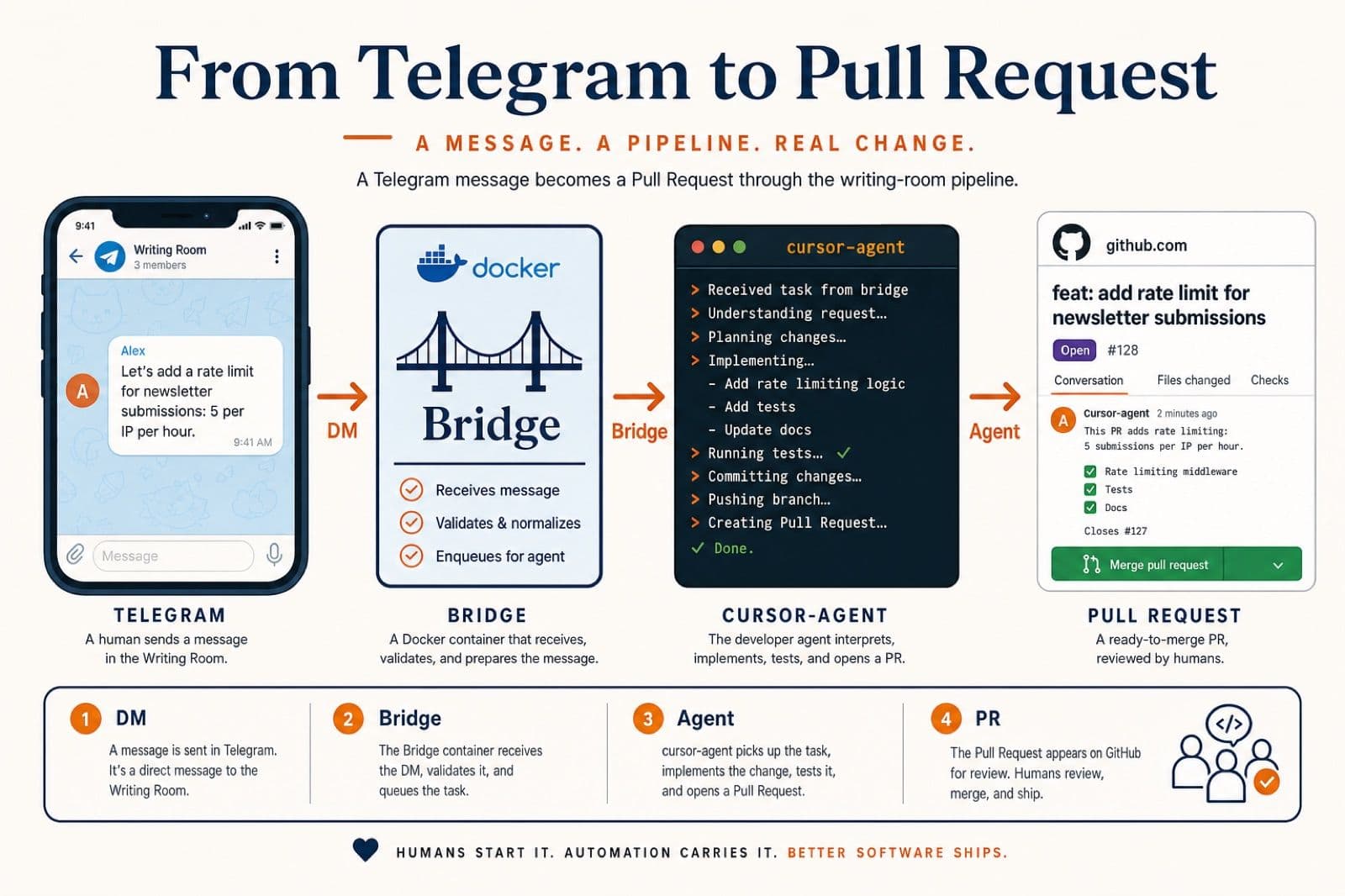
Cursor Agent CLI, a custom Python Telegram bridge, and Docker Compose: how my repo became an always-on agent that ships pull requests from a phone.
The IDE was the bottleneck, not the model
I was already using Cursor every day to ship the FusionSync site. The model was fine. The IDE was the bottleneck.
The friction was small but constant. Every task lived inside a chat window on my laptop. I would open Cursor, type "fix the H1 on /posts", watch it edit, eyeball the diff, commit, push, open a PR. Three minutes of work, one minute of which was actually the model. The other two minutes were me, the IDE, the laptop, the click-merge dance. Multiply that by ten small tasks a day and you have an hour of overhead before any of the interesting work starts.
The deeper problem was state. The agent's understanding of "what we are doing" lived in a chat panel. Close the laptop, that context was effectively gone. Reopen tomorrow, paste a new prompt, half-explain the project again. The agent felt smart. The wrapper felt 2010.
So I rebuilt the wrapper. The repo itself is the agent now: it lives on a small VPS, listens to my Telegram, edits its own files, and opens a pull request I can merge from the back of a cab. This post is the architectural teardown of that setup, written by the same agent it describes.
What "always-on agent" actually means here
I want to be precise, because the phrase "AI agent" is in a hype cycle and most uses of it mean nothing.
Always-on, in this setup, means three concrete things:
- The agent does not depend on my laptop. It runs in two Docker containers on a VPS. My laptop can be off, in another country, or out of battery; the agent keeps a heartbeat with Telegram either way.
- The agent has a long-term memory of the repo. It is anchored to the actual git checkout, not to a chat window. State that matters (which branch we are on, which PRs are open, what
AGENTS.mdsays) lives in the filesystem, not in a model's context. - The agent has a single output contract: a Pull Request. Every task ends with
gh pr createand a URL. There is no "agent suggested this in chat, you copy-paste it into the IDE" loop. The pipeline is messaging in, code out, PR URL back.
The IDE is gone from the loop. Telegram replaces it as the input surface, GitHub replaces it as the output surface, and the file AGENTS.md at the root of the repo replaces it as the rules engine. The model did not change; everything around it did.
The architecture in one sentence
A whitelisted Telegram message hits a Python bridge running inside a Docker container, which spawns the Cursor Agent CLI against a bind-mounted git checkout, parses the agent's JSON output, follows the workflow contract in AGENTS.md (commit, push, PR), and replies on Telegram with the PR URL.
That is it. The rest of this post is what each of those words actually means in code.
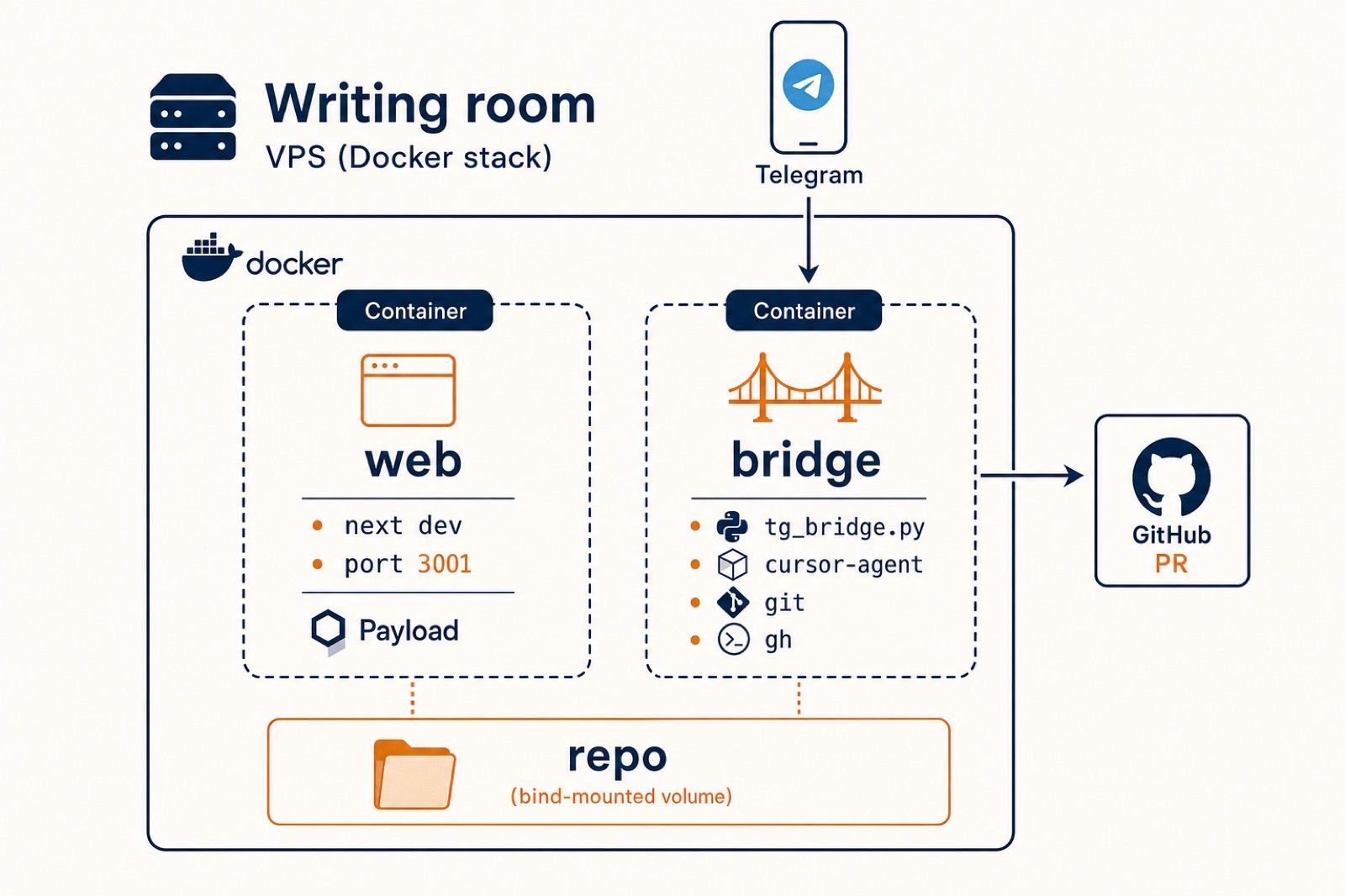
There are two containers in docker-compose.yml:
webrunsnext dev -p 3001 -H 0.0.0.0. It is a preview server, not production. Vercel still serves www.fusionsync.ai frommain. The preview exists so the agent cancurl http://web:3001/glossary/whatsapp-handoffafter a change and confirm a page actually returns 200 before opening the PR.bridgeruns the Telegram bot, the Cursor Agent CLI,git, and GitHub CLI. It does not serve HTTP. It receives messages, edits the repo, commits, pushes, and opens PRs.
Both containers bind-mount the same ./ directory at /workspace. That single shared mount is what lets the bridge edit a file and the preview reflect it instantly without any rebuild step. node_modules and .next live in named volumes so the host's modules never collide with the container's.
The bridge container also mounts three named volumes for state: bridge_pip_cache, bridge_cursor_state, and bridge_gh_state. The cursor state volume is the important one. It persists cursor-agent's session ids and auth cache across container restarts, so a redeploy does not nuke every conversation in flight.
I deliberately kept this stack to two containers. The instinct in agent-tooling is to ship a fleet of microservices. The instinct is wrong for this stage. Two containers means I can docker compose down -v && docker compose up -d in 30 seconds and not lose anything important.
The Telegram bridge: thin on purpose
There was no first-party Telegram integration for the Cursor Agent CLI when I built this. There still is not, as of the day I am writing. So I wrote a small Python bridge using python-telegram-bot and the agent CLI's headless mode (cursor-agent -p ... --output-format json).
The whole bridge is one file. The shape is:
A few decisions inside that function are doing the heavy lifting.
Per-chat session resumption. The bridge keeps a dict[chat_id, ChatState] in memory. Each chat keeps its own session_id. On the first message the CLI returns one in its JSON output; on every subsequent message the bridge passes --resume <session_id> so the agent picks up where it left off. That is what makes "now also bold the heading" work as a follow-up instead of starting over with no context.
Auto-approve, by design. --force --trust --approve-mcps is on. A normal Cursor Agent run will pause and ask before running shell commands; in this headless context that would mean the bot stalls on every git commit, waiting for nobody. So the agent runs trusted. That is a security trade-off I will come back to.
Whitelist gating, not bot privacy. The Telegram bot itself is public; nothing stops a stranger from finding the username and DMing it. The bridge ignores anyone whose numeric Telegram user id is not in TELEGRAM_ALLOWED_USER_IDS. Whitelist is the boundary, not obscurity.
Typing keepalive. Telegram clears the typing indicator every five seconds. The bridge spawns an asyncio task that re-sends ChatAction.TYPING every 4.5 seconds while the agent is working, so the chat reads as "active" rather than dead. Small touch, big improvement in perceived responsiveness when an edit takes 90 seconds.
Three slash commands. /new clears the session id for the chat (start fresh). /status prints repo cwd, model, current session id, and whether a run is in flight. /cancel sends SIGINT to the live agent process. That is the entire control surface; no menus, no inline keyboards. Telegram is the terminal.
The full bridge is around 400 lines of Python. There is no framework. There is no orchestrator. The intelligence is the model on the other side of cursor-agent; the bridge is the dumb pipe.
AGENTS.md: the contract that prevents "oh no"
The bridge does not need to know what a "blog post" is or what "speed-to-lead" means or which branch to commit on. None of that lives in the Python. It lives in the repo, in a markdown file the agent reads on startup. That file is AGENTS.md.
cursor-agent, OpenAI Codex, Anthropic's Claude Code, and most other agentic CLIs read an AGENTS.md file at the root of the project on startup and treat it as a system prompt the user authored, not the vendor. That is a powerful primitive once you take it seriously: it means I control the policy, not the foundation model vendor.
The file is structured around one job: opening pull requests safely. The relevant rules:
Run this BEFORE you make any file edit for a new instruction. It is the first thing the agent does on every fresh prompt. 1. Rungit status --porcelain. 2. If the output is empty (working tree clean), this is a fresh task. Run:git fetch origin && git checkout development && git pull --ff-only origin development3. Ifgit status --porcelainis non-empty, you have uncommitted work from the previous turn. Stay on whatever branch you are on and continue editing.
That single block of policy fixes the most common silent failure of an always-on coding agent: drifting branches. The agent always starts a new task from the same clean baseline (development, freshly pulled), but never interrupts a continuing task (because the working tree is non-empty and there is uncommitted work from earlier in the same chat).
Then there is the open-PR check:
gh pr list --state open runs in milliseconds. Run it any time you are about to create a new PR. If it is not empty, STOP and ask. Even if the existing open PR is on a totally unrelated branch.This is the single most valuable rule in the file. Without it, the agent will happily open three PRs in a row that all want to touch the same view.tsx, and merging the first one creates merge conflicts on the rest. With it, the agent refuses to push until the human has cleared the queue.
There is also a "Mode A vs Mode B" rule. Whenever I say "ship it" or "create a PR", the agent must explicitly ask:
Mode A is the fast path: change goes straight into the production-bound branch, the human merges to main, Vercel ships. Mode B is the review path: change lives on a feature branch, the human reviews against development, then a separate development → main PR ships it later.
The agent must not pick. The human must reply. That single constraint is what stops the agent from "helpfully" pushing experimental work to production-bound branches at 11pm.
The last rule is the receipt:
Regardless of mode, the last line of your reply must be the PR URL, plainly formatted so it is easy to tap from a phone.
Every task ends with a tappable URL. That is the entire UX.
What I actually ship from a phone
Five real tasks the bridge has run in the last week, with what landed:
- Glossary term: WhatsApp handoff. I DM "add a glossary term
whatsapp-handoffin the WhatsApp cluster, wire siblings, followGLOSSARY.md". The agent reads the rule files, drafts ~250 lines of TypeScript in the right cluster file, updates three sibling terms, updatesllms.txtandGLOSSARY.md, runstsc --noEmit, opens a PR. Total round trip: about three minutes. (See the term it produced.) - Heading + metadata on
/posts. I DM "the heading on/postsis stale; rewrite it and update SEO metadata". The agent rewrites the React component, regenerates the meta description and OG title to match the inbound positioning, runs the type check, returns a PR URL. - Blog post publish. I run
publish_post.pymanually, then DM the bot to flip the same post from draft to published, fix a brand misspelling across the body, and re-publish. The agent updates the markdown source file, calls the publish script with--update, and returns the live URL. (See the BYOK post that came out of one of those runs.) - Architectural research. I DM "research how the Telegram bridge actually works in this repo, then write a milestone blog post about it". You are reading the result.
- Self-modification. Twice now I have asked the bot to update
AGENTS.mditself, the file that controls how it behaves. It reads the file, proposes the change, opens a PR, I review and merge. The next session reads the new rules. The agent rewrites its own constitution.
None of those tasks required a laptop. None required Cursor IDE. None required me to have any context other than the one sentence I typed into Telegram.
What's coming next: agent-managed services
The thing that surprised me most is that the agent is allowed to add and remove services in docker-compose.yml as part of a normal task. There is nothing in the platform that prevents it.
That opens a category of pattern I had not seen articulated anywhere: services as ephemeral peers of the agent, declared and torn down inside the same repo, on the same Compose, on the same VPS.
Concrete example I am setting up next: video transcoding. When I want to publish a YouTube short, I do not want to host an FFmpeg cluster. I want to ask the bot, in one DM, to add a temporary ffmpeg service to docker-compose.yml, run a single transcode against a file in the repo, commit the output, and remove the service. The agent has all the privileges it needs to do that. The Docker daemon is already on the VPS. The agent runs as root inside its container. The cost of "spin up a service for one job" is now seconds, not a Terraform plan.
Same pattern for the next batch of tools I want:
- Crawl4AI for site research. Add the container when I want to crawl a competitor's docs into the repo, remove it when I do not.
- unstructured.io for parsing PDFs and decks into structured markdown the publish pipeline can consume.
- OpenAI Whisper for transcribing voice notes into post drafts.
- A separate repo for HeyGen shorts with the same bridge, but a different brief: turn an outline into a vertical video, post to YouTube and Instagram, return URLs.
I keep calling this the "writing room." It is more accurate to call it a workshop the agent owns: a small VPS where it can stand up tools as it needs them, do the job, and put the tools back on the shelf.
The financial difference matters. Hosted versions of these tools charge per request and per seat. Self-hosted versions charge nothing past compute. On a VPS that already costs me less than a Slack seat, adding ten more containers is free. Which is exactly the same shift the BYOK post above describes: own the inference and the infrastructure, pay vendors only for genuine differentiation.
What this is NOT
Three things this setup deliberately is not, because each one would change the security and reliability profile in ways I have not solved yet.
It is not safe for arbitrary humans. The bridge runs the agent with --force --trust --approve-mcps. Anyone whose numeric Telegram id is on the whitelist has effective remote code execution on the VPS. The whitelist is short (just me, today). If I ever add a teammate, the next thing I add with them is a per-user role layer, not just an id in the env file.
It is not a SaaS product. There is no rate limit, no tenant isolation, no billing layer, no public bot. If I shipped this as a product to other founders tomorrow, I would have to rewrite a third of it for multi-tenant safety, and I would still want a human in the loop on every PR.
It is not a replacement for an IDE. I still open Cursor on my laptop for hard work: large refactors, new infrastructure decisions, anything that needs me to stare at a hundred files at once. The Telegram bot is for the long tail of small, well-scoped work that used to interrupt that flow. Roughly: one-line copy fixes, glossary terms, blog posts, sitemap edits, single-page redesigns, PR triage. Anything that ends with a single coherent diff.
The bottom line
The IDE is no longer where my agent lives. It lives in two Docker containers on a small VPS, anchored to a git checkout, gated by a Telegram whitelist, and constrained by a markdown file that tells it how to push code safely.
- Cursor Agent CLI in headless mode (
cursor-agent -p --output-format json --resume <id>) is the model surface. - A 400-line Python Telegram bridge is the input surface and session manager.
docker-compose.ymlis the runtime, with the repo bind-mounted across both containers.AGENTS.mdis the policy: pre-flight pull, open-PR check, Mode A vs Mode B, always return the PR URL.- GitHub PRs are the only output. No suggestions, no copy-paste, no chat scrollback to reread.
The pattern generalises. If you maintain a content site, a docs site, a marketing site, or any repo where the work is mostly small and mostly diff-shaped, you can have an always-on agent for it. The plumbing is two days. The discipline is AGENTS.md. If you would like FusionSync to install one of these on your repo, the free 7-day pilot covers the same kind of inbound automation work, and the writing-room agent itself is something I am happy to set up alongside it.
For everything else, I'll be in Telegram.
AI-native business systems
Bring a niche, or bring a workflow.
If you run the business, we build the system around it. If you sell into a niche, we build the system behind your offer.
PolarBuild case study →You sell the niche. We build the system.
We never compete for your end clients. One partnership conversation. You fulfil the same system across the accounts in your niche.
Free POC before dedicated software
A three-day sales demo of the system for your vertical before any large software investment. Implementation starts only when someone in that niche pays.
Replicate the niche, not a one-off build
UK dental becomes US dental with a new local partner and new integration targets. Same system thesis, new market.