
Production Teardowns
n8n on Docker With Nginx and Let's Encrypt HTTPS (2026)

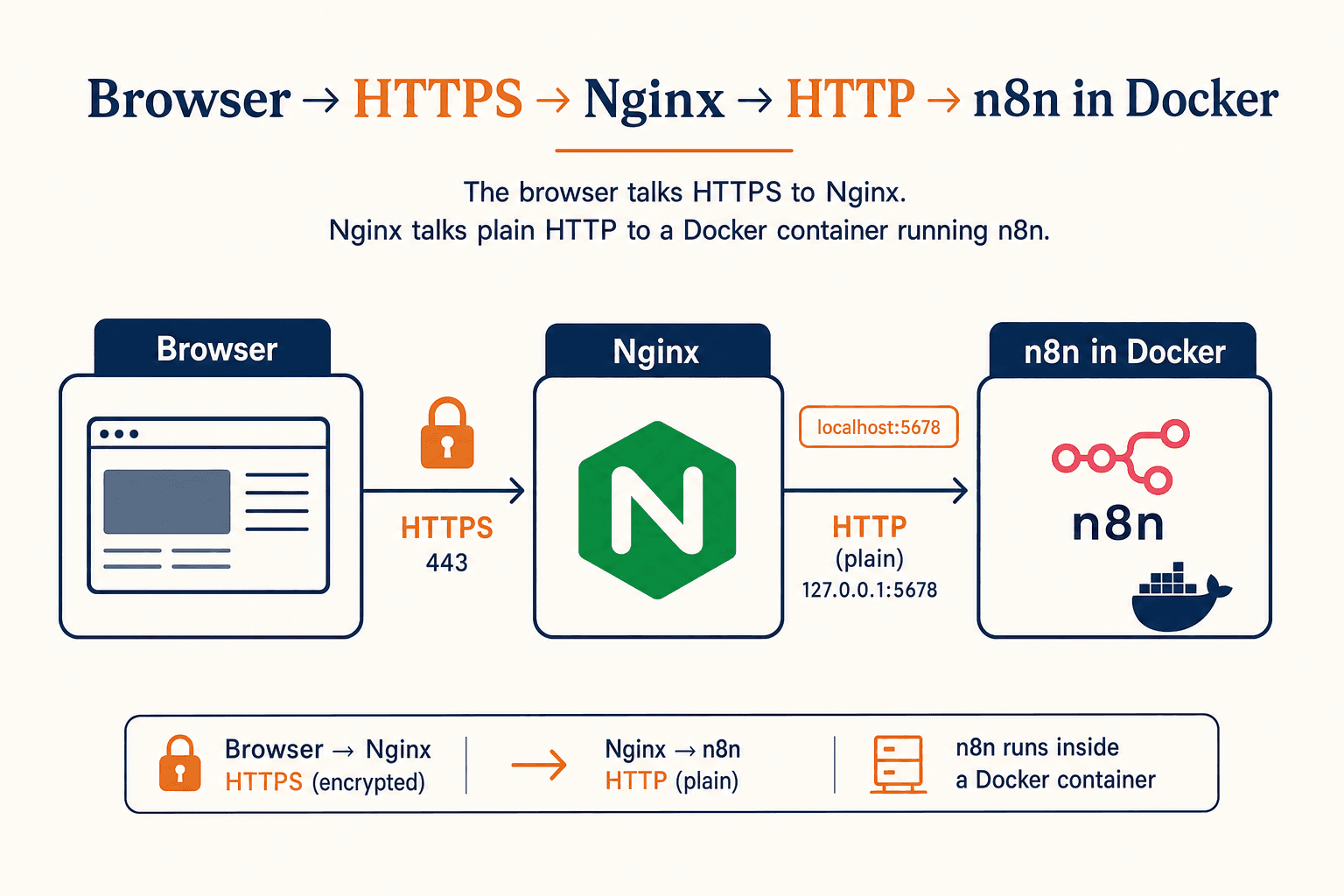
A 2026 walkthrough: self-host n8n in Docker behind Nginx with a Let's Encrypt certificate, on any Ubuntu VPS, in under thirty minutes.
Why this is the smallest setup that actually holds up
There is a long list of n8n self-hosting tutorials online. Most of them ship one of three failure modes: they expose n8n on a raw port (port 5678 served over plain HTTP, no TLS, OAuth callbacks broken), they use a clever combined image that bundles Nginx into the n8n container (now you cannot reason about either layer independently), or they hand-roll a nginx.conf so verbose it hides what the proxy is actually doing.
This post is the boring version of the setup I have been running on a small Hetzner box for the writing-room stack. One Ubuntu host, Docker Compose, one n8n container, one Nginx site, one Let's Encrypt certificate from Certbot. Total elapsed time: about half an hour the first time you do it, ten minutes the second.
It is also the shape that makes Google login, OAuth callbacks, and inbound webhooks (Stripe, Twilio, Google Forms) work on the first try, because every URL n8n hands out is a real https://... URL on a real domain.
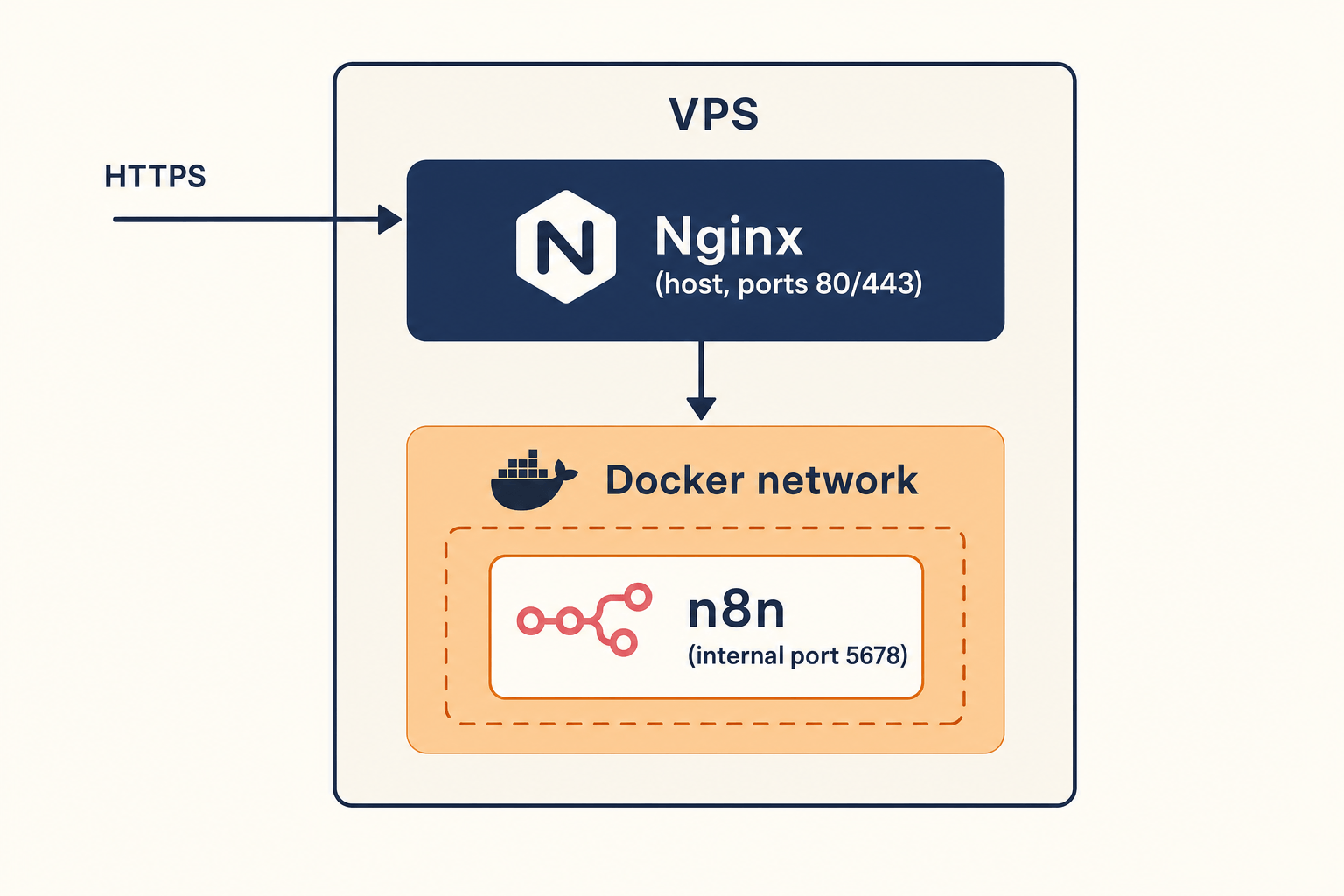
What you need before you start
A short shopping list. If you skip the DNS step you will fail at the Let's Encrypt step, so do not skip the DNS step.
| Item | Notes |
|---|---|
| Ubuntu 22.04 or 24.04 VPS | 2 vCPU and 2 GB RAM is fine for a personal n8n instance. The cheapest [Hetzner CX22](https://www.hetzner.com/cloud) works. |
| A domain you control | e.g. `n8n.yourdomain.com`. A subdomain is preferred so the cert is scoped narrowly. |
| An A record | `n8n.yourdomain.com -> <VPS public IPv4>`. Propagation matters. Test with `dig +short n8n.yourdomain.com`. |
| A non-root user with sudo | We will run Docker as a non-root user. n8n itself runs as a non-root user inside the container by default. |
| Open ports | 22 (SSH), 80 (HTTP, only so Certbot can solve the ACME challenge), 443 (HTTPS). Nothing else. |
Two warnings worth absorbing before you type anything:
- Do not publish n8n's default port (5678) to the public internet. The whole point of Nginx is that n8n stays on a private Docker network. If you find yourself doing
-p 5678:5678on the n8n container in any production tutorial, close it. That tutorial is wrong. - Use a subdomain, not a path prefix. Running n8n at
https://yourdomain.com/n8nis technically possible and operationally annoying. Webhook URLs, OAuth callbacks, and the editor all assume they own a hostname.
Install Docker and Docker Compose
On a fresh Ubuntu VPS, the cleanest path is the official Docker apt repository, not the distro snap.
Log out and back in so the docker group membership takes effect. Verify with docker run --rm hello-world. If that prints the "Hello from Docker!" banner, the engine is healthy.
Lay out the n8n directory
I keep everything under /srv/n8n on the host. This is the data root for the container; back it up the same way you back up /etc or any other stateful system directory.
/srv/n8n/data will hold the SQLite database, the encryption key file, and any binary data n8n stores. If you ever migrate hosts, this directory plus your docker-compose.yml and your .env file are the whole migration payload.
The Docker Compose file
This is the boring, minimal compose that has not bitten me in a year of running it.
Three things worth flagging:
ports: "127.0.0.1:5678:5678"binds n8n's port to the loopback interface only. Nothing outside the host can reach it directly. Nginx, which runs on the host, can. This is the single most important line in the file.WEBHOOK_URLandN8N_EDITOR_BASE_URLboth point at the public HTTPS hostname. Without these, n8n generates webhook URLs againstlocalhostor the container's internal IP, which means every Twilio, Stripe, Slack, or Google Forms webhook trigger you wire up will fail silently.N8N_PROXY_HOPS=1tells n8n there is exactly one reverse proxy in front of it (Nginx). With this, n8n trusts theX-Forwarded-*headers Nginx adds and shows the right client IP in execution logs.
Generate a strong encryption key once and never lose it. If you lose it, every credential stored in n8n becomes unreadable.
Write the .env next to the compose file:
Start it once to make sure it boots, then stop it before we add Nginx.
You should see Editor is now accessible via: https://n8n.yourdomain.com/ even though the cert does not exist yet. That's fine; n8n is just printing the URL it expects to live at. Once you see the line, Ctrl+C out of logs and docker compose down.
Install Nginx and Certbot
Certbot's nginx plugin will edit your Nginx config in place to wire up the ACME challenge and inject the ssl_certificate directives. It is not magic; it just saves you a step. The Certbot documentation is worth bookmarking for renewal debugging.
Create the n8n site config first, without TLS:
Three lines deserve a callout:
client_max_body_size 50mlets you upload reasonable binary payloads (CSV files, small audio clips for transcription nodes) through the editor without nginx returning 413.- The
UpgradeandConnection "upgrade"headers are what let the n8n editor's WebSocket connection survive the proxy. Without them, the canvas works but nodes will not stream execution results live. - The 24-hour
proxy_read_timeoutmatters if you run long-lived nodes (think waiting for a human approval). n8n's default is fine for short workflows; if yours run for hours, raise this here, not in n8n.
Enable the site and reload:
Hit http://n8n.yourdomain.com/ once over plain HTTP. You should see n8n's login page, served via Nginx. Now we add TLS.
Issue the Let's Encrypt cert
Certbot's nginx plugin handles the HTTP-01 challenge, the cert install, and the Nginx config rewrite in one command:
What this does, in order:
- Solves an HTTP-01 ACME challenge against your server on port 80.
- Writes the cert and key under
/etc/letsencrypt/live/n8n.yourdomain.com/. - Edits the Nginx site to add a second server block on 443 with
ssl_certificateandssl_certificate_keyset. - Adds a 301 redirect from port 80 to 443 (that is what
--redirectdoes). - Installs a systemd timer at
/lib/systemd/system/certbot.timerto renew the cert before it expires.
Confirm the renewal timer is healthy:
The dry run should print Congratulations, all simulated renewals succeeded. If it doesn't, your problem is almost always one of: a stale A record, port 80 closed at the firewall, or the Nginx config not actually serving the .well-known/acme-challenge/ path. The Let's Encrypt forum is the right place to debug specifics.
Now start n8n again and hit the HTTPS URL.
Visit https://n8n.yourdomain.com/. Create the owner account. The editor should load, the OAuth callback URLs displayed in the credential dialogs should all read https://n8n.yourdomain.com/rest/oauth2-credential/callback, and the green padlock should be on in the address bar.
What to verify before you trust this in production
A short checklist I run on every new n8n host before pointing real webhooks at it.
| Check | Command or action | Expected |
|---|---|---|
| TLS rating | Run the domain through [SSL Labs](https://www.ssllabs.com/ssltest/) | A or A+ |
| Port 5678 not public | `curl -s -o /dev/null -w "%{http_code}\n" http://<vps-ip>:5678/` from your laptop | Connection refused or timeout |
| Webhook URL correct | Create a Webhook node, copy the production URL | Starts with `https://n8n.yourdomain.com/webhook/` |
| Auto-renew dry-run | `sudo certbot renew --dry-run` | "all simulated renewals succeeded" |
| Backups | Schedule a daily snapshot of `/srv/n8n/data` and your `.env` | Restorable to a new host within 30 minutes |
If you want a deeper auto-renewal failure playbook, the Certbot renewal walkthrough is the next piece. If you intend to expose webhooks to the public internet long-term, also read the self-hosted n8n hardening guide before pointing real customer data at this box.
The bottom line
n8n on a single Ubuntu VPS, behind Nginx, with a Let's Encrypt cert from Certbot, is the smallest production setup that does not silently break OAuth or webhooks. Once it is wired up, you treat /srv/n8n/data as your stateful payload and the rest of the host as cattle.
- Use a subdomain, not a path prefix. n8n assumes it owns a hostname.
- Bind n8n to
127.0.0.1:5678, not0.0.0.0. Nginx is the only thing on the host that should reach it. - Set
WEBHOOK_URL,N8N_EDITOR_BASE_URL, andN8N_PROXY_HOPS=1in the compose file or webhooks will return broken URLs. - Use Certbot's nginx plugin for first issue and dry-run the renewal before trusting it.
- Back up
/srv/n8n/dataand the encryption key as one inseparable unit.
If you want this stack pre-wired into a closer-ready inbound system, with the webhook plumbing already pointed at Twilio, WhatsApp, and your CRM, we run a free 7-day pilot that ships you a working n8n host plus the workflows around it. No fixed retainer, no API markup.
AI-native business systems
Bring a niche, or bring a workflow.
If you run the business, we build the system around it. If you sell into a niche, we build the system behind your offer.
PolarBuild case study →You sell the niche. We build the system.
We never compete for your end clients. One partnership conversation. You fulfil the same system across the accounts in your niche.
Free POC before dedicated software
A three-day sales demo of the system for your vertical before any large software investment. Implementation starts only when someone in that niche pays.
Replicate the niche, not a one-off build
UK dental becomes US dental with a new local partner and new integration targets. Same system thesis, new market.