
Production Teardowns
WhatsApp OTP Not Received on Twilio: Voice Verify Fix

Updated
A2P carrier filters drop WhatsApp OTP SMS on Twilio virtual numbers. Fix it in five minutes with voice OTP and the Twilio Dev Phone.
If your Twilio number is not receiving the WhatsApp OTP, the problem is almost never with Twilio or with WhatsApp. It is A2P (Application-to-Person) carrier filtering silently dropping the short-code SMS before it reaches your virtual number. The fix is to switch the WhatsApp Business API verification channel from SMS to voice and answer the automated call inside the Twilio Dev Phone, a browser-based softphone built into the Twilio Console. Total setup time: under five minutes, no SIP trunk, no physical SIM, no extra code.
If you tried the original SMS-bypass approach in our Bypassing the Meta Sandbox walkthrough and still hit the rate-limit lockout, this post is the cleaner voice-OTP playbook for the same problem.
The Problem: WhatsApp Verification Code Never Arrives on a Twilio Number
You are setting up a new sender phone number in Meta WhatsApp Manager, the registration UI for the WhatsApp Business API and the WhatsApp Cloud API. You pick Text Message (SMS) for the OTP delivery method, you enter a Twilio number you have already purchased, and you hit submit.
Then, nothing.
The "Verify" dialog sits at the six-digit input. Twilio's SMS logs show no inbound message. The carrier delivery report does not appear. You click Resend Code once, twice, three times, and within a few minutes Meta shows a familiar but useless error:
"You have requested too many verification codes. Please wait before trying again."
That message is a rate-limit lockout, and it can freeze the number for several hours.

Symptoms you may also see
- WhatsApp Business API "Add Phone Number" flow stuck on the OTP entry screen.
- No inbound SMS appearing in the Twilio Console messaging logs for the destination number.
- HTTP 429 or "rate limit reached" errors in the Meta Graph API
/{phone-number-id}/request_codeendpoint. - "Verification temporarily unavailable" banner inside Meta Business Manager.
- The number is technically active on Twilio (status "in use") yet behaves as if it does not exist for SMS verification.
All of these point to the same underlying cause.
Why It Happens: A2P 10DLC Carrier Filtering Drops Short-Code SMS to Virtual Numbers
Before we get to the fix, the root cause is worth understanding because it explains why retrying the SMS channel is a guaranteed dead end.
What is A2P 10DLC?
A2P stands for Application-to-Person, and it is the regulatory framework used by major mobile carriers in the United States and many other markets to classify automated messaging traffic. 10DLC ("10-Digit Long Code") is the specific A2P standard that governs long-form business SMS sent over standard local phone numbers.
Under A2P 10DLC, carriers including T-Mobile, AT&T, and Verizon require all automated SMS traffic to be registered against a vetted brand and campaign. Unregistered or unclassifiable traffic is filtered or dropped at the carrier edge before delivery.
Why short-code verification SMS gets blocked on VoIP and virtual numbers
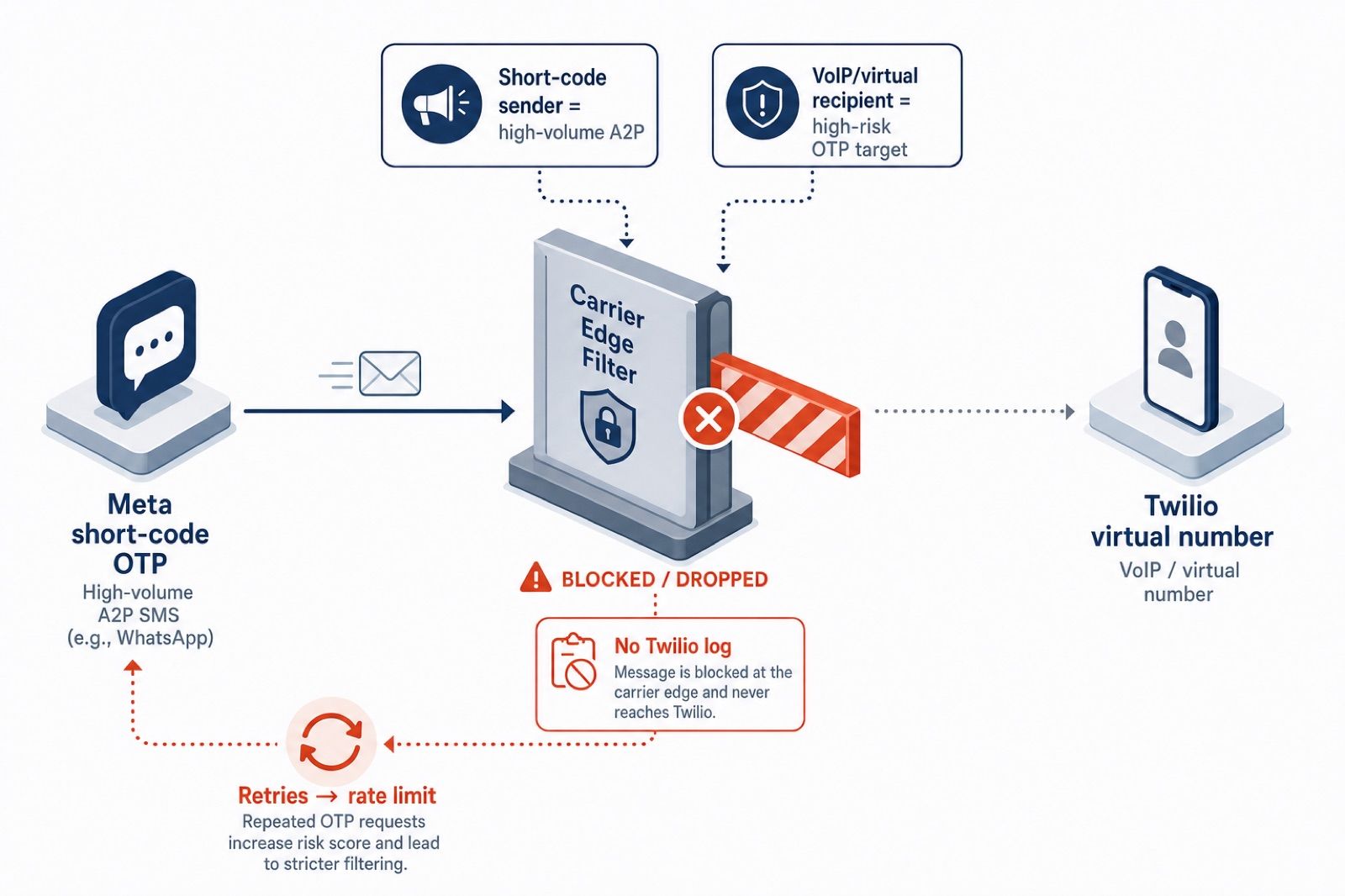
Meta's verification SMS is sent from a short code (5- or 6-digit number) rather than a 10-digit long code. Short codes are explicitly classified as high-volume A2P traffic.
Carriers apply two filters that compound the problem:
- Sender filter: Short-code traffic from large platforms is subject to extra scrutiny because it is a common vector for phishing OTP relay attacks.
- Recipient filter: VoIP and virtual numbers (the category Twilio numbers fall into) are flagged as high-risk recipients for OTP messages, because they are commonly used in account takeover attempts.
When both flags are true, as is the case for "Meta short code → Twilio virtual number," major carriers drop the message at the network edge. The SMS never reaches Twilio. There is no failed delivery log to debug.
How the rate limit makes it worse
Meta's verification endpoint has its own rate limit, separate from the carrier issue. After 2 to 3 resend attempts in a short window, the WhatsApp Business API marks the phone number ID as rate-limited and returns a backoff window that can be several hours long. The number is otherwise fine; you simply cannot re-request the code until the backoff expires.
Most developers discover both issues at once, which is why the failure looks so confusing.
The Fix: Use the Voice OTP Channel via the Twilio Dev Phone
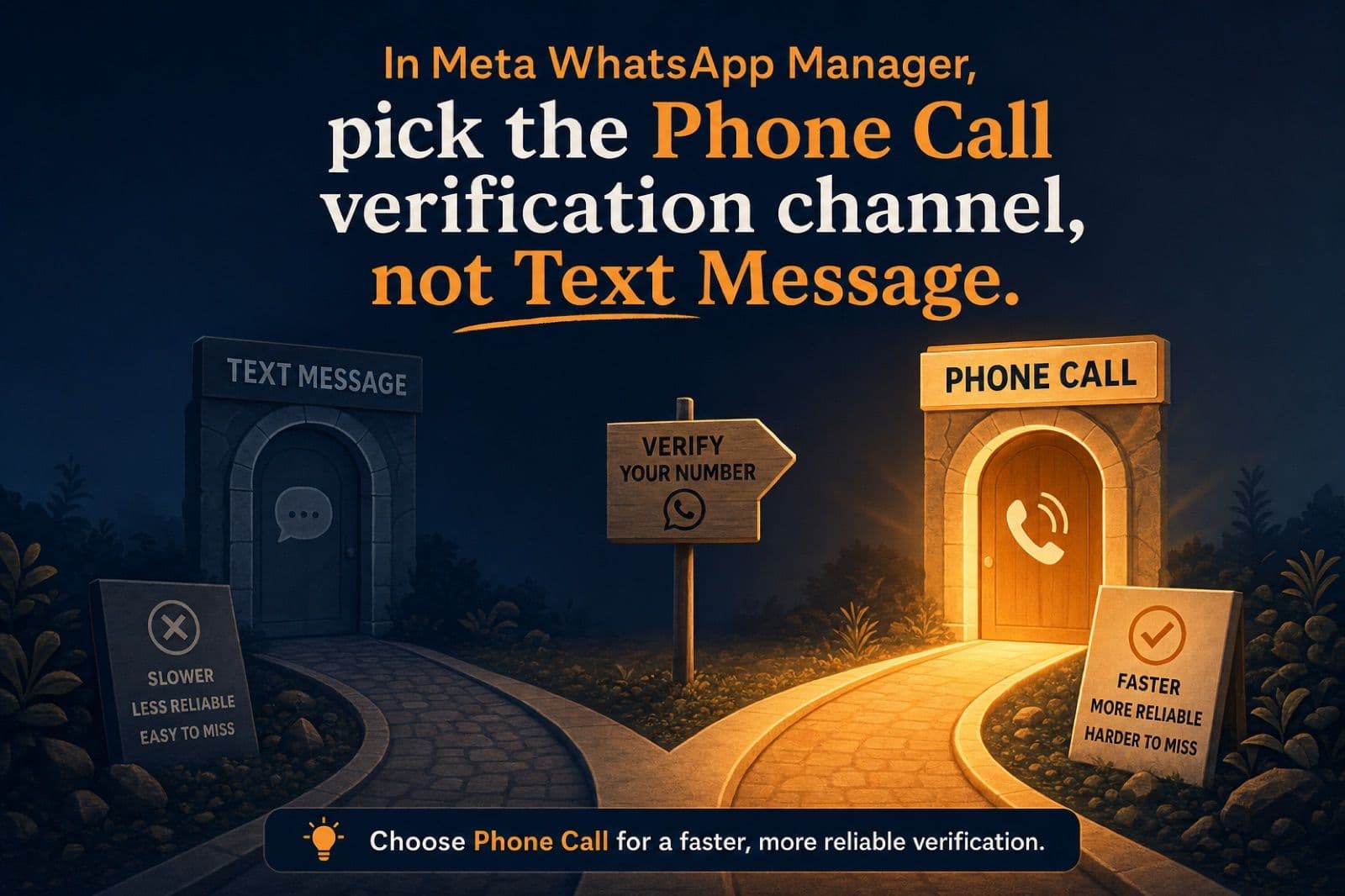
The good news is that the WhatsApp Business API supports voice OTP delivery as a first-class verification channel, and it operates on a different rate-limit track than SMS. The voice channel is also not subject to A2P short-code filtering, because voice calls travel through a different signalling path than SMS and are not affected by carrier-level A2P messaging policies.
The remaining question is practical: how do you answer an automated voice call on a virtual Twilio number without provisioning SIP infrastructure or writing audio-routing code?
The answer is the Twilio Dev Phone, a free, browser-based softphone built into the Twilio Console.
What is the Twilio Dev Phone?
The Twilio Dev Phone is a developer tool that turns any browser tab into a fully functional softphone bound to one of your active Twilio numbers. It registers as a SIP client to Twilio's infrastructure using the same signalling path as a production SIP trunk, then routes the audio stream into the browser via WebRTC.
Key properties relevant to OTP verification:
- It runs entirely in the browser; no desktop client, no SIP credentials to configure manually.
- It can receive both inbound voice calls and SMS on the bound number, displayed inside the tab.
- It is free and included with any active Twilio account.
- It works on any Twilio voice-capable number, including local long codes and toll-free numbers.
This combination is exactly what Meta's voice OTP flow needs.
Step-by-Step: Verify a Twilio Number with WhatsApp Business API Using Voice Authentication
This is the full playbook. Total time is under five minutes assuming you already have a Twilio number purchased and the WhatsApp Business API app set up in Meta for Developers.
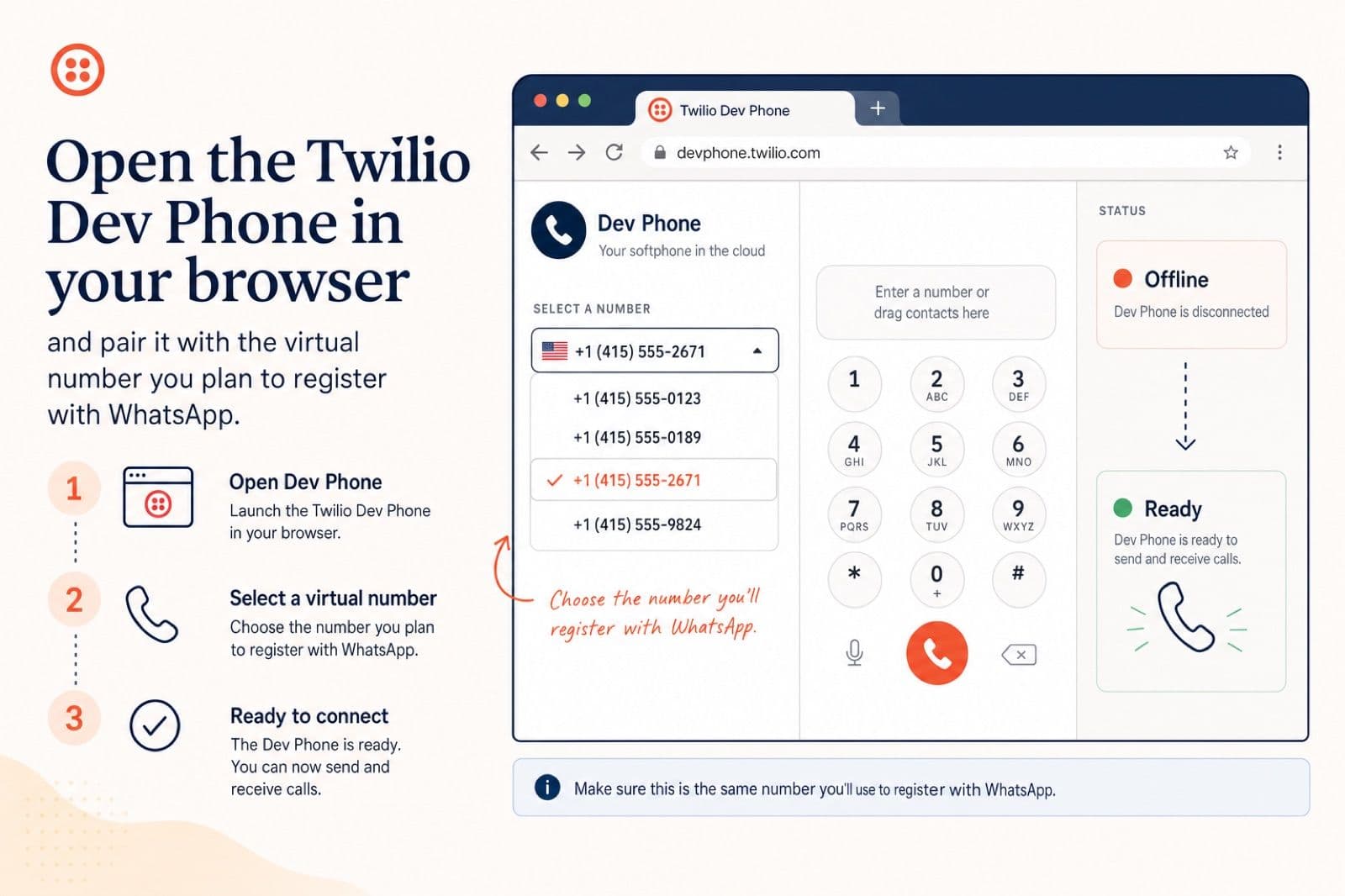
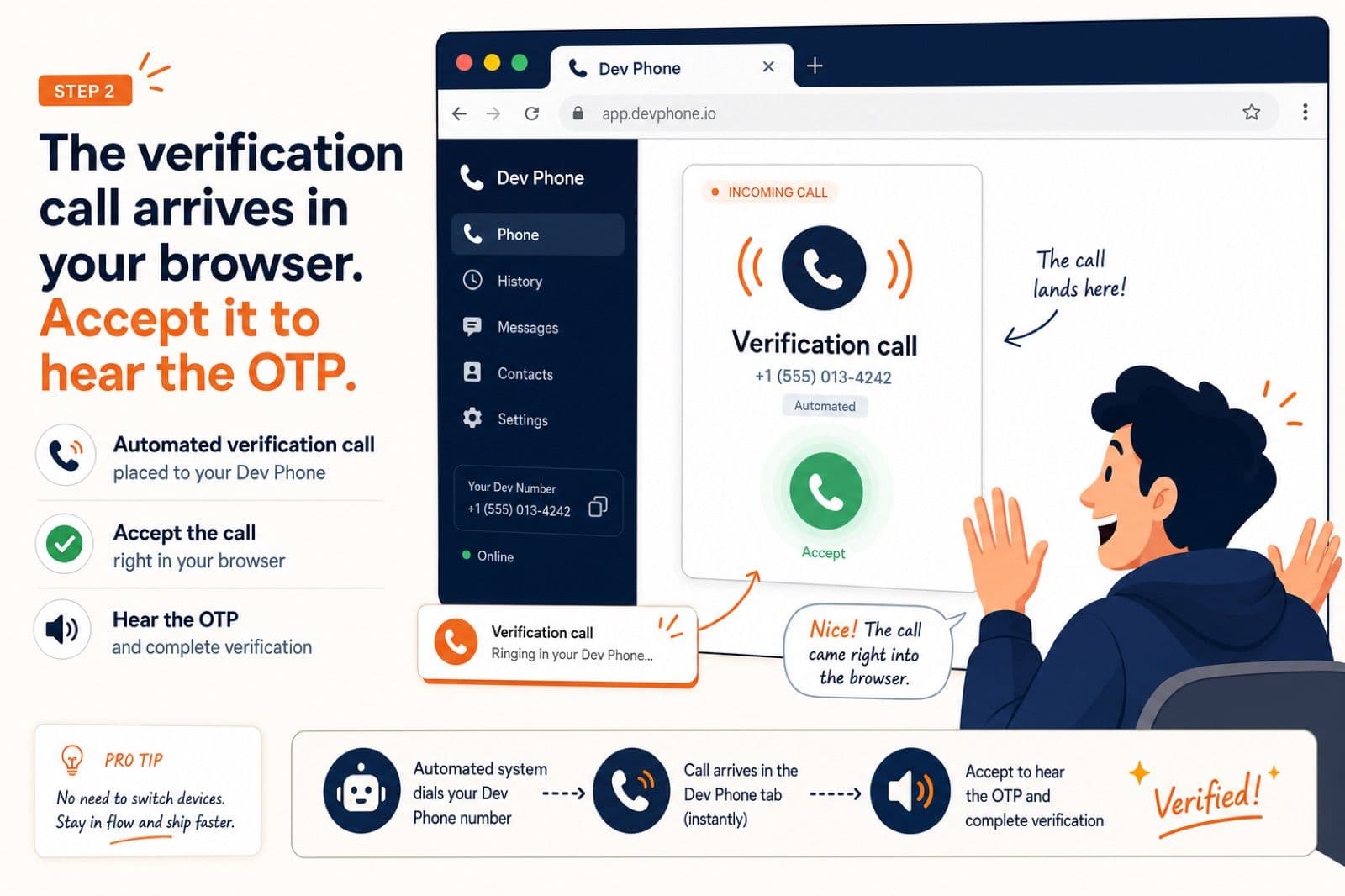
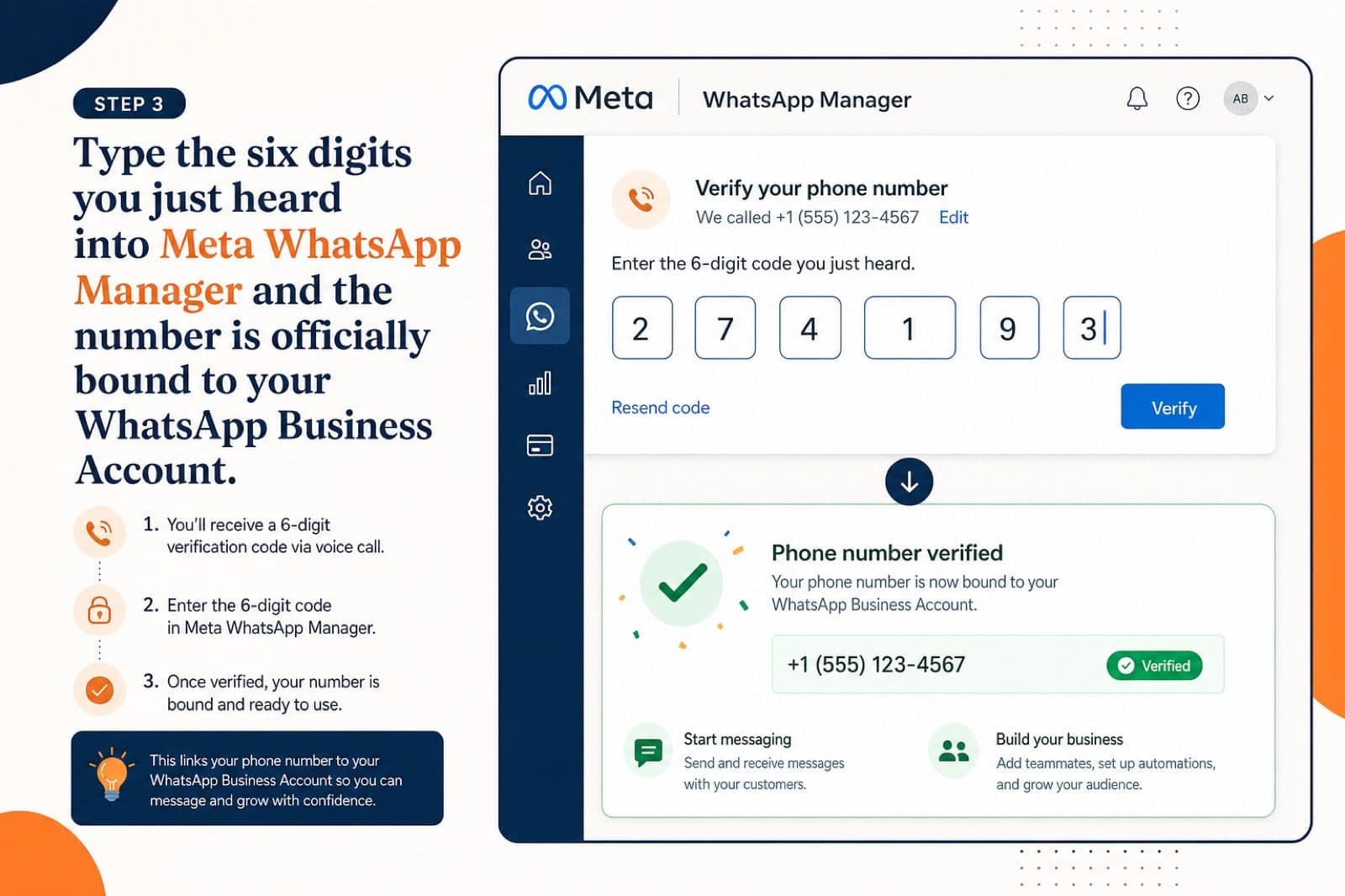
Step 1. Open the Twilio Dev Phone and pair it with the number you plan to register.
60-second walkthrough of the voice OTP flow Prefer to watch it? Here is the full flow in under a minute.
Step 1: Initialize the Twilio Dev Phone
- Log in to the Twilio Console.
- In the global search bar, type Twilio Dev Phone, or browse to Develop → Voice → Dev Phone.
- Click Start Dev Phone. The tool will prompt you to select an active Twilio number.
- Choose the exact Twilio number you intend to register inside Meta WhatsApp Manager. This is critical; the Dev Phone only forwards calls placed to the number it is paired with.
- Wait until the status indicator at the top of the tab reads "Connected" or "Ready." Leave this tab open. Closing it disconnects the softphone.
Step 2: Request Voice Verification Inside Meta WhatsApp Manager
- Open Meta Business Manager in a new browser tab.
- Navigate to your WhatsApp Business Account: WhatsApp Manager → Phone Numbers → Add Phone Number, or in the App Dashboard go to WhatsApp → API Setup → Add Phone Number.
- Enter the Twilio number in E.164 format (for example,
+14155550112). - When prompted for the OTP delivery method, select "Phone Call" and not "Text Message."
- Click Send Code. Meta's authentication service will dial your Twilio number within a few seconds.
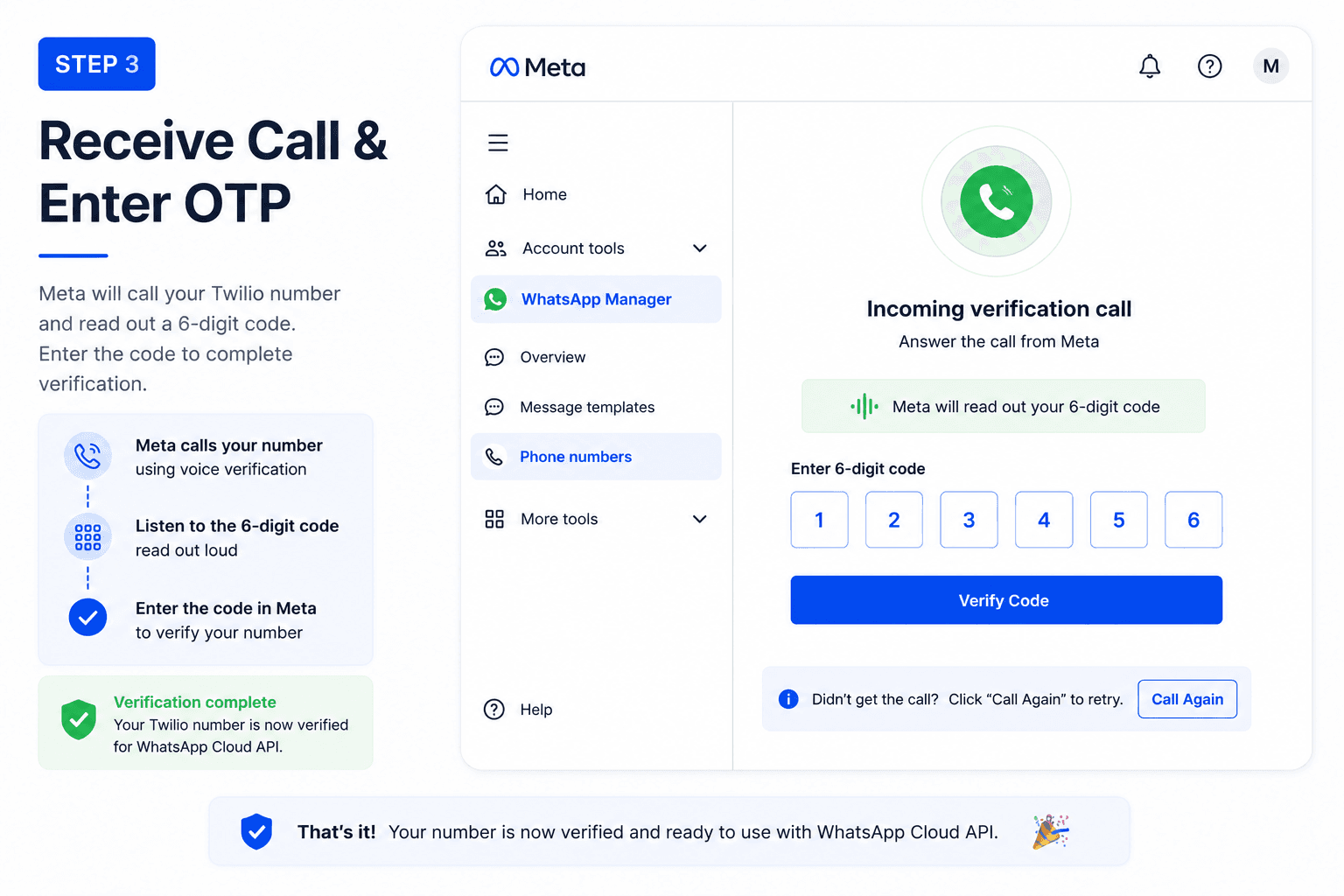
Step 3: Answer the Call in the Dev Phone Browser Tab
- Switch back to the Twilio Dev Phone tab.
- Within about five seconds the tab will start ringing, with an incoming-call banner showing a Meta authentication caller ID.
- Click Accept. The audio stream is now connected to your browser speakers.
- A computer-generated voice will read out the six-digit verification code, usually twice.
- Type the code into the OTP field inside Meta WhatsApp Manager.
The verification completes immediately. The Twilio number is bound to your WhatsApp Business Account (WABA) as an official production sender.
Comparison: SMS vs Voice for WhatsApp Number Verification on Twilio
| Verification channel | Delivery reliability on Twilio virtual numbers | Rate-limit risk | Setup complexity | Recommended for VoIP |
|---|---|---|---|---|
| **SMS short-code OTP** | Low. Routinely dropped by A2P carrier filters before reaching Twilio. | High. 2-3 retries trigger a multi-hour lockout. | None. | No. |
| **Voice OTP via Twilio Dev Phone** | High. Voice traffic bypasses A2P SMS filters entirely. | Low. Voice OTP uses a separate rate-limit track. | Three clicks in the Twilio Console. | Yes. |
For any virtual or VoIP number, voice is the only reliable channel for first-time WhatsApp Business API verification.
After Verification: Wiring the Twilio WABA Number into Your AI Agent
Verification is the gate that blocks most AI WhatsApp builds. Once you are past it, the rest is plumbing, and a WhatsApp number that actually responds within seconds is one of the highest-leverage assets for any business serious about speed to lead on inbound enquiries.
The typical production flow looks like this:
- A customer sends a WhatsApp message to your verified Twilio number.
- Meta's WhatsApp Cloud API delivers a webhook event to your configured endpoint.
- Your backend processes the payload, runs the message through your LLM orchestration layer (LangChain, OpenAI Agents SDK, n8n, your own router, and so on), and produces a response.
- Your backend sends the response back to the customer via the WhatsApp Cloud API messages endpoint.
The Meta Developer Sandbox, which refuses to route most real inbound traffic, becomes irrelevant at this point because the number is operating in production mode against the live Cloud API. If your use case is event sales or any other WhatsApp-primary market, our breakdown of how event companies use WhatsApp to convert more enquiries walks through what to put on top of this verified number once it is live.
Common Errors and Fixes
A short troubleshooting table for the issues that come up most often around WABA registration on Twilio.
| Error or symptom | Cause | Fix |
|---|---|---|
| "You have requested too many verification codes" | Meta verification rate limit triggered by SMS retries. | Wait the cooldown out (often several hours), then start clean with voice OTP. |
| Voice call from Meta connects but no audio plays | Browser tab muted or wrong audio output device. | Unmute, check the system output device, and try again. |
| Dev Phone tab does not ring | Number paired in Dev Phone is not the one entered in Meta. | Re-pair the Dev Phone to the exact E.164 number used in Meta WhatsApp Manager. |
| "Phone number already registered" | The number is already bound to another WABA. | Remove it from the previous WABA in WhatsApp Manager before re-adding. |
| Verification succeeds but messages do not deliver | Display name not approved, or template required for first message. | Submit display name for review, then send a pre-approved template message first. |
FAQ
Why is my Twilio number not receiving the WhatsApp verification code?
Major mobile carriers apply A2P 10DLC filtering to short-code SMS from large platforms like Meta when the recipient is a VoIP or virtual number. The verification SMS is dropped at the carrier edge before it ever reaches Twilio, so it never appears in your Twilio inbound logs. Switching the WhatsApp Business API verification channel from SMS to voice avoids the filter and delivers the OTP reliably.
Can I use a Twilio number for the WhatsApp Business API?
Yes. Any Twilio voice-capable number can be registered as a sender for the WhatsApp Business API, provided it is verified through voice OTP (not SMS) and is not currently bound to another WhatsApp Business Account. Once verified, the number behaves as a normal production sender against the WhatsApp Cloud API.
How do I verify a virtual number with WhatsApp without a physical SIM?
Use the voice OTP channel inside Meta WhatsApp Manager and answer the call in the Twilio Dev Phone, a browser-based softphone in the Twilio Console. No physical SIM card, no SIP trunk, and no server code are required. The full flow takes about five minutes.
What is A2P 10DLC and why does it block WhatsApp OTP delivery?
A2P 10DLC is the United States carrier standard for automated, application-to-person SMS sent over 10-digit long codes. Carriers apply filtering rules under this standard that drop high-volume short-code traffic to VoIP and virtual numbers. Because WhatsApp's verification SMS comes from a short code and your Twilio number is virtual, the message gets filtered out before delivery.
Does WhatsApp Business API support voice OTP?
Yes. The WhatsApp Business API registration flow exposes both Text Message (SMS) and Phone Call options for the One-Time Password. The voice channel operates independently of the SMS rate-limit track, and it is the recommended option for any virtual or VoIP recipient number.
What is the Twilio Dev Phone used for?
The Twilio Dev Phone is a browser-based softphone that turns any browser tab into a working phone handset paired to one of your Twilio numbers. It is built for developer testing of voice and SMS flows without provisioning physical hardware or SIP endpoints. For WhatsApp Business API verification, it serves as the device that picks up Meta's automated voice call and plays the OTP audio.
How long does it take to verify a Twilio number with WhatsApp using voice OTP?
End to end, under five minutes for an account that already has a Twilio number purchased and a Meta for Developers WhatsApp app set up. The Twilio Dev Phone initializes in about 30 seconds, Meta dials the number within five seconds of the request, and the OTP entry itself is a single field.
Key Takeaways
- The Twilio number is not the problem. A2P 10DLC carrier filtering drops short-code SMS to VoIP and virtual numbers before it ever reaches Twilio.
- Stop retrying SMS. Each retry burns through Meta's verification rate limit and triggers multi-hour lockouts.
- Switch to voice OTP. The WhatsApp Business API supports phone-call verification as a first-class channel, and it bypasses A2P SMS filtering entirely.
- The Twilio Dev Phone is the missing piece. It is a free, browser-based softphone in the Twilio Console that picks up Meta's automated voice call, no SIP trunk or extra code required.
- End-to-end registration takes under five minutes once you know the right channel to use.
If you are building a production WhatsApp AI agent on top of Twilio, this is the first infrastructure obstacle to clear. Once the number is bound to your WhatsApp Business Account, the rest of the integration, webhooks, message routing, template approval, and agent orchestration, runs as documented. For a wider look at how the WhatsApp piece fits into a full inbound stack, see our AI playbook for converting inbound leads into customers.
AI-native business systems
Bring a niche, or bring a workflow.
If you run the business, we build the system around it. If you sell into a niche, we build the system behind your offer.
PolarBuild case study →You sell the niche. We build the system.
We never compete for your end clients. One partnership conversation. You fulfil the same system across the accounts in your niche.
Free POC before dedicated software
A three-day sales demo of the system for your vertical before any large software investment. Implementation starts only when someone in that niche pays.
Replicate the niche, not a one-off build
UK dental becomes US dental with a new local partner and new integration targets. Same system thesis, new market.