
Production Teardowns
Self-Hosted Email Verifier: Free, Local, Unlimited

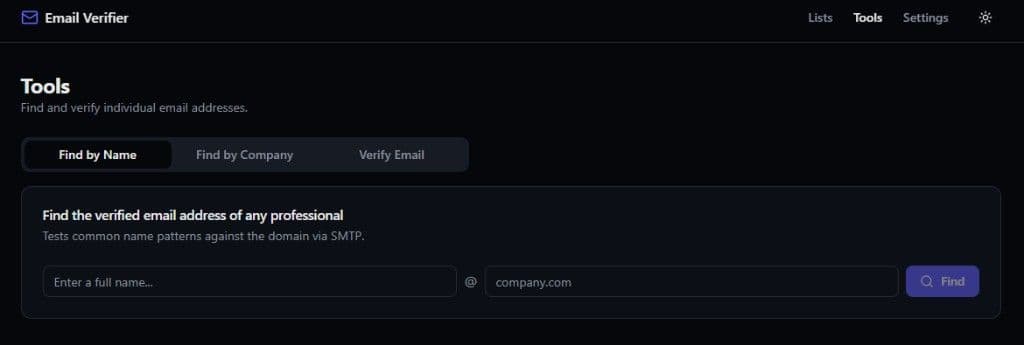
Most email verifiers charge per address and upload your list to their servers. This open-source Docker tool verifies locally, with no per-email fees.
The per-email tax shows up right when your list gets useful
I was cleaning a prospect list for agency outreach and hit the same wall I always hit with hosted verifiers.
The CSV had a few thousand contacts scraped from public directories and enriched manually. Before any cold email went out, every address needed a sanity check: syntax valid, domain accepts mail, mailbox probably exists. The hosted tools make that easy. Upload the file, wait for the progress bar, download the cleaned export. They also charge somewhere between $0.003 and $0.008 per address depending on volume tier, and they require you to upload the entire list to their infrastructure first.
At 20,000 verifications a month, that is $60 to $160 every month, forever, scaling linearly with list size. For an agency running multiple client campaigns, or an operator building vertical prospect databases, the bill is not catastrophic. It is just persistent. And the privacy trade is real: your client's lead list, or your proprietary niche database, lives on someone else's servers for the duration of the job.
So I built Email Verifier: a self-hosted email verification and finder tool that runs locally via Docker, costs nothing per check, and never uploads your list anywhere. This post is the teardown of why that architecture matters, what it actually does, and how to run your first list in about five minutes.
What email verification actually checks (and why SaaS vendors charge for it)
Email verification is not magic. At the protocol level, most tools run a sequence of cheap checks before attempting the expensive one:
| Check | What it tests | Cost to run |
|---|---|---|
| Syntax | RFC-compliant address format | Near zero |
| DNS / MX | Domain exists and accepts mail | Low |
| SMTP handshake | Mail server responds to RCPT TO for that address | Medium (network + rate limits) |
| Catch-all detection | Domain accepts all addresses regardless of mailbox | Medium |
| Disposable / role flags | Known throwaway domains, role accounts like info@ | Low (lookup tables) |
The SMTP step is why per-email pricing exists. Each verification opens a connection to the recipient's mail server, simulates the start of a delivery attempt, and reads the response code. Gmail, Outlook, and corporate gateways do not always give a clean yes or no. Some return temporary failures (greylisting), some block verification attempts entirely, and some accept everything (catch-all). A good verifier labels those edge cases honestly instead of guessing.
Hosted services like Hunter.io and ZeroBounce run those checks from their IP pools at scale. You pay per credit because they absorb the infrastructure, the rate-limit juggling, and the IP reputation management. That is a fair business model. It is also a recurring tax on a commodity operation once you are willing to run the checks yourself.
The math that pushed me toward self-hosting
Before building, I ran the numbers against the tools I was already paying for.
| Monthly volume | Typical hosted cost | Self-hosted cost |
|---|---|---|
| 2,000 | Free tier or ~$16–49/mo | $0 (your hardware) |
| 10,000 | ~$50–80/mo | $0 |
| 20,000 | ~$60–160/mo | $0 |
| 100,000 | ~$350–500/mo | $0 |
Hunter.io's Starter plan runs $49/month for 2,000 credits, usable for finding or verifying (0.5 credits per verification). ZeroBounce pay-as-you-go starts around $0.008 per email at low volume and drops toward $0.0035 at 100,000 credits. Both are reasonable if you also need their hosted UI, API integrations, and shared IP reputation.
The break-even question is not "is $50/month expensive?" It is "do I need to pay that every month for a check I can run from a Docker container on a machine I already own?" For agencies building outbound lists alongside inbound lead systems, the answer started leaning toward no. Same instinct that led to the BYOK automation stack: own the commodity layer, pay for the parts that actually differentiate.
What Email Verifier does (and what it does not pretend to do)
Email Verifier is three tools in one local app:
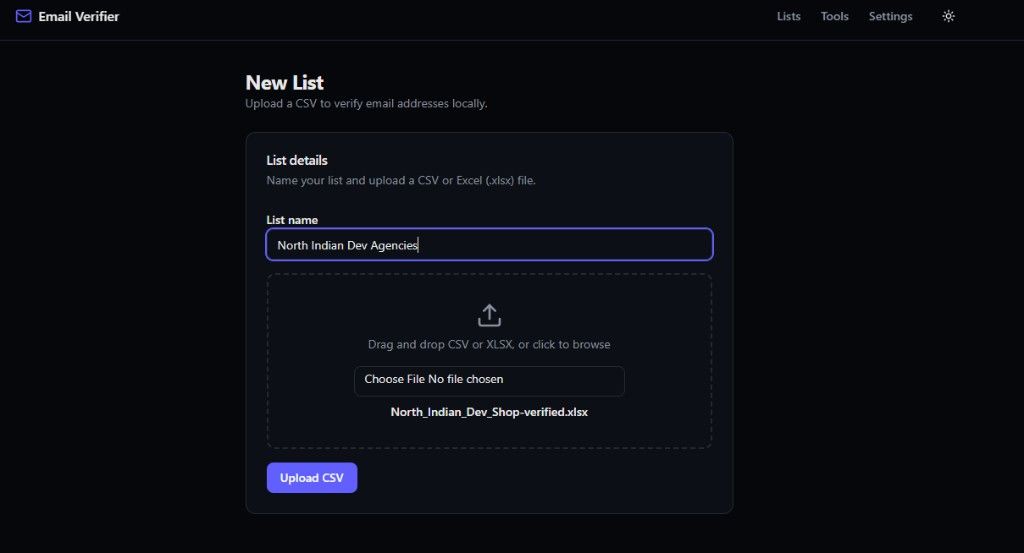
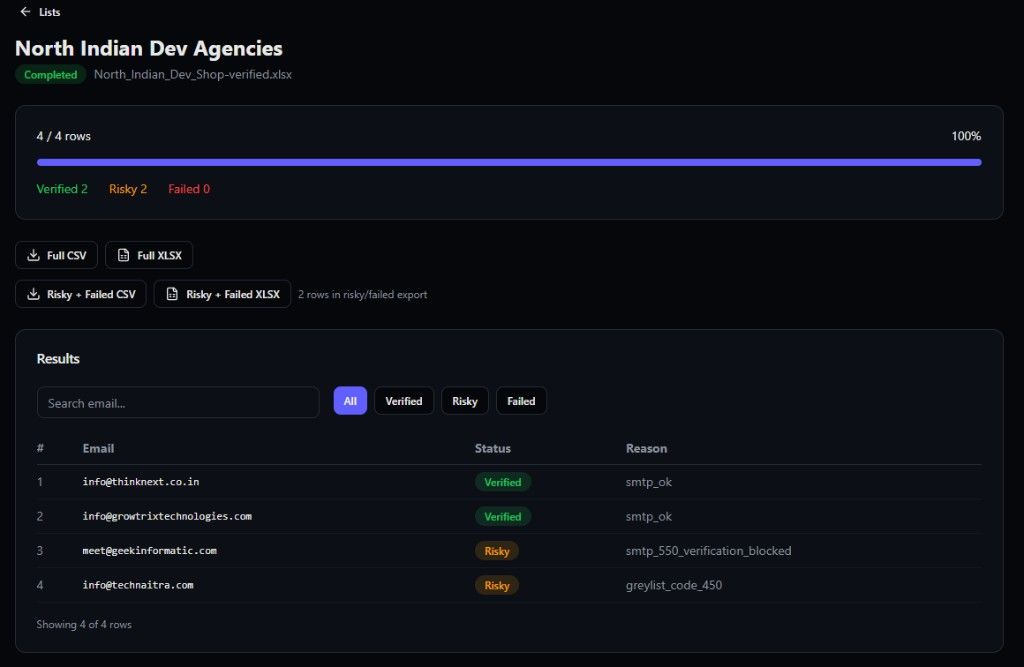
Bulk list verification. Upload CSV or Excel, pick a list name, and the engine processes every row on your machine with live progress. Results land in three buckets: Verified, Risky, and Failed. Each row carries a reason code so you can audit the call (smtp_ok, greylist_code_450, smtp_550_verification_blocked, and similar).
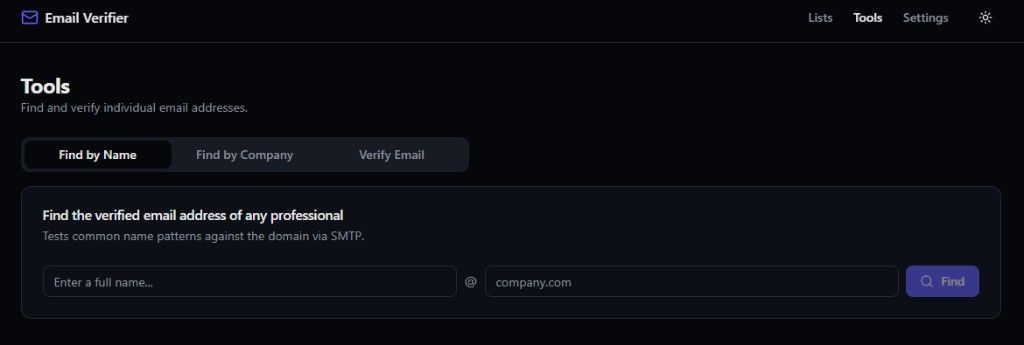
Single-address tools. A Tools tab covers find-by-name (tests common name patterns against a domain via SMTP), find-by-company, and verify-one-email when you only need a single check.
Selective export. Download the full list as CSV or XLSX, or grab just the Risky + Failed subset. That last export is deliberate: instead of paying a hosted verifier to re-check your entire list, you can optionally run only the ambiguous rows through a paid service for extra certainty.
The landing page is honest about accuracy: nobody can promise 100% on SMTP verification. Gmail and Outlook often refuse to confirm mailbox existence at the protocol level. When that happens, Email Verifier marks the row Risky and moves on. That is the correct behavior. Guessing "Valid" on a greylisted address is how you end up with bounce rates that wreck domain reputation.
Install in one command (Docker required)
Prerequisite: Docker Desktop running on your machine. That is the only hard dependency.
The installer pulls two containers: the Email Verifier app and Postgres 16 for local state. Setup takes about two minutes on a normal connection. When it finishes, it prints a local URL (typically port 5050). Open that in your browser and you are in.
No API keys. No SaaS account. No credit card. The install script generates a random admin password unless you choose one. From there:
- Click New List and name your upload.
- Drag in a CSV or XLSX file (any size your machine can hold in memory).
- Watch the progress bar as rows move through verification.
- Export the results.
In my test run on a small agency prospect list, 13 addresses came back Verified, 8 Risky, and 3 Failed. I downloaded the full Excel for the clean sends and pulled the Risky + Failed CSV separately for manual review. Total time from curl | bash to exported files: under ten minutes, most of which was SMTP waiting on remote mail servers.
Full walkthrough from install command to first verified list export.
Why "your list never leaves your machine" is architecture, not marketing
Most hosted verifiers require you to upload the file to their cloud, wait for processing on their infrastructure, then download the result. Your prospect list transits their servers by design. Their privacy policy governs what happens to it.
Email Verifier inverts that flow. The web UI runs locally. Postgres runs locally. SMTP checks originate from your IP address, not a shared verifier pool that might be rate-limited or blocklisted from aggressive use. Nobody at RecallSync sees your list because there is no upload endpoint to their servers. The open-source repo is inspectable if you want to confirm that claim in code.
Three practical wins for agency operators:
Client confidentiality. If you are verifying a dental clinic's patient referral list or a real estate agency's off-market buyer roster, keeping the file on your own hardware is a selling point, not a nice-to-have.
No shared IP reputation roulette. Hosted verifier pools get abused by bad actors running garbage lists. When their IPs get throttled, your clean list pays the price. Self-hosted checks use your IP, so your reputation is your responsibility (and under your control).
Unlimited re-runs. Need to verify the same list again after a month because mail servers changed? No incremental credit charge. Re-upload and go.
This is the same ownership instinct as running self-hosted n8n behind your own TLS instead of paying per-workflow on a hosted automation tier. The ops burden moves to you. The meter goes away.
Verified, Risky, Failed: how to use the three buckets
The three-status model matches how deliverability people actually think about lists:
Verified (smtp_ok). Safe to mail for most campaigns. The mail server accepted the RCPT TO probe. Still not a lifetime guarantee (people change jobs, mailboxes get deleted), but good enough for a first pass.
Risky (greylist, verification blocked, catch-all signals). Do not auto-delete these. Greylisting (450 responses) often clears on retry. Verification-blocked domains (550 on probe) might still accept real mail from a warmed sending domain. Catch-alls accept everything, so you cannot confirm the specific mailbox exists. Export these separately and decide per campaign tolerance.
Failed (invalid syntax, no MX, hard reject). Drop from the send list. Mailing these hurts bounce rate and sender score.
The Risky + Failed export exists so you can run only that subset through a paid verifier if you need higher confidence on a high-stakes campaign. You pay for ambiguity resolution, not for re-checking addresses you already know are good. That hybrid workflow (free bulk pass locally, paid pass on the edge cases) is usually cheaper than uploading the full list to ZeroBounce every time.
Self-hosted vs hosted: an honest comparison
| Dimension | Hosted (Hunter, ZeroBounce, etc.) | Email Verifier (self-hosted) |
|---|---|---|
| Cost model | Per email / credits | Free (your compute + electricity) |
| List privacy | Uploaded to vendor cloud | Stays on your machine |
| Setup time | Signup + API key | ~2 min Docker install |
| IP for SMTP checks | Shared verifier pool | Your IP |
| Email finding | Often bundled (Hunter) | Built-in find-by-name/company |
| Accuracy on edge cases | Vendor-specific scoring | Honest Risky labels + reason codes |
| Integrations | ESP APIs, Zapier, native plugins | CSV/XLSX export (bring your own pipeline) |
| Maintenance | Zero | You patch Docker images |
Hosted wins when you want zero ops, native Mailchimp/Klaviyo plugins, and someone else managing IP reputation at scale. Self-hosted wins when you verify frequently, care about list confidentiality, or run enough volume that the monthly credit bill annoys you.
Neither replaces list hygiene fundamentals: permission, relevance, and sending warmup still matter more than any verifier.
Who this is for (and who should keep paying SaaS)
Good fit:
- Agency owners building vertical prospect databases for clients
- Operators running regular outbound who verify before every campaign
- Teams already self-hosting n8n, Postgres, or similar infra and comfortable with Docker
- Anyone who hit Hunter or ZeroBounce credit limits mid-month and resented it
Stick with hosted if:
- You verify fewer than 500 emails a month and the free tiers cover you
- You need real-time API verification embedded in a signup form
- You cannot run Docker locally and do not want a VPS
- Your compliance team requires a vendor SOC 2 report for data processing
For FusionSync's own stack, Email Verifier sits in the same "own the commodity check" layer as BYOK inference and self-hosted automation. We still run inbound lead response on sub-60-second handoff systems. Verification is upstream of that: garbage emails never enter the CRM in the first place.
FAQ
Is self-hosted email verification legal?
Checking whether a mail server accepts an address via SMTP is standard list hygiene practice. Laws like CAN-SPAM and GDPR govern how you use the list after verification, not the verification step itself. You are still responsible for consent and relevant content on outbound sends.
Will Gmail and Outlook addresses verify cleanly?
Often they come back Risky, not Verified. Large providers frequently block or defer verification probes. That is an industry-wide limitation, not a bug in self-hosted tools. The Risky bucket exists for exactly this reason.
Does running checks from my IP hurt deliverability?
Verification probes are separate from campaign sends. Running checks from your IP does not automatically damage your sending domain reputation. Aggressive parallel probing can trigger rate limits on the target mail servers, so the tool paces requests. If you verify huge lists daily, consider running the container on a dedicated VPS IP rather than your office network.
Can I use this instead of Hunter.io for finding emails?
The built-in find-by-name and find-by-company tools test common patterns (first.last@, f.last@, etc.) against a domain via SMTP. That covers a meaningful slice of B2B discovery without a Hunter subscription. Hunter still wins on scale, enrichment data, and Chrome extension workflows. Think of Email Verifier as covering the verify-and-basic-find layer for free.
What if I need 100% accuracy?
Nobody offers that. The honest workflow is: self-hosted bulk pass for free, then run only the Risky rows through a paid verifier if the campaign stakes justify it. You pay for ambiguity, not volume.
Is the code really open source?
Yes. Full repo at github.com/recallsync/email-verifier. Inspect, fork, contribute, or run from source if you prefer not to use the install script.
The bottom line
Per-email verification SaaS is a recurring tax on a commodity SMTP check. For operators and agencies who verify lists regularly, self-hosting removes the meter and keeps prospect data off third-party servers.
- Install: one
curl | bashcommand, Docker required, ~2 minutes to running UI. - Cost: $0 per email. You pay with your own compute, not credits.
- Privacy: the list never uploads anywhere. Checks run from your machine on your IP.
- Output: Verified, Risky, and Failed with reason codes, plus selective export for edge cases.
- Honest limits: large providers return Risky often. Plan a hybrid pass if you need higher confidence on ambiguous rows.
If you are building outbound lists for agency clients or running your own prospect databases, try Email Verifier locally before the next credit pack invoice hits. The install command is on the landing page, the demo video walks through a first list, and the repo is open if you want to read the SMTP logic before trusting it with real data.
For inbound lead systems (Instagram, WhatsApp, form-to-call) where speed and handoff matter more than list verification, that is a different layer of the stack. We cover that in the inbound lead architecture posts. Verification is step zero: clean the list before it ever touches a sequencer or CRM.
AI-native business systems
Bring a niche, or bring a workflow.
If you run the business, we build the system around it. If you sell into a niche, we build the system behind your offer.
PolarBuild case study →You sell the niche. We build the system.
We never compete for your end clients. One partnership conversation. You fulfil the same system across the accounts in your niche.
Free POC before dedicated software
A three-day sales demo of the system for your vertical before any large software investment. Implementation starts only when someone in that niche pays.
Replicate the niche, not a one-off build
UK dental becomes US dental with a new local partner and new integration targets. Same system thesis, new market.