
Inbound Lead Management
Meta's WhatsApp Business AI: What Event Companies Miss

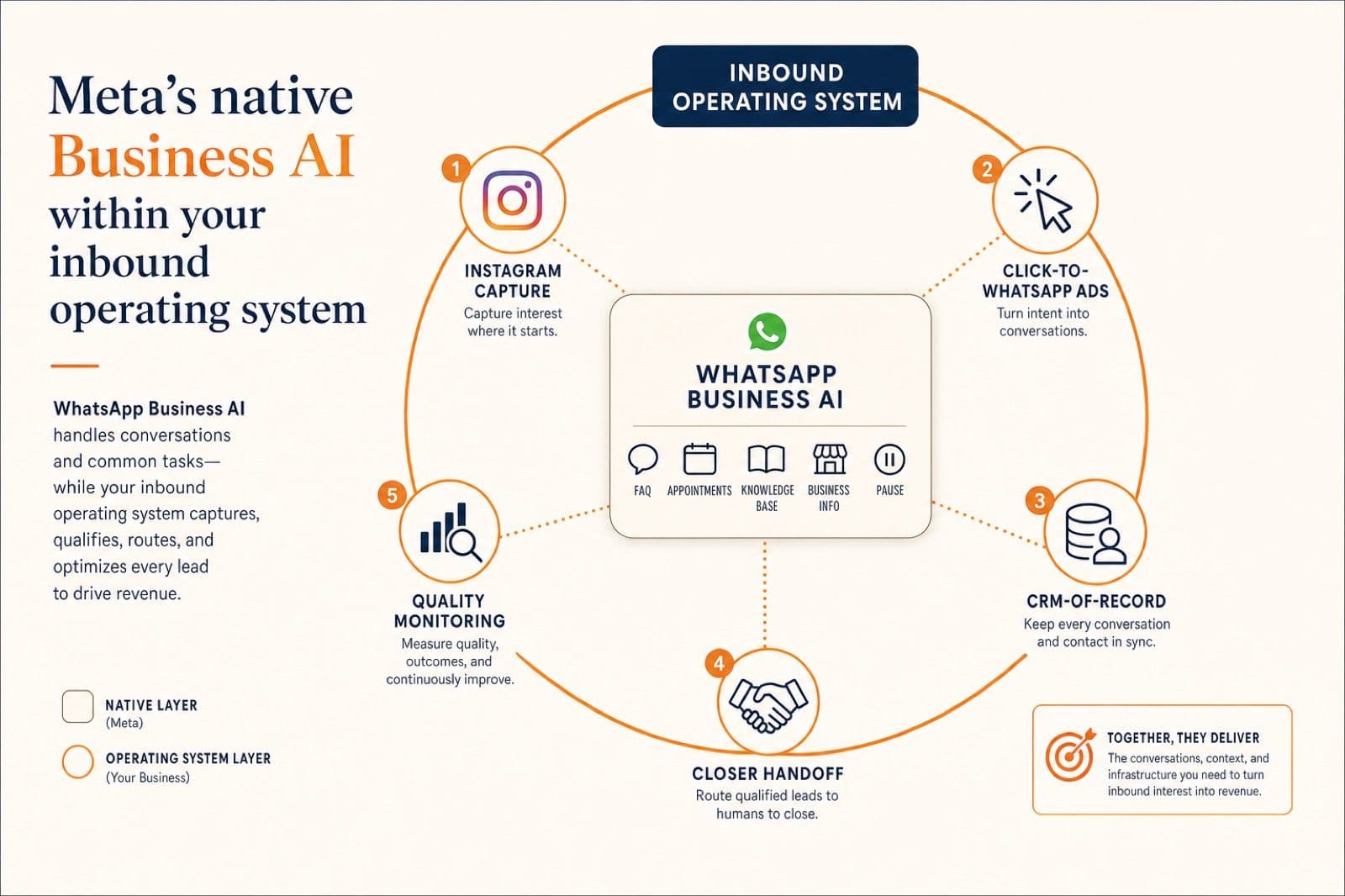
Meta launched Business AI inside the WhatsApp Business app in May 2026. Useful for solo operators. Insufficient for inbound-heavy event teams.
Meta just shipped a free AI agent inside WhatsApp Business. The ceiling shows up faster than the feature list suggests.
On May 15, 2026, Meta launched Business AI inside the WhatsApp Business app for small businesses in India. It is free, native, and rolls out from the Tools tab as "Your Business AI." Eligible owners upload a catalog and a few documents, choose how the agent behaves, and the app starts answering customer queries 24x7.
The feature list reads like a starter inbound system: FAQ replies, appointment booking, lead capture, knowledge base injection from past chats and media, default business info, and pre-configured Q&A. There are governance toggles for audience filtering, formatting rules, automated 1-hour follow-ups, and a "Respond Manually" override. UPI payments inside chat are coming soon.
For a solo merchant with a single number, this is a genuinely useful product. It collapses three or four BSP starter features into a free, native experience.
For an event company running Click-to-WhatsApp ads, qualifying buyers across Instagram and WhatsApp, syncing leads to a CRM, and handing closer-ready conversations to a sales desk, it is not an inbound operating system. The features stop at exactly the moment your sales motion gets serious.
I have been shipping the Instagram-to-WhatsApp inbound stack for event companies long enough to see this shape often. A platform ships a native version of one slice of the system. The slice is real. The slice is not the system.
This post maps what Meta actually shipped, why it only runs on one of the two WhatsApp surfaces, where it works well, where it breaks for event companies, and how to think about whether your team should adopt it, ignore it, or run it alongside a real inbound OS.
What Meta actually shipped on May 15
Strip the marketing language and Business AI is built around five operator-facing modules and a handful of governance settings, all configured inside the WhatsApp Business app. Meta's setup guide and the official announcement line up on the basics.
The five modules are:
- Customer info capture. Triggers automatically for new contacts or on custom keywords like "order" or "book." Captures fields the operator defines (name, location, size) and stores them in a downloadable spreadsheet template.
- Appointment booking. Connects video calls (Google Meet), phone, or in-person slots. Handles duration, time zones, and operating hours.
- Knowledge base injection. Two flavors. Past chats: the owner exports real high-converting WhatsApp threads and uploads them so the AI mirrors that tone. Media and files: catalogs, brochures, and pricing sheets the AI reads to keep replies current.
- Default business info. Office hours, address, website, top catalog items, payment methods including UPI, return policies. The standard "About us" block but readable by the agent.
- Pre-configured Q&A. Explicit question-and-answer templates for things like "When is the next workshop?" The agent serves the canned answer instantly.
The governance settings are the more interesting part:
- Audience filtering. All new 1-on-1 chats, 1-on-1 chats except existing contacts, ad-driven traffic only, or pause to learn.
- Response customization. Toggle emojis, allow raw pricing, set behavioral framing prompts (for example, "use casual Hinglish, keep replies short").
- Automated 1-hour follow-ups. Re-engage contacts who go cold.
- Manual override. Sandbox prompt testing plus a per-chat "Respond Manually" button that pauses the AI and hands the conversation to the human owner.
This is a reasonable design for the product Meta actually built. The interesting part is what surface it built on, not what features it ships.
The two WhatsApp surfaces, and why this only ships on one
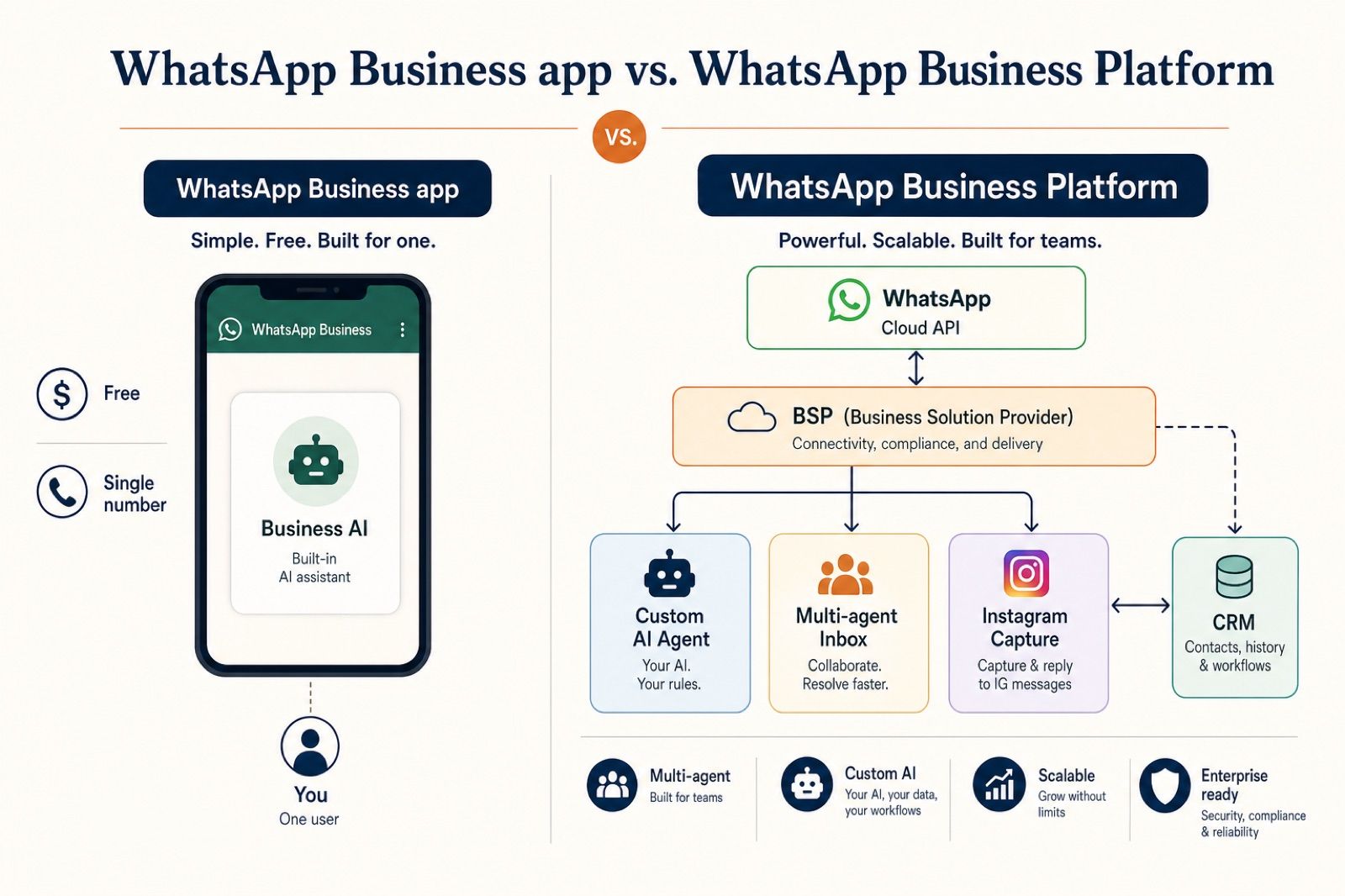
Most operators who only know the WhatsApp Business app do not realize there are two completely separate WhatsApp business products. The native Business AI feature only runs on one of them. That single fact decides whether this announcement matters for your team.
| Surface | What it is | Who it is for | Can run Business AI? |
|---|---|---|---|
| WhatsApp Business app | Free Android/iOS app for one phone | Solo operator, single number | Yes, native |
| WhatsApp Business Platform (Cloud API) | Meta's [official API](https://developers.facebook.com/docs/whatsapp/) for programmatic messaging | Multi-agent teams, BSP-backed stacks, custom AI | No |
Meta states this clearly in its developer guidance for AI agents: any production WhatsApp AI agent built outside the Business app needs access to the WhatsApp Business Platform via direct Cloud API or a Business Solution Provider. The free app does not support programmatic automation.
That maps to a hard architectural rule: you can run Meta's native Business AI, or you can run a BSP-backed inbound operating system. You cannot run them both on the same number at the same time, because the two surfaces are different WhatsApp products.
Switching from the app to the Cloud API requires migrating the number to a verified WABA, getting templates approved, and provisioning the BSP relationship. It is doable, but it is not a checkbox. It is a one-way migration most operators do once.
For solo merchants, that does not matter. For event companies, it matters a lot.
Where Meta's Business AI fits well
Before tearing into where this breaks for event companies, it is worth saying what works. Business AI is a real product step, not a marketing release. For the right operator, it is the cleanest free version of an AI assistant you can install on WhatsApp today.
It fits well when most of these are true:
- Single owner, single number, single phone. The whole stack lives inside one app on one device.
- Small catalog, mostly FAQ-shaped queries. Customers ask price, hours, stock, and shipping. They do not negotiate, evaluate dates, or compare packages.
- Mostly Indian-language inbound with light multilingual switching. Meta confirms support for all native Indian languages.
- Low or zero ad spend. Inbound is mostly organic referral, walk-in WhatsApp clicks, or directory-driven enquiries.
- No CRM dependency yet. The "downloadable spreadsheet" of captured fields is enough.
- No multi-agent team yet. The owner can manually take over when needed.
Concrete fits I would actually recommend it for in 2026:
- A single-location bakery taking order enquiries.
- A neighborhood clinic answering hours, doctor availability, and appointment requests.
- A solo tutor or coach handling course questions and booking discovery calls.
- A kirana shop or D2C side hustle running on the WhatsApp Business app already.
- A boutique studio owner managing inbound DMs personally and looking to stop missing after-hours queries.
Two design choices Meta got right and competitors should steal:
Past chats as knowledge. Letting owners upload real high-converting threads as the training corpus is genuinely smart. It is the LLM Wiki pattern applied to a WhatsApp inbox: pre-compile the knowledge that already exists rather than retrieving it lazily on every reply. Most BSP chatbots train on a generic FAQ. Real threads carry tone, objection handling, and pricing nuance.
Pause-to-learn. Letting the operator run the AI in observation mode before it goes live is a smarter onboarding default than most BSPs ship.
If your business looks like the list above, install it. The bar to try is low and the safety net is honest: the per-chat manual override is one tap.
Where it breaks down for event companies
Now the harder part. Almost every defining property of an event company's inbound stack hits a wall inside the WhatsApp Business app surface that Business AI runs on.
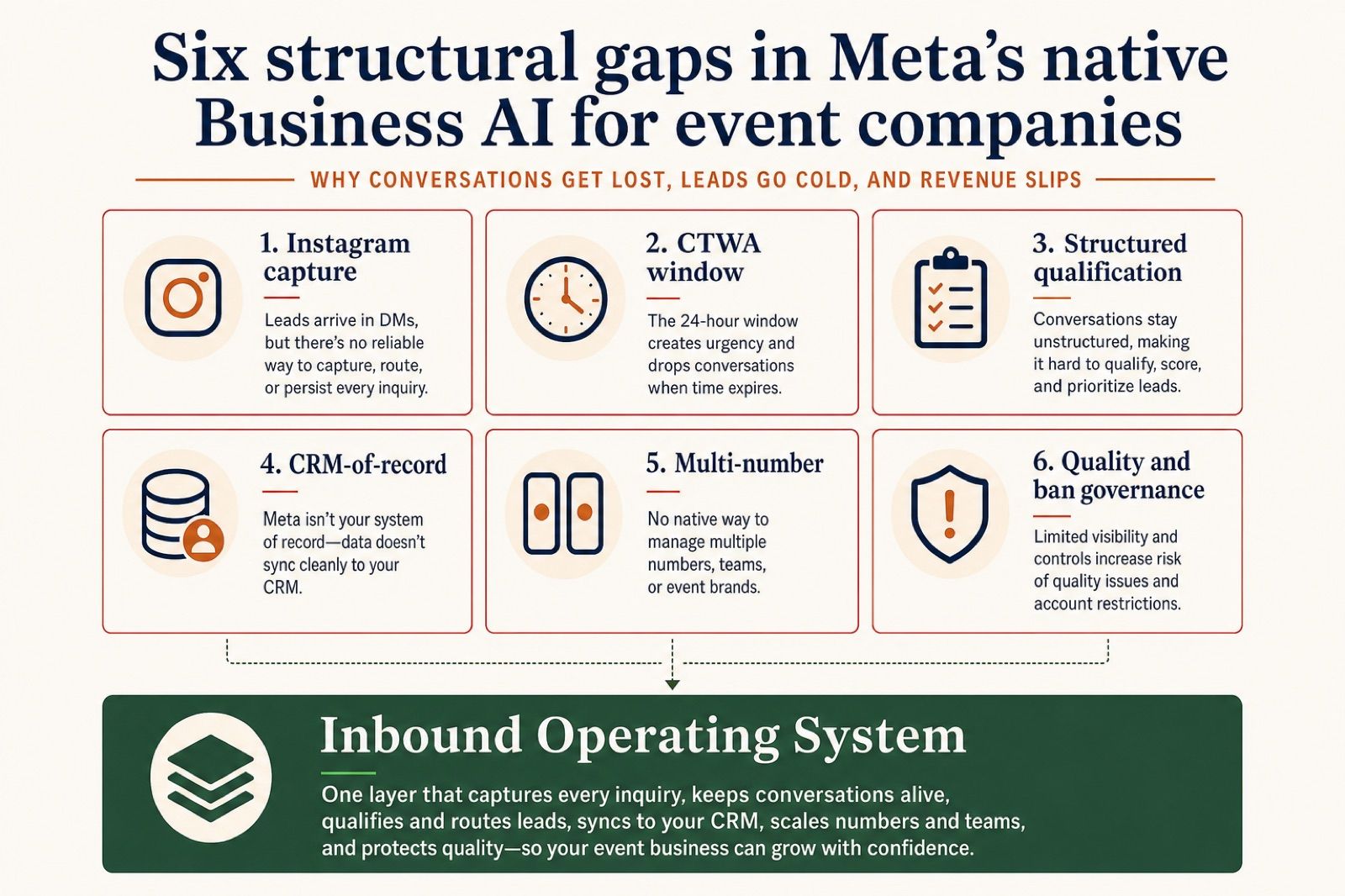
These are the six gaps. Each one is structural, not a feature gap that gets patched in a later release.
Gap 1: No Instagram capture
Event companies do not start their funnel inside WhatsApp. They start on Instagram. A buyer sees a Reel, taps a story, comments under a venue post, or sends a DM that says "available for Dec 14?" The first touch is Instagram, not WhatsApp.
Business AI lives in the WhatsApp Business app. It cannot read Instagram DMs, comments, or story replies. It cannot trigger a state-preserving handoff from an Instagram thread to a WhatsApp thread. The buyer has to find your number, copy it, open WhatsApp, and start over.
This is the leak that the Instagram OS handoff pattern was built to fix. A native WhatsApp tool, by definition, does not solve it.
Gap 2: No Click-to-WhatsApp cost control
Click-to-WhatsApp ads (CTWA) are the highest-intent paid channel Meta sells. They open a 72-hour free entry-point window where most messages are free. Outside that window, marketing templates apply.
Business AI on the app surface does not give you template management, conversation-cost analytics, or CTWA-specific routing. The agent will reply, but you cannot:
- See how many of today's conversations are inside vs outside the 72-hour window.
- Run different message strategies inside the window vs after it.
- Manage approved marketing templates for re-engagement.
- Optimize ad-driven cost per qualified lead.
For a team running a five-figure CTWA budget, that ceiling is expensive. The whole reason CTWA economics work is template orchestration around the free window. The native agent does not see the window because it is not a Cloud API product.
Gap 3: No structured qualification
Event sales needs a minimum dataset before a closer can do anything: date, guest count, event type, city or venue, budget band, decision-maker status, and source. Meta itself shipped WhatsApp Flows precisely to solve this on the BSP surface.
Business AI captures custom fields into a spreadsheet. That is a starting point, not a qualification system. There is no Flow integration, no progressive profiling across messages, no validation rules, and no reusable qualification ruleset across campaigns. The agent will ask the questions, but the structure of the answers is not durable.
For a wedding planner who needs to know "is this a Dec 14 wedding for 250 guests in Delhi NCR with a 5 to 8 lakh budget?" before a closer joins, "fields in a downloadable spreadsheet" is not enough.
Gap 4: No CRM-of-record
Event companies do not run on a WhatsApp inbox. They run on a CRM where a deal record holds DMs, WhatsApp threads, calendar bookings, payments, and follow-up tasks together. The closer opens a deal, sees the full timeline, and continues from context.
Business AI writes captured fields to its own spreadsheet template. There is no native sync to GoHighLevel, HubSpot, Salesforce, Zoho, or a custom CRM. There is no concept of a deal record, a pipeline stage, or an attribution source.
That gap forces a choice every operator eventually feels: either the WhatsApp app stays the source of truth (and the CRM rots), or the CRM stays the source of truth (and the WhatsApp inbox is disconnected from it). The Cloud API path with proper handoffs into a deal record is the only architecture where both stay current.
Gap 5: No multi-number portfolio
Event companies routinely run more than one WhatsApp number. One for ads, one for closer-led replies, one for partner queries, one for a separate business line. WhatsApp's portfolio-level limits and tier inheritance only matter if you are operating on the Business Platform.
The WhatsApp Business app is built for one number on one phone. Business AI inherits that scope. There is no central console, no shared inbox across numbers, no per-number quality monitoring, and no portfolio-level governance.
The moment you scale past one number, the native agent is not the right tool.
Gap 6: No quality and ban governance
Healthy WhatsApp accounts in 2026 are governed, not just connected. Quality rating, messaging tier, block rate per template, service-window vs marketing-template ratios. The whole ban-architecture playbook for event companies only applies on the Business Platform surface.
The Business AI app does not surface quality rating in the way an inbound-OS team needs to monitor it. It does not give you per-template block rate. It does not let you pause a marketing template that just turned a number Yellow. The governance lives at a different layer.
For a solo operator that never sends marketing templates, this is fine. For an event company running ad-driven inbound, it is the difference between staying Green and a recovery process with a roughly 2.76% appeal success rate.
The architectural decision matrix
Here is the cleanest way I can frame the decision for a founder reading this and trying to figure out whether to adopt Business AI, ignore it, or run a different stack.
| Capability area | Native Business AI on WhatsApp Business app | Inbound operating system on Cloud API + BSP |
|---|---|---|
| Cost | Free | BSP markup + Meta conversation rates |
| Setup time | Same day, in-app | 24 to 72 hours with BSP onboarding |
| Single owner, single number | Excellent fit | Overkill |
| Multi-agent team | Not supported | Native shared inbox |
| Multi-number portfolio | Not supported | Native, with portfolio-level limits |
| Instagram capture and handoff | None | Required component |
| Click-to-WhatsApp ad orchestration | Replies only | Window-aware template strategy |
| Structured qualification (Flows) | Not available | First-class |
| CRM sync to GoHighLevel, HubSpot, Salesforce | None | Native, often included |
| Quality and ban governance | Not surfaced | Weekly dashboard |
| Knowledge base from past chats | Excellent | Possible, often more work to set up |
| Manual handoff per chat | One-tap | Routed to a real human queue |
| Custom behavioral framing | Yes, in-app | Yes, in code or BSP UI |
| Appropriate for | Solo operators, small catalogs, FAQ-shaped queries | Event companies, real estate, MICE, multi-channel teams running paid acquisition |
Two principles fall out of the table:
Native Business AI is the right starter system for solo operators on the Business app. It collapses several BSP-priced features into a free experience. If you fit the profile in the previous section, install it tomorrow.
Native Business AI is not an inbound operating system. The moment any of these are true, you need the Cloud API path: paid ads driving inbound, multi-number setup, CRM-of-record, multi-agent team, structured event qualification, or governed quality monitoring.
There is no sequence where an event company runs Business AI now and grows into the Cloud API later by adding features. The two are different products on different surfaces. The migration is a one-time switch.
What stays on the app, what moves to the inbound OS
For the operators who fit Business AI, the right move is to install it and let it earn its keep.
For event companies, the right move is to keep building on the Cloud API stack and treat Meta's announcement as confirmation that the basic building blocks of a WhatsApp AI assistant are no longer differentiated. The differentiated work has moved to the layers around the assistant.
A practical migration mental model:
| What stays | What moves to the inbound OS |
|---|---|
| Catalog and basic FAQ replies | Instagram-to-WhatsApp handoff with state |
| Pre-configured Q&A for top 20 questions | Structured event qualification (Flows) |
| Past-chat knowledge ingestion | CRM-of-record with full deal timeline |
| Casual tone, brief replies, language switching | Multi-number portfolio with quality monitoring |
| Pause-to-learn during onboarding | CTWA window-aware template strategy |
| Per-chat manual override | Multi-agent shared inbox with routing |
Notice the pattern. Everything in the left column is content, behavior, or single-thread mechanics. Everything in the right column is architecture: who initiates, where the data lives, how teams hand off, how money flows through the funnel.
Meta solved a real layer of the content problem. The architecture problem is unchanged.
What Meta got right (and what BSPs should steal)
The honest read is that Meta shipped a smart product for the right segment, with a few choices that smaller BSPs should copy.
Knowledge base from real conversations. Most chatbots get trained on a generic FAQ. Letting owners upload high-converting WhatsApp threads is a much better default and produces a noticeably better tone. This is a strict upgrade over the typical BSP onboarding script.
Pause to learn. A specific mode where the AI watches conversations without replying so the operator can review what it would have said is a much friendlier first hour with the product than "go live and pray."
Per-chat manual override. A one-tap "I will take this one" button is a better human-handoff UX than most multi-agent inboxes ship. Most BSPs make handoff a routing rule, which is heavier than the real-life moment of "let me jump in here."
Casual framing. Letting the operator instruct the AI to use Hinglish, short replies, and human-like fragments is closer to how WhatsApp actually reads than the formal robotic tone many enterprise chatbots default to.
Inbound-OS teams should not pretend these design wins do not matter. Steal the past-chat ingestion, the pause-to-learn mode, and the framing prompts. Wire them into the BSP-side stack.
FAQ
Is Meta's Business AI free?
Yes. According to Meta's official announcement, Business AI on the WhatsApp Business app is free for eligible small and medium businesses in India. UPI payments inside chat are coming soon, with no pricing model announced for the AI feature itself.
Can I use Business AI on the WhatsApp Cloud API?
No. Business AI is a feature inside the free WhatsApp Business app. The Cloud API and BSP-backed stacks are a different product surface entirely. If your team is already on the Cloud API for multi-agent inbox, custom AI, or CRM integration, this announcement does not change your stack.
Does Business AI work with Instagram?
No. The agent runs inside the WhatsApp Business app and sees only WhatsApp messages on that number. There is no native bridge to Instagram DMs, story replies, or comments. Event companies that depend on Instagram-first capture still need a separate handoff layer.
Can I run Business AI alongside Click-to-WhatsApp ads?
Technically yes. The agent will reply to CTWA-driven inbound. Practically, you lose visibility into the 72-hour free entry-point window and template orchestration that most CTWA economics depend on. For ad-led teams, the Cloud API path remains the right surface.
Does Business AI replace my BSP or my AI agency?
If you fit the solo-operator profile, it can replace a starter BSP plan and a basic chatbot. It does not replace a BSP-backed Cloud API stack with multi-agent inbox, CRM integration, multi-number management, and CTWA orchestration. For event companies and multi-channel teams, those layers stay separate.
When does it make sense to switch back to a custom inbound system?
The signals are clear: paid acquisition driving inbound, more than one human replying, more than one number on the business, a CRM that needs to stay current, structured qualification that needs more than a few fields, or any team that runs marketing templates beyond service-window replies. Any one of those signals means the Cloud API stack is the right home for AI on WhatsApp.
Can I use Business AI and FusionSync at the same time?
Not on the same number. The WhatsApp Business app and the Cloud API are separate products on separate surfaces. A team can run Business AI on a single non-critical number and a Cloud API stack on the primary inbound number. Most event companies pick one path and standardize on it.
The bottom line
Meta's Business AI is a smart product for the right operator. It collapses a few BSP-priced features into a free, native experience inside the WhatsApp Business app. For solo merchants, single-number teams, and FAQ-shaped inbound, it is the cleanest starter agent on WhatsApp in 2026. For event companies running paid ads, qualifying buyers across Instagram and WhatsApp, and syncing leads into a CRM, it is one box inside a larger system that has not been replaced.
- Business AI ships on the WhatsApp Business app, not the Cloud API. That single fact decides who can use it.
- It fits solo operators, single-number teams, and FAQ-shaped inbound. It does not fit ad-led, multi-number, or CRM-dependent teams.
- The 6 gaps for event companies are structural: Instagram capture, CTWA cost control, structured qualification, CRM-of-record, multi-number portfolio, and quality governance.
- Meta got knowledge ingestion from real past chats, pause-to-learn, and per-chat manual override right. BSPs should copy these.
- The architectural choice between native Business AI and a BSP-backed inbound OS is one-way. Pick the surface that matches your sales motion before you pick the agent.
If your event business is already running Click-to-WhatsApp ads, multi-channel inbound, or a CRM that needs to stay current, the native agent is not the right home. The next step is a free 7-day production pilot on one campaign, where we install the Instagram-to-WhatsApp inbound operating system on the Cloud API surface and prove it produces closer-ready handoffs under real volume. If you want the leak map first, start with a free AI audit and we will model where your current WhatsApp setup is exposed.
AI-native business systems
Bring a niche, or bring a workflow.
If you run the business, we build the system around it. If you sell into a niche, we build the system behind your offer.
PolarBuild case study →You sell the niche. We build the system.
We never compete for your end clients. One partnership conversation. You fulfil the same system across the accounts in your niche.
Free POC before dedicated software
A three-day sales demo of the system for your vertical before any large software investment. Implementation starts only when someone in that niche pays.
Replicate the niche, not a one-off build
UK dental becomes US dental with a new local partner and new integration targets. Same system thesis, new market.