
Inbound Lead Management
WhatsApp Bans 2026: How Event Companies Stay Out of the Red

WhatsApp banned 5.9M Indian accounts last March. For event companies, ban risk is an architecture problem, not a compliance checklist.
WhatsApp banned 5.9 million Indian accounts last March. Your event business could be next.
In March 2026, WhatsApp banned 5,978,096 accounts in India under its monthly transparency report. Of those, 1,376,357 were proactively banned before any user complaint arrived. Meta's systems detected the pattern and acted first.
Most of those bans target scam accounts, bulk spammers, and fraud rings. But a real slice of them are legitimate businesses that lost their WhatsApp number overnight. No warning. No gradual downgrade. Just a red screen and a customer database that no longer exists.
The standard advice is a 7-rule compliance checklist: use official APIs, get real consent, warm up your number, monitor your quality rating. All of it is correct. None of it is the root cause.
For event companies, WhatsApp ban risk is an architecture problem. The businesses that get banned are not the ones sending too many messages. They are the ones whose recipients did not want the messages they sent. That is a channel design failure, not a policy failure.
This post maps the ban mechanics, the five anti-patterns that take healthy event accounts into the red, and the four architectural decisions that collapse most compliance rules into one operating model.
How WhatsApp's ban system actually works in 2026
Before the rules, understand the two state variables that decide whether your number survives.
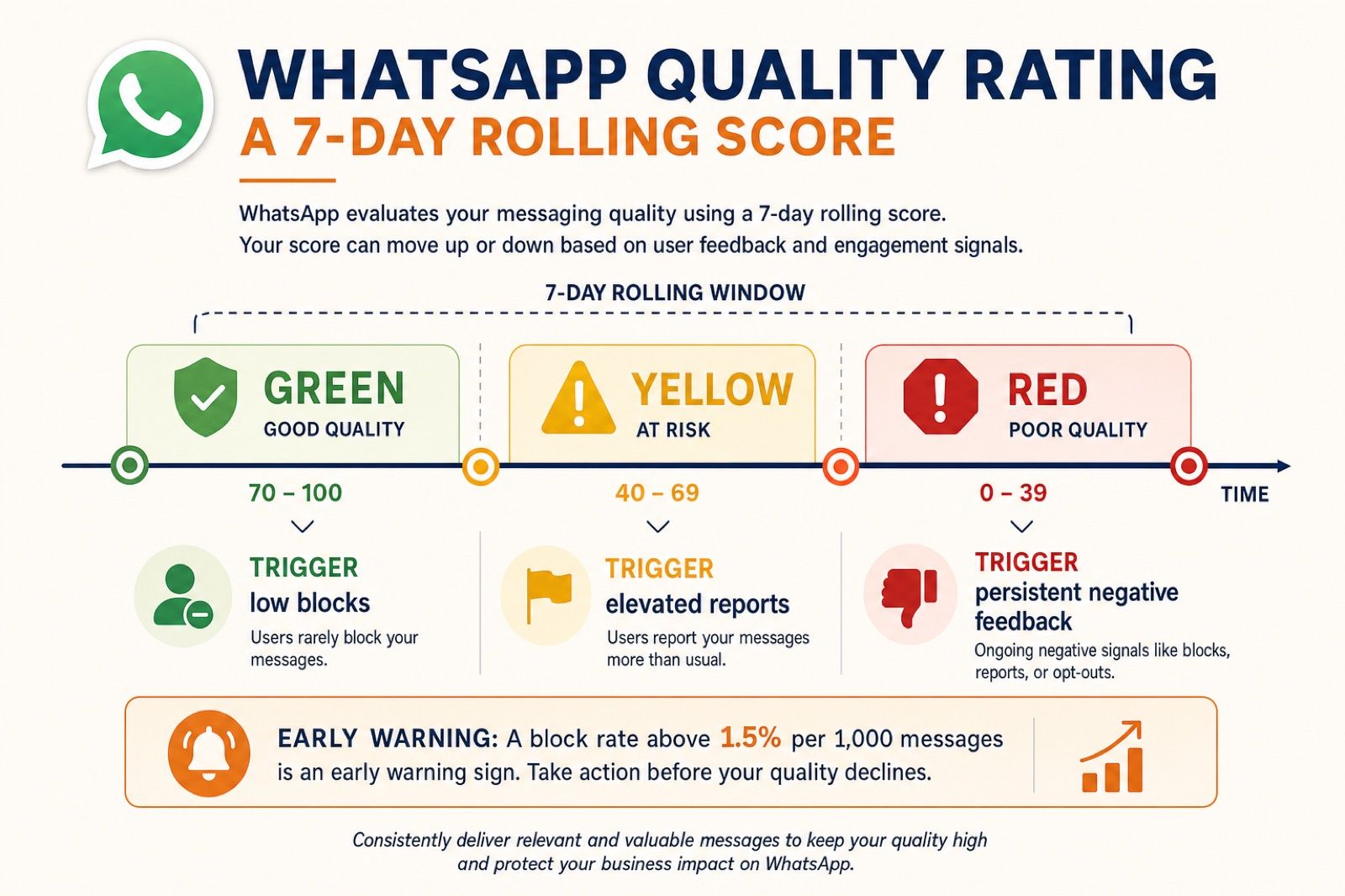
Quality rating: the 7-day rolling score
Every WhatsApp Business API phone number has a quality rating based on how recipients reacted to your messages over the past seven days. Meta evaluates blocks, spam reports, and the reasons users give when they block you.
| Rating | Color | What it means | Operational impact |
|---|---|---|---|
| High | Green | Low block and report rates | Normal operations; tier upgrades possible |
| Medium | Yellow | Elevated negative signals | Warning state; tier upgrades pause |
| Low | Red | Persistent negative feedback | Marketing templates restricted; suspension risk |
Meta does not publish exact thresholds. Operational data from BSP partners puts the early warning zone at a block rate above 1.5% per 1,000 messages delivered. Above 3%, the rating typically drops to Red within 24 hours.
Yellow to Green usually resolves in 48 to 72 hours after you stop the offending behavior. Red to Green typically takes 7 to 14 days.
Messaging tier: the volume ceiling
Separate from quality rating, your number sits in a messaging tier that caps how many unique users you can reach in a rolling 24-hour period:
| Tier | Daily unique users | How you get there |
|---|---|---|
| Tier 0 | 250 | New, unverified account |
| Tier 1 | 1,000 | Business verification complete |
| Tier 2 | 10,000 | 2x volume sustained for 7 days + Green rating |
| Tier 3 | 100,000 | Same pattern, next tier |
| Tier 4 | Unlimited | Enterprise-scale, stable Green |
Since October 2025, limits apply at the business portfolio level, not per phone number. All numbers in your Business Manager share the highest tier achieved by any number in the portfolio.
What changed in October 2025
Two changes matter for how you think about ban risk:
- "Flagged" and "Restricted" statuses were discontinued (October 7, 2025). A Red rating no longer automatically triggers an immediate tier downgrade. You get more time to course-correct before Meta acts.
- Portfolio-level limits replaced per-number limits. A new number in your portfolio inherits the tier of your strongest number. That is useful for scaling, but it also means one bad number can drag down the whole portfolio's reputation.
The core mechanic has not changed: you do not get banned for volume. You get banned because recipients blocked you, ignored you, or reported you.
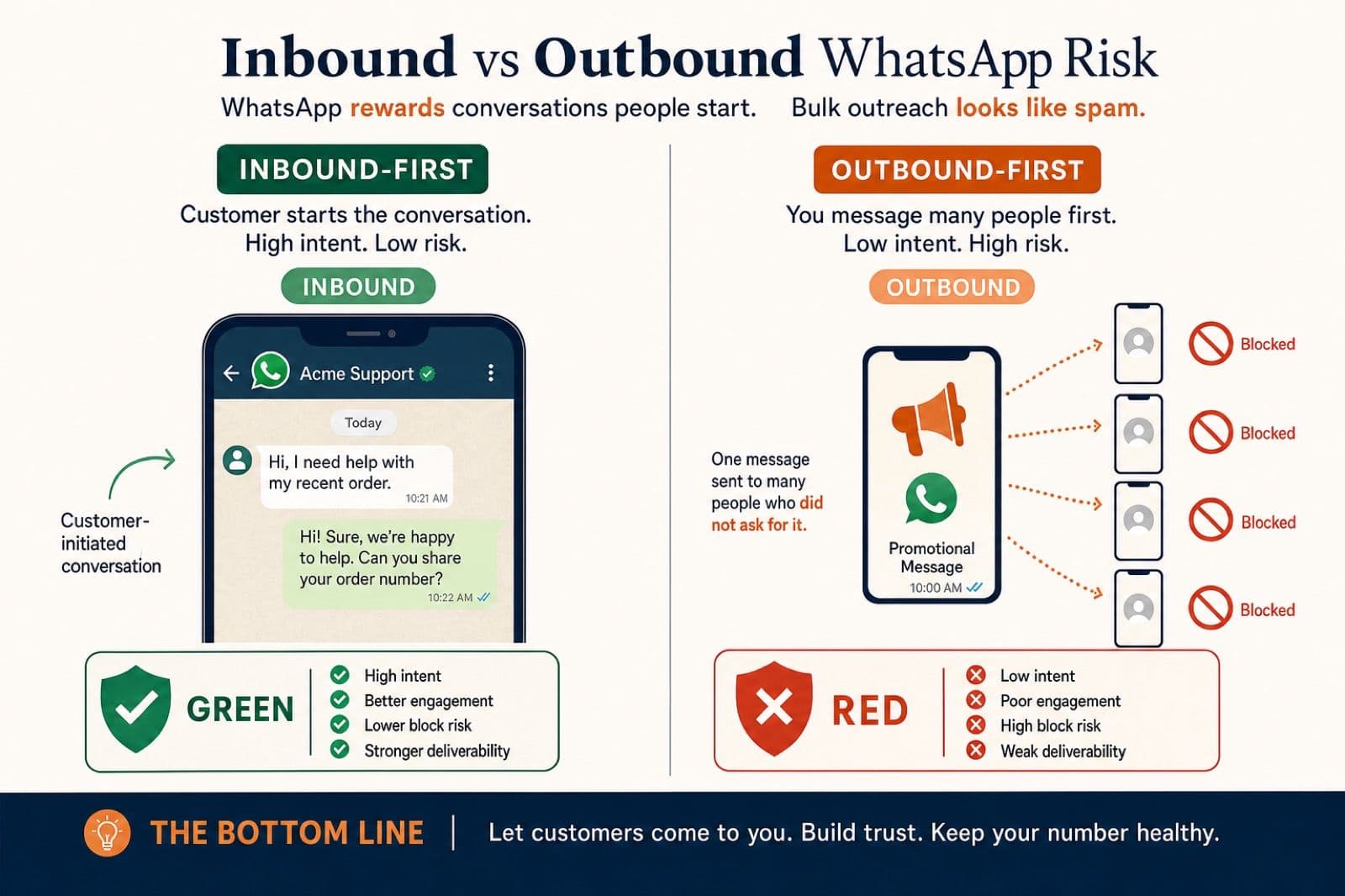
Two operating models, two completely different risk profiles
There are two fundamentally different ways to use WhatsApp for business. They look similar from the outside. They produce opposite ban outcomes.
Outbound-first: the marketing list model
This is how most e-commerce and SaaS businesses use WhatsApp:
- You own a contact list
- You send marketing templates to segments
- Re-engagement broadcasts are a regular tactic
- Volume scales with list size
- The service window is an afterthought
Ban risk profile: High. Block rates spike on cold segments. Spam reports accumulate on bulk sends. Quality rating is fragile because most recipients did not initiate the conversation.
Inbound-first: the operating system model
This is how event companies should use WhatsApp:
- The customer initiates every thread
- You reply inside the 24-hour service window (free)
- Templates are rare exceptions, not the default
- Volume scales with inbound demand, not list size
- The service window is the primary channel
Ban risk profile: Low. Block rates stay low because the customer started the conversation. Spam reports are rare because it is one-to-one, not bulk. Quality rating stays Green because engagement is high and unsolicited sends are minimal.
| Dimension | Outbound-first | Inbound-first |
|---|---|---|
| Who initiates | Business | Customer |
| Default message type | Marketing template | Free-text reply in service window |
| Block rate driver | Stale list, no opt-in memory | Rare; customer opted in by messaging |
| Quality rating stability | Fragile | Stable |
| Recovery difficulty if banned | Hard | Hard (appeal rate is ~2.6%) |
| Right fit for event companies | No | Yes |
The inbound operating system is not just better for conversion. It is structurally safer on WhatsApp.
Why event companies are structurally low-risk (and still get banned)
Event sales does not work as a broadcast channel. The buyer needs to confirm a date, see the venue, talk to someone, and send a deposit. The conversation is the product.
That gives event companies a structural advantage on WhatsApp:
The buyer initiates. A Click-to-WhatsApp ad, a Reel comment, a referral. The customer opened the thread. There is no "I don't know this sender" block reason.
The service window is the default channel. Every inbound message opens a 24-hour window where your replies are free. If you respond within 24 hours on a CTWA click, Meta opens a 72-hour free entry point window where all message types are free.
Marketing templates are rare. Most outbound in a healthy event-company week is utility or service messages inside open windows. Marketing templates are the exception, not the rule.
Engagement is naturally high. Buyers ask follow-ups, send voice notes, share venue photos. High reply rates are the default, not something you have to engineer with buttons.
A healthy event-company WhatsApp week might look like:
- 200 to 800 inbound conversations
- 85%+ of outbound inside service windows (free)
- Under 10 marketing template sends
- Block rate under 0.5%
- Quality rating: Green
That is a profile Meta's algorithm reads as healthy.
So why do event companies still get banned?
Because they get tempted to act like e-commerce marketers. Once you treat WhatsApp like a marketing list, every structural advantage disappears.
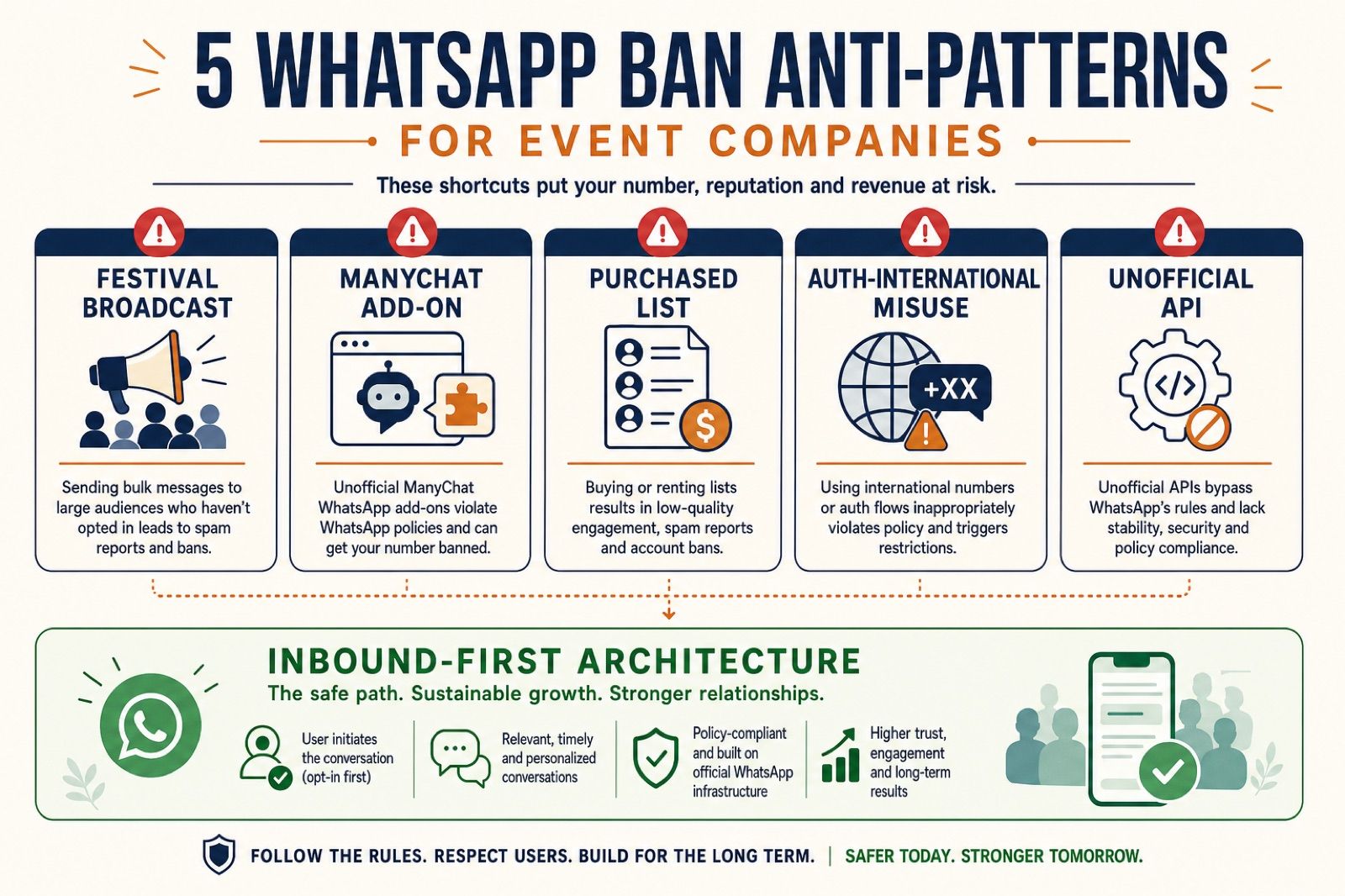
The five anti-patterns that take event accounts into the red
These are the five ways I see healthy event-company WhatsApp accounts get banned or restricted in 2026. Each one is architectural, not a policy slip.
Anti-pattern 1: The festival broadcast
What it looks like: Wedding season starts. The operator pulls every WhatsApp number that ever messaged them, maybe 8,000 contacts, and schedules a generic "Book your date now, 20% off" marketing template.
Why it fails: 30% of those contacts do not remember messaging you. The original conversation was 18 months ago. They block. The block rate crosses 1.5% within hours. The number is Yellow by morning, Red by the next week.
The architectural fix: If broadcast is the only outbound tool your team can access, the broadcast list will eventually destroy the account. Inbound-first stacks should not have broadcast capability accessible to the team at all. Re-engagement belongs in Instagram or email, not in a cold WhatsApp list.
Anti-pattern 2: The Manychat add-on
What it looks like: The team connects a generic Instagram chatbot to a WhatsApp sender to "centralize replies." A month later, the bot is auto-DMing Instagram followers on WhatsApp without their consent.
Why it fails: Instagram consent is not WhatsApp consent. Followers who never opted into WhatsApp messages block and report. The number quality drops because the bot treated two channels as one permission surface.
The architectural fix: WhatsApp is a separate consent surface from Instagram. Handoffs happen only when the buyer explicitly chooses to continue on WhatsApp, via a one-tap template they click. See the Instagram OS handoff pattern for how state-preserving handoffs work without unsolicited outreach.
Anti-pattern 3: The purchased list
What it looks like: Someone sells the operator a list of "wedding leads in Delhi NCR." The team imports it and sends a marketing template.
Why it fails: Purchased lists are poison on WhatsApp. Those contacts did not opt into your WhatsApp number. The first marketing template triggers blocks at a rate Meta's algorithm will not forgive. There is no compliant way to message a list you did not earn yourself.
The architectural fix: Every WhatsApp contact must have an auditable opt-in trail: they messaged you, they clicked a CTWA ad, or they tapped a handoff template. If you cannot prove that for a contact, do not message them.
Anti-pattern 4: Authentication-international misuse
What it looks like: A destination wedding business serves guests from India, UAE, and the UK. The booking flow fires OTPs at every step for every guest regardless of country.
Why it fails: Cross-border authentication templates trigger Meta's authentication-international rate, which is 2 to 3x the domestic rate. High volumes of international auth messages can flag the account for review, especially when combined with other quality signals.
The architectural fix: Remove OTPs from non-critical booking steps. Use WhatsApp identity itself for verification where possible. Scope authentication templates to the highest-value transactions only. The WhatsApp pricing breakdown covers where authentication-international rates apply.
Anti-pattern 5: The "ban-resistant" unofficial tool
What it looks like: An operator buys a tool marketed as "WhatsApp automation without API limits" or "Manychat killer, no BSP needed." The tool wraps the WhatsApp Business app or uses an unauthorized session-based protocol.
Why it fails: Unofficial APIs are an immediate and often permanent ban vector. Meta's enforcement on unofficial API users is aggressive. Appeals for accounts banned on unofficial tools have near-zero success rates because the violation is a terms-of-service breach, not a quality rating issue.
The architectural fix: Use the official WhatsApp Business Platform via a verified BSP or direct Cloud API integration. Full stop. No workaround exists.
The 7 rules collapse into 4 architectural decisions
The standard compliance checklist for WhatsApp bans has seven rules. Each one is correct. Each one is downstream of architecture.
| Common rule | What it actually requires architecturally |
|---|---|
| Use official APIs only | Real BSP + verified WABA, not wrapper tools |
| Obtain real consent | Inbound-first: customer initiates, consent is implicit |
| Design for engagement | Service window replies, not template blasts |
| Warm up numbers gradually | New numbers inherit portfolio tier; still start inbound-only |
| Monitor account quality weekly | Build quality rating into ops, not a one-time check |
| Segment your audience | Inbound-first removes the temptation to message stale contacts |
| Provide human backup | Bot fallback is a routing decision, not a separate compliance rule |
Here are the four architectural decisions that make most of the checklist automatic:
Decision 1: Use a real BSP with a verified WABA.
Not a wrapper. Not a session-based tool. Not "WhatsApp Business app with extra features." The WhatsApp Business Platform via Twilio, 360dialog, Wati, or direct Cloud API. Verified business, approved templates, auditable message logs.
Decision 2: Make the 24-hour service window your default channel.
Every inbound message opens a free reply window. Your team's default behavior is to reply inside that window, not to reach for a marketing template. Templates are for when the window has closed and you have a specific, consented reason to re-engage.
Decision 3: Treat marketing templates as the exception, not the rule.
A healthy event-company week has 85%+ of outbound inside service windows. Marketing templates are for re-engagement of recent, engaged contacts only. Not for cold lists. Not for festival blasts. Not for "we haven't talked in 6 months" segments.
Decision 4: Make every send earn its place.
Consent (they messaged you), segmentation (they engaged recently), engagement design (quick-reply buttons on templates that need replies), and human fallback (route to a closer after two bot failures). If a send cannot pass all four checks, do not send it.
Get those four right and the 7 rules mostly take care of themselves. Get them wrong and no checklist saves the account.
The weekly monitoring dashboard (5 minutes, every Monday)
Most operators check WhatsApp quality once, panic when it turns Yellow, and then stop monitoring until the next crisis. The right cadence is a 5-minute dashboard check every week.
| Metric | Where to find it | Healthy range | Action if outside range |
|---|---|---|---|
| Quality rating | WhatsApp Manager > Phone Numbers | Green | Yellow: pause marketing templates for 48h. Red: pause all outbound, audit templates. |
| Messaging tier | WhatsApp Manager > Insights | Stable or growing | Frozen: check for Red rating or policy flags. |
| Block rate per template | BSP analytics or webhook logs | Under 1.5% per 1,000 delivered | Above 1.5%: pause that template immediately. |
| Reply rate on marketing templates | BSP analytics | Above 10% | Below 5%: template or audience is wrong. |
| Service window vs. template ratio | Your inbound system logs | 80%+ service window | Below 60%: you are behaving outbound-first. |
| Marketing template volume (7-day) | BSP billing or analytics | Low and intentional | Rising without a campaign plan: stop and audit. |
If your number goes Yellow, the dashboard tells you which template caused it within 24 hours. Do not wait for Meta's email. By the time the email arrives, the rating is often already Red.
For teams running WhatsApp Flows for qualification, also watch Flow completion rate and post-Flow block rate. A Flow that collects fields but sends buyers into a spammy follow-up sequence will still hurt your rating.
If you are already banned or restricted: the honest recovery path
The numbers are not encouraging.
Meta's own India transparency data shows that in recent months, roughly 10,000+ ban appeals are filed monthly. Only about 300 are reversed. That is a 2.76% appeal success rate. In India, appeals for accounts banned on unofficial APIs have near-zero success because the violation is a terms-of-service breach, not a quality rating issue.
Treat a ban as final unless you have a strong WABA-level case with BSP support.
If your rating is Red but the number is not banned yet
You still have time. Run this sequence:
- Stop all marketing templates immediately. Keep only utility and service messages for active, in-window conversations.
- Pull the last 7 days of template performance. Rank by block rate. Pause anything above 1.5%.
- Audit the audience segment. If the worst block rates correlate with contacts inactive for 90+ days, exclude that segment permanently.
- Wait 7 days without further damage. The quality rating is a rolling window. Red to Green typically takes 7 to 14 days if the behavior actually stops.
- Resume marketing templates only on proven segments. Recent engagers. Small batches. One template at a time.
If the number is already banned
- Contact your BSP within 30 days. Do not send multiple appeals directly to Meta. Repeated submissions read as spam to the review algorithm.
- Prepare one clean appeal: WABA ID, phone number, business registration, opt-in evidence (screenshots of CTWA ads, handoff templates, inbound message logs), and a written remediation plan.
- If it is a WABA-level ban, escalate through your BSP's Meta-facing channel with a compliance dossier: business documents, privacy policy URL, opt-in flow screenshots, and customer journey documentation.
- If the appeal fails, provision a new number on the official API. Inform existing contacts via SMS or another channel. Do not attempt to message banned-number contacts from a new sender without fresh consent.
The operational decision is to architect so you never need this path. Recovery odds are genuinely bad. Prevention is the only viable strategy.
FAQ
Can I send a Diwali or Christmas broadcast to my WhatsApp list?
Only if the list is recent, engaged, and opted in. A broadcast to contacts who have not messaged you in 90+ days is the single most common trigger for a Yellow or Red rating on event-company accounts. Safer pattern: send marketing templates only to contacts who transacted or actively engaged in the last 30 to 60 days, and keep total marketing volume low relative to your service-window conversation volume.
Do quick-reply buttons prevent bans?
They help with reply rate, which is one of Meta's quality signals. But buttons do not fix a bad list. A well-designed template with great buttons sent to people who do not remember opting in will still generate blocks. Buttons improve engagement from people who do reply. They do not reduce blocks from people who do not.
Is the WhatsApp Cloud API safer than going through a BSP?
The Cloud API is the official path. Safety comes from how you use it, not which official path you choose. Block rate, report rate, prohibited content, and engagement on stale lists apply identically whether you go direct or through a BSP. The Cloud API just means there is no unauthorized wrapper between you and Meta.
How long does it take to recover from a Yellow or Red rating?
Yellow to Green: typically 48 to 72 hours after stopping the offending behavior. Red to Green: typically 7 to 14 days. These are rolling windows. If you resume the bad behavior during recovery, the clock resets.
What is the most common reason event companies get banned?
The festival broadcast to a stale list. Second is the unofficial-API tool. Third is the Instagram chatbot that quietly added unsolicited WhatsApp DMs. All three are architectural mistakes with architectural fixes.
Should I worry about bans if I only use WhatsApp for inbound replies?
Much less. Inbound-only operations with no marketing template sends are structurally low-risk. The risk rises the moment you add outbound marketing templates, especially to segments you did not earn through inbound consent.
The bottom line
WhatsApp does not ban event companies because they send too many messages. They ban them because the people they sent them to did not want them. That is an architecture problem, not a compliance problem.
- WhatsApp banned nearly 6 million Indian accounts in March 2026 alone. A real slice are legitimate businesses with bad inbound architecture.
- Quality rating is a 7-day rolling score. Block rates above 1.5% per 1,000 messages are an early warning. Above 3%, you are in Red.
- Inbound-first event companies are structurally low-risk. Five anti-patterns explain almost every banned event-company account.
- The 7 compliance rules collapse into 4 architectural decisions: real BSP, service window as default, marketing templates as exception, every send earns its place.
- Recovery odds are poor: ~2.76% appeal success in India. Prevention is the only viable strategy.
If your event business runs WhatsApp as an inbound channel today, the next step is a free 7-day production pilot on one campaign. We install the inbound operating system, wire quality monitoring, and prove the architecture keeps you Green under real volume. If you want the leak map and ban-risk audit first, start with a free AI audit and we will model where your current WhatsApp setup is exposed.
AI-native business systems
Bring a niche, or bring a workflow.
If you run the business, we build the system around it. If you sell into a niche, we build the system behind your offer.
PolarBuild case study →You sell the niche. We build the system.
We never compete for your end clients. One partnership conversation. You fulfil the same system across the accounts in your niche.
Free POC before dedicated software
A three-day sales demo of the system for your vertical before any large software investment. Implementation starts only when someone in that niche pays.
Replicate the niche, not a one-off build
UK dental becomes US dental with a new local partner and new integration targets. Same system thesis, new market.